
FragStealers
作者:rebot | 分类:模组
Minecraft 版本: 26.2
平台: paper
标签: management storage utility
FragStealers 26.2-6 -- NEW
FragStealers is a Paper plugin for protecting player storage, operating secure container shops, sending items through virtual mailboxes, sharing controlled access with trusted players, and giving administrators a logged recovery tool.
Requirements
- Paper 26.2
- Java 25
Installation
- Stop the server.
- Place
FragStealers-26.2-6.jarin the server'spluginsfolder. - Start the server.
- Review
plugins/FragStealers/config.yml.
When updating from an older version, keep the existing FragStealers data files. New settings and data files are created without replacing existing configuration values.
Supported containers
FragStealers supports:
- Chests
- Trapped chests
- Double chests
- Barrels
A container must be empty before it can become a lock, shop, or mailbox. A container cannot be registered as more than one FragStealers type.
Ordinary storage locks
To protect a container:
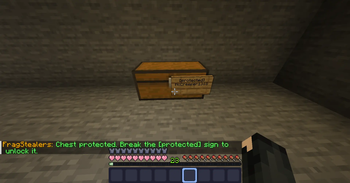
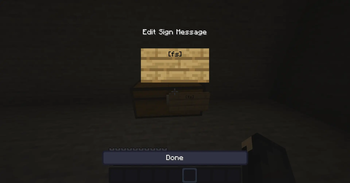
- Attach a sign directly to the side of the container, or place a standing sign directly above it.
- Enter
[fs]on the first line. - Finish editing the sign.
The sign changes to:
[protected]
PlayerName
The owner can open the container and remove the protection sign. Trusted players can open the container according to the trust system. Authorized Master Key holders can open the container and remove its sign for administrative recovery.
The protected container cannot be broken until its protection sign is removed.
Hopper settings
The following settings apply only to ordinary [fs] locks:
hopper-take-item: false
hopper-put-item: truehopper-take-itemcontrols extraction by hoppers and hopper minecarts.hopper-put-itemcontrols insertion by hoppers and hopper minecarts.- Shops and mailboxes always block hopper access.
Trusted player access
Protection owners can grant access to individual players while looking directly at their protected sign or container within six blocks.
/fs trust <player> [access|manage]
/fs untrust <player>
/fs trusted
The target player must already be known to the server. Trust is stored by UUID in trusted-players.yml, so name changes do not transfer access to another account.
Access levels
| Protection | access |
manage |
|---|---|---|
| Ordinary lock | Open and use the container | Same as access |
| Shop | Add valid stock only | Add or remove stock, collect payments, and configure an unconfigured shop |
| Mailbox | Deposit and collect mail through a restricted pickup view | Fully manage mailbox contents |
Trusted players cannot:
- Remove or edit the protection sign
- Break the protected container
- Add another chest half to the protection
- Change the protection's trust list
Only the protection owner can change trusted players. Master Key administrators cannot change another player's trust list. Removing a protection automatically deletes its trust entries.
Player shops
To create a shop:
- Attach a sign to an empty supported container.
- Enter
[fs shop]on the first line. - Right-click the completed shop sign.
- Select the item being sold and its quantity.
- Select the payment item and its quantity.
- Confirm the setup.
Shop stock remains in the physical container. Collected payments are stored in shops.yml until the owner, a manage-level trusted player, or an authorized Master Key holder collects them.
Item selection and search
The item selector includes an anvil search field. It supports partial friendly names and Minecraft-style names, including:
diamond
oak log
oak_log
ingot
Leaving the search blank shows the full item catalog.
Shop signs
Configured shop signs display:
- The sale item in green
- The payment item in red
- Colored text without a glow effect
Disabling shops
fs-shops: falseDisabling shops prevents new shop creation and customer purchases. Existing shop records remain saved, and owners or administrators can still manage, collect, or dismantle them.
Virtual mailboxes
Creating your own mailbox
- Attach a sign to an empty supported container.
- Enter
[fs mail]on the first line. - Leave the second line blank.
- Finish editing the sign.
The sign changes to:
[mail]
PlayerName
Creating a mailbox for another player
An administrator with fragstealers.masterkey.use can hold a genuine Master Key in either hand and create a mailbox for a known player:
Line 1: [fs mail]
Line 2: PlayerName
The mailbox is stored under the target player's UUID as though that player created it. Delegated creation is recorded in audit-log.yml.
Depositing and collecting mail
- Other players can deposit items without seeing existing mailbox contents.
- Occupied slots appear as locked red panes during deposit mode.
- A single chest or barrel mailbox has 27 virtual slots.
- A double chest mailbox has 54 virtual slots.
- Master Keys and internal menu items cannot be mailed.
- The owner receives You've Got Mail! after a successful online deposit and once after joining while mail remains waiting.
Access-level trusted players can collect mail but cannot insert or rearrange items through pickup mode. Manage-level trusted players receive full mailbox-content controls.
Disabling mailboxes
fs-mail: falseDisabling mailboxes prevents new mailbox creation and new deposits. Existing mailbox data remains saved and can still be collected or recovered.
Master Key
The Master Key is an unbreakable custom wooden axe identified through persistent item data. A renamed ordinary wooden axe does not work as a Master Key.
/fs give masterkey
/fs give masterkey <player>
Requirements:
- Giving keys requires
fragstealers.masterkey.give. - Using keys requires
fragstealers.masterkey.use. - The key normally must remain in the main hand while accessing or managing another player's protection.
- Delegated mailbox creation accepts the key in either hand so the sign can be placed normally.
A Master Key cannot directly break a protected container. The administrator must remove the protection sign first.
Commands
| Command | Description |
|---|---|
/fs trust <player> [access\|manage] |
Adds or updates a trusted player on the protection being targeted |
/fs untrust <player> |
Removes a trusted player from the targeted protection |
/fs trusted |
Lists trusted players and access levels for the targeted protection |
/fs give masterkey |
Gives the sender a Master Key |
/fs give masterkey <player> |
Gives an online player a Master Key |
/fs reload |
Reloads config.yml and merges missing defaults |
Permissions
| Permission | Default | Purpose |
|---|---|---|
fragstealers.lock.create |
true |
Create ordinary storage locks |
fragstealers.shop.create |
true |
Create player shops |
fragstealers.mail.create |
true |
Create mailboxes |
fragstealers.trust.manage |
true |
Manage trusted players on protections the player owns |
fragstealers.masterkey.give |
op |
Give Master Keys |
fragstealers.masterkey.use |
op |
Use Master Key administrative access |
fragstealers.admin.reload |
op |
Reload the plugin configuration |
Data files
FragStealers stores its data in:
plugins/FragStealers/
├── config.yml
├── locks.yml
├── shops.yml
├── mailboxes.yml
├── trusted-players.yml
└── audit-log.yml
Do not edit data files while the server is running. FragStealers uses atomic YAML writes to reduce the risk of partial or corrupted saves.
Administrative audit log
audit-log.yml records administrative actions performed through Master Key access, including:
- Creating a mailbox for another player
- Removing another player's protection sign
- Withdrawing items from another player's protected lock
- Withdrawing stock from another player's shop
- Withdrawing items from another player's mailbox
Audit entries older than 30 days are purged automatically.
请登录后举报
请 登录 后赞助作者。
暂无评论,抢个沙发吧~