
ScreenShare+
作者:rebot | 分类:模组
Minecraft 版本: 26.1.2
平台: folia paper
标签: management social utility

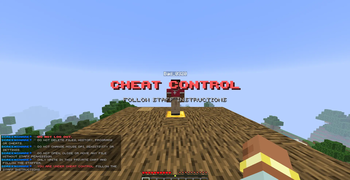



     
**Author:** `Bad_0320` **Platform:** `Paper / Folia` **Minecraft:** `26.1.2` **Java:** `25+` **Storage:** `MariaDB / SQLite` **Sync:** `Redis`
✨ Overview
ScreenShare+ is a complete screenshare control system designed for modern Minecraft servers that need clean staff tools, safe player handling and professional moderation workflows.
It includes guided setup positions, private staff/suspect chat, automatic teleport handling, ban on quit, inventory backup and restore, persistent recovery, configurable sounds, tab completion and optional multi-server sync.
Built to inspect players, not your TPS.
🚀 Feature Highlights
| ### 🔍 Screenshare Sessions Everything needed to start and control staff checks in a clean way. * `/ss ` command * Staff position teleport * Suspect position teleport * Private session handling * Clean start/end workflow * Hub return location * Automatic cleanup * Staff-friendly messages | ### 💬 Private SS Chat A private chat channel between staff and suspect during the check. * Staff-only session chat * Suspect-only session chat * Clean role prefixes * Public chat separation * No chat confusion * No manual channel setup * Styled messages * Small caps support |
| ### 🎒 Inventory Protection Protect both players during screenshare checks. * Staff inventory backup * Suspect inventory backup * Armor backup * Offhand backup * Selected slot backup * Inventory clear on start * Restore on end * Restore on rejoin | ### 🌐 Network Ready Designed for both single servers and larger networks. * MariaDB support * Redis synchronization * SQLite fallback * Safe fallback behavior * Multi-server ready structure * Runtime library loading * Lightweight final jar * Clean modular backend |
⚡ Zero-Lag Design
ScreenShare+ is designed to keep staff tools smooth without abusing the main thread.
Teleport handling, storage operations, inventory backup logic and sync systems are structured to reduce server impact and keep moderation actions clean.
| Design Goal | Result |
|---|---|
| Folia-safe scheduler design | Better modern server support |
| Async-friendly storage logic | Less main-thread pressure |
| Runtime libraries | Lightweight final jar |
| Paper API usage | Easier updates |
| No NMS dependency | Better compatibility |
| No useless reflection | Cleaner and safer codebase |
| Modular services | Easier maintenance |
📍 Guided Setup System
ScreenShare+ includes a clean in-game setup flow.
Start setup mode with:
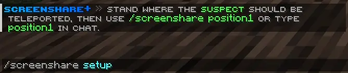
/screenshare setup
The plugin will guide you step by step through the screenshare room configuration.
| Setup Step | Purpose |
|---|---|
/screenshare position1 |
Saves the suspect position |
/screenshare position2 |
Saves the staff position |
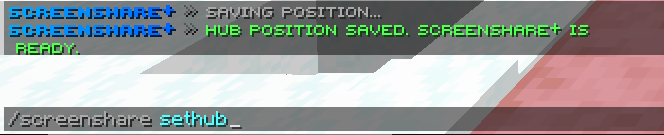
/screenshare sethub |
Saves the return hub/spawn position |
Players can also type position1 and position2 directly in chat during setup.
🔍 Screenshare Workflow
Starting a screenshare is simple.
/ss <player>
When a session starts, ScreenShare+ automatically:
- Saves staff inventory
- Saves suspect inventory
- Clears both inventories
- Teleports the suspect to position 1
- Teleports the staff member to position 2
- Sends the suspect the configured warning messages
- Opens private staff/suspect chat
- Starts quit protection
- Plays configurable feedback sounds
Everything happens in one clean workflow.
💬 Private Staff ↔ Suspect Chat
During an active screenshare, public chat is replaced by a private session chat for the staff member and the suspect.
| Role | Chat Prefix |
|---|---|
| Staff | STAFF |
| Suspect | SUSPECT |
This keeps moderation clean, private and easy to follow.
No public chat spam.
No messy commands.
No confusion.
🚪 Ban On Quit
If the suspect leaves during a screenshare, ScreenShare+ can automatically execute a configurable ban command from console.
Default command:
ban <player> 30d Quit during screenshare -s
This makes ScreenShare+ perfect for punishment systems such as BadBans.
| Event | Action |
|---|---|
| Suspect quits | Ban command executed |
| Private chat | Closed instantly |
| Staff member | Returned to hub |
| Staff inventory | Restored safely |
| Suspect inventory | Restored on rejoin |
Ban on quit can be changed or disabled from the config.
🎒 Inventory Backup & Restore
ScreenShare+ includes a persistent inventory safety system.
When a screenshare starts, the plugin saves:
| ### Player Inventory * Main inventory * Hotbar * Armor * Offhand * Selected slot | ### Restore Triggers * Screenshare ends normally * Suspect quits * Staff member quits * Server restarts * Player rejoins later |
Backups are stored safely so inventories can be restored even after a restart.
Designed to prevent item loss during staff checks.
🔊 Configurable Sounds
ScreenShare+ includes polished sound feedback for important actions.
| Sound Event | Purpose |
|---|---|
| Screenshare start | Feedback when a session begins |
| Screenshare end | Feedback when a session ends |
| Setup start | Feedback when setup begins |
| Setup step saved | Feedback when a position is saved |
| Setup complete | Feedback when setup is finished |
| Hub saved | Feedback when hub is saved |
| Command error | Feedback when something is wrong |
| Suspect quit | Alert when suspect leaves |
Every sound can be changed or disabled in the config.
🌐 Multi-Server Support
ScreenShare+ is ready for networks and shared moderation environments.
| Component | Purpose |
|---|---|
| MariaDB | Main source of truth for persistent data |
| Redis | Real-time synchronization between servers |
| SQLite | Local fallback when MariaDB is unavailable |
If MariaDB or Redis are not available, ScreenShare+ safely falls back to SQLite and disables multi-server sync automatically.
🎨 Styled Messages
ScreenShare+ uses clean and modern messages with Small Caps Unicode styling.
Example:
ѕᴜѕᴘᴇᴄᴛ ᴜɴᴅᴇʀ ѕᴄʀᴇᴇɴѕʜᴀʀᴇ
| Message Type | Style |
|---|---|
| Start message | Clean warning layout |
| Staff prefix | Blue staff identity |
| Suspect prefix | Red suspect identity |
| Setup messages | Step-by-step guided style |
| Error messages | Clear and readable |
| Restore messages | Safe inventory feedback |
| Quit messages | Staff-friendly alerts |
📜 Commands
### 🔍 Screenshare Commands | Command | Description | | ----------------- | ---------------------------------------- | | `/ss ` | Start a screenshare session | | `/ssend ` | End a screenshare session | | `/endss ` | Alternative command to end a screenshare | ### ⚙️ Setup Commands | Command | Description | | ------------------------ | ------------------------ | | `/screenshare setup` | Start guided setup mode | | `/screenshare position1` | Save suspect position | | `/screenshare position2` | Save staff position | | `/screenshare sethub` | Save return hub position | | `/screenshare cancel` | Cancel setup mode | ### 🔧 Admin Commands | Command | Description | | ------------------------ | -------------------------- | | `/screenshare status` | View plugin status | | `/screenshare positions` | View saved positions | | `/screenshare reload` | Reload configuration files |
🔐 Permissions
### Main Permissions | Permission | Access | | --------------------- | ------------------------------------- | | `screenshare.admin` | Full access to every command | | `screenshare.command` | Access to basic ScreenShare+ commands | | `screenshare.setup` | Access to setup commands | | `screenshare.start` | Start screenshare sessions | | `screenshare.end` | End screenshare sessions | | `screenshare.status` | View status and saved positions | | `screenshare.reload` | Reload the plugin | ### Recommended Groups | Group | Permissions | | ------- | ----------------------------------------------------------------------------------- | | Staff | `screenshare.command`, `screenshare.start`, `screenshare.end`, `screenshare.status` | | Manager | Staff permissions + `screenshare.setup` | | Admin | `screenshare.admin` |
🧩 Technical Highlights
| ### Modern Paper Setup * Paper API * Folia-safe scheduler design * `paper-plugin.yml` * Java 25+ * Maven build * ProGuard obfuscation * Tab completion * Clean command handling | ### Performance Focus * Async-friendly storage * Runtime libraries * Lightweight final jar * No NMS * No useless reflection * Modular services * Safe fallback behavior * TPS-friendly workflow |
✅ Requirements
| Requirement | Version |
|---|---|
| Minecraft | 26.1.2 |
| Paper | 26.1.2 |
| Java | 25+ |
Optional:
| Optional Service | Purpose |
|---|---|
| MariaDB | Persistent network storage |
| Redis | Multi-server synchronization |
| SQLite | Local fallback storage |
🛡️ Why ScreenShare+?
ScreenShare+ is made for staff teams that want a screenshare plugin that feels modern, clean and safe.
请登录后举报
请 登录 后赞助作者。
暂无评论,抢个沙发吧~