
BanChest
作者:rebot | 分类:模组
Minecraft 版本: 1.21 1.21.1 1.21.2 1.21.3 1.21.4 1.21.5 1.21.6 1.21.7 1.21.8 1.21.9 1.21.10 1.21.11 26.1 26.1.1 26.1.2 26.2
平台: paper purpur
标签: game-mechanics management utility
BanChest
Turn a ban into a treasure hunt.
When you permanently ban a player, their inventory and ender chest shouldn't disappear into
the void — especially on a server with a limited world size. BanChest takes everything
they were carrying and scatters it across the overworld in labelled chests for other players
to discover.
Features
- One command —
/banchest <player>handles everything - Works on online and offline players (reads
.datfiles directly for offline players) - Redistributes inventory + ender chest, including armor, off-hand, and hotbar
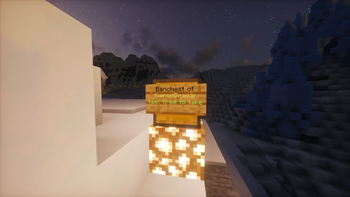
- Places each chest on a glowstone base so it stands out in the world
- Attaches a signed label to every chest identifying whose loot it is
- Shulker-aware — optionally unpacks filled shulker boxes into their own separate chests
so one lucky find can't hand out a shulker full of diamonds - Configurable world shape — circle or square border
- Supports multiple chests when the player's loot exceeds 27 slots, with configurable
placement (spread across the world or clustered near each other) - LuckPerms-compatible permission node
- In-game reload command — no server restart needed after config changes
- Logs exact chest coordinates to console so you always know where the loot landed
Requirements
- Paper 1.21.1 (or a fork compatible with Paper 1.21.1)
- Java 21
Installation
- Drop
banchest-(version).jarinto your server'splugins/folder - Restart the server — a
plugins/BanChest/config.ymlwill be generated - Edit the config to match your world border, then run
/banchest reload
Commands & Permissions
| Command | Description | Permission | Default |
|---|---|---|---|
/banchest <player> |
Redistribute the player's inventory into overworld chests | banchest.use |
OP only |
/banchest reload |
Reload config.yml without restarting |
banchest.use |
OP only |
LuckPerms example
/lp group admin permission set banchest.use trueConfiguration
# Radius (in blocks) of your world border.
# For 'circle': the circle's radius.
# For 'square': the half-side-length (chests land within [-radius, +radius] on both axes).
world-radius: 3000

# Shape of the world border: 'circle' or 'square'.
world-shape: circle

# When true, each filled shulker box in the player's inventory is opened and its
# contents are spawned as a separate batch of chest(s) at their own random location(s).
# The emptied shulker shell is left with the regular loot pool.
# Prevents one chest find from handing out an entire shulker's worth of rare resources.
treat-shulkers-independently: true

# When a player's total loot exceeds 27 slots, should each overflow chest be placed
# at a completely different random location?
#   true  – every chest lands somewhere different in the world (maximum spread).
#   false – overflow chests cluster near each other.
separate-locations-per-chest: true
How It Works
Step-by-step
-
You run
/banchest <playername>(typically after banning them via your preferred method) -
BanChest reads the player's full inventory (hotbar, main slots, armor, off-hand)
and ender chest -
If
treat-shulkers-independentlyis enabled, every filled shulker box is extracted —
its contents become their own independent chest batch at a separate location, and the
empty shulker shell stays with the regular loot -
The total item pool is split into groups of 27 (one chest per group)
-
For each group, a random surface location is selected within your configured world
border, avoiding water, lava, floating positions, and blocked spots -
A glowstone block is placed on the ground, a chest is placed on top of it, and
an oak wall sign is attached to the chest reading:Banchest of PlayerName feel free to take -
The player's inventory and ender chest are cleared from their data — items exist
only in the world now -
Exact coordinates of every chest are printed to the server console
Safety
- If a chest location cannot be found after 60 attempts, a warning is logged and that
chest group is skipped (extremely rare in a populated world) - Player data is only cleared after chests are successfully placed — if something goes
wrong, their data is left intact and an error is logged to console - The command does not ban the player — ban handling is entirely separate
FAQ
Does this work on players who are currently offline?
Yes. BanChest reads the player's .dat file directly, so it works on anyone who has
previously logged into the server, regardless of their current online status.
What if the player had more than 27 items?
Multiple chests are spawned. With separate-locations-per-chest: true (default), each
chest lands at a completely different random location in the world.
What happens to shulker boxes?
With treat-shulkers-independently: true (default), the contents of each filled shulker
are extracted and spawned as their own chest(s) elsewhere in the world. The empty shulker
shell stays in the main loot chest. With the option disabled, shulkers are placed in chests
as-is, unopened.
Can I see where chests were placed?
Yes — every chest placement is logged to the server console with exact X/Y/Z coordinates
and the world name.
Will running the command also ban the player?
No. BanChest only handles item redistribution. Use your existing ban workflow
(/ban, LiteBans, AdvancedBan, etc.) to handle the actual ban separately.
请登录后举报
暂无评论,抢个沙发吧~