
SyncModPack
作者:rebot | 分类:模组
Minecraft 版本: 1.18.2
平台: forge
标签: management technology utility
? SyncModPack
Rejoins un serveur moddé en installant UN SEUL mod. SyncModPack télécharge le reste tout seul.
Join a modded server with just ONE mod installed. SyncModPack downloads the rest for you.
?? Français
Pourquoi SyncModPack ?
Installer un modpack à la main, c'est long et pénible. Et côté serveur, gérer quels mods
sont « client » ou « serveur » est un casse-tête qui finit souvent en crash.
SyncModPack règle les deux problèmes d'un coup.
✨ Fonctionnalités
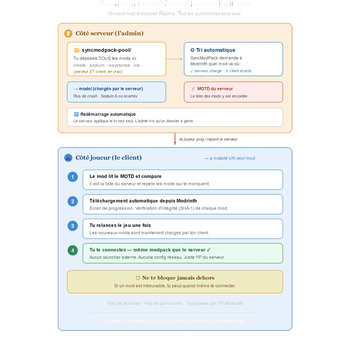
- ? Un seul mod, une seule IP. Pas de launcher externe (CurseForge, Prism...), pas de
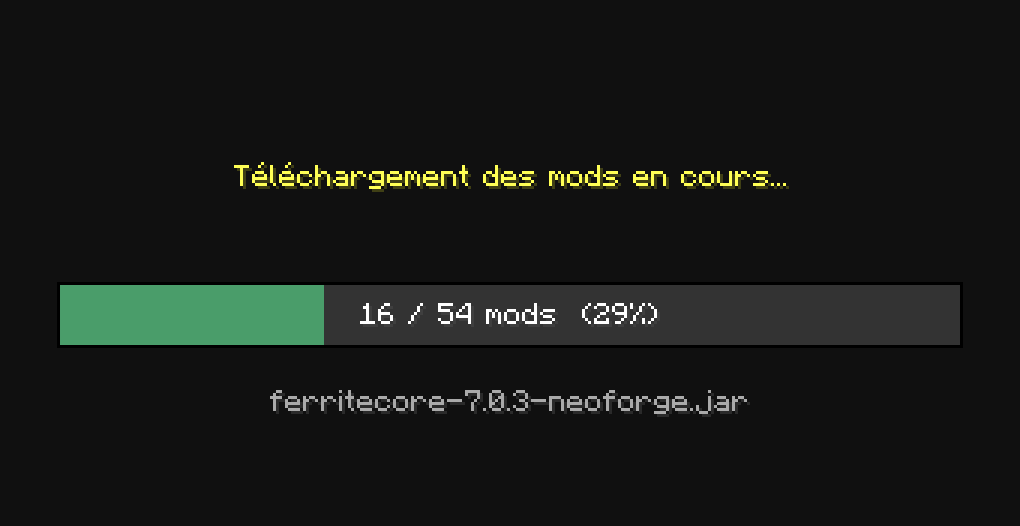
port à ouvrir, pas de site tiers. Tout se fait via l'adresse normale du serveur Minecraft. - ⬇️ Téléchargement automatique. Quand tu rejoins un serveur, les mods qui te manquent
sont téléchargés automatiquement depuis Modrinth, avec vérification d'intégrité (SHA-1). - ? Tri automatique côté serveur. Dépose TOUS tes mods dans un seul dossier : SyncModPack
détecte (via Modrinth) lesquels tournent côté serveur et écarte les mods purement client
(Sodium, Iris, Xaero's...). Fini les crashs au démarrage. - ⚡ Cache intelligent. Le serveur ne re-vérifie que les mods réellement nouveaux —
démarrage rapide, et qui fonctionne même si Modrinth est momentanément indisponible. - ? Redémarrage automatique du serveur après le tri (compatible MCSManager & co).
- ?️ Ne te bloque jamais dehors. Si un mod est introuvable, un écran clair te laisse
quand même te connecter.
? Installation — Joueur
- Installe NeoForge 1.21.1.
- Place le
.jarde SyncModPack dans ton dossiermods/. - C'est tout ! Rejoins un serveur compatible — les mods manquants se téléchargent tout seuls.
Relance le jeu une fois quand c'est demandé, et joue.
?️ Installation — Serveur
- Installe NeoForge 1.21.1 sur ton serveur et place le
.jarde SyncModPack dansmods/. - Crée un dossier
syncmodpack-pool/à côté demods/et mets-y TOUS tes mods
(serveur ET client : Create, Waystones, Sodium, Iris... absolument tout). - Démarre le serveur.
SyncModPack s'occupe du reste : il trie tes mods, charge uniquement ceux qui vont côté serveur,
annonce la liste complète aux joueurs, et redémarre une fois pour appliquer.
? Tu n'as plus qu'UN dossier à gérer. Un nouveau mod ? Glisse-le dans
syncmodpack-pool/,
redémarre, c'est réglé.
⚙️ Réglages avancés (optionnel)
Dans config/ :
syncmodpack-serverforce.txt— force un mod à être chargé côté serveur.syncmodpack-clientforce.txt— force un mod à rester côté client uniquement.
(un bout de nom de fichier par ligne)
? Tableau de compatibilité
Légende : ✅ Supporté · ⚠️ Testé mais non supporté · ❌ Non pris en charge
| Minecraft | Loader | Statut |
|---|---|---|
| 1.21.4 | — | ❌ Non pris en charge |
| 1.21.3 | — | ❌ Non pris en charge |
| 1.21.2 | — | ❌ Non pris en charge |
| 1.21.1 | NeoForge | ✅ Supporté |
| 1.21 | — | ❌ Non pris en charge |
| 1.20.6 | NeoForge | ✅ Supporté |
| 1.20.5 | — | ❌ Non pris en charge |
| 1.20.4 | Forge | ✅ Supporté (côté client) |
| 1.20.3 | Forge | ⚠️ Testé mais non supporté |
| 1.20.2 | Forge | ✅ Supporté |
| 1.20.1 | Forge | ✅ Supporté |
| 1.19.4 | — | ❌ Non pris en charge |
| 1.19.3 | — | ❌ Non pris en charge |
| 1.19.2 | Forge | ✅ Supporté |
| 1.19.1 / 1.19 | — | ❌ Non pris en charge |
| 1.18.2 | Forge | ✅ Supporté |
| 1.18.1 / 1.18 | — | ❌ Non pris en charge |
D'autres versions pourront être ajoutées selon la demande.
❓ FAQ
- Les mods doivent-ils être sur Modrinth ? Oui, pour le tri et le téléchargement automatiques.
Un mod absent de Modrinth ne bloque pas le joueur (il pourra se connecter quand même). - Combien de mods au maximum ? La limite théorique se situe autour de 450 à 500 mods.
En dessous, tout fonctionne normalement. Au-delà de ~500 mods, le serveur démarrera toujours,
mais la synchronisation pourrait ne plus passer (le mod peut refuser un modpack trop volumineux).
Pour la quasi-totalité des modpacks (généralement 50–300 mods), tu es très largement dans la marge. - Quels loaders / versions ? Forge et NeoForge, de la 1.18.2 à la 1.21.1 (voir le tableau
ci-dessus). D'autres versions pourront suivre selon la demande.
?? English
Why SyncModPack?
Installing a modpack by hand is slow and tedious. And on the server side, figuring out which
mods are "client" or "server" is a headache that often ends in a crash.
SyncModPack solves both problems at once.
✨ Features
- ? One mod, one IP. No external launcher (CurseForge, Prism...), no ports to open, no
third-party site. Everything goes through the normal Minecraft server address. - ⬇️ Automatic downloads. When you join a server, the mods you're missing are downloaded
automatically from Modrinth, with integrity verification (SHA-1). - ? Automatic server-side sorting. Drop ALL your mods into a single folder: SyncModPack
detects (via Modrinth) which ones run server-side and excludes pure client mods
(Sodium, Iris, Xaero's...). No more startup crashes. - ⚡ Smart cache. The server only re-checks genuinely new mods — fast startup, and it works
even if Modrinth is temporarily unavailable. - ? Automatic server restart after sorting (works with MCSManager and similar panels).
- ?️ Never locks you out. If a mod can't be found, a clear screen still lets you connect.
? Installation — Player
- Install NeoForge 1.21.1.
- Drop the SyncModPack
.jarinto yourmods/folder. - That's it! Join a compatible server — missing mods download automatically. Restart the game
once when prompted, and play.
?️ Installation — Server
- Install NeoForge 1.21.1 on your server and put the SyncModPack
.jarinmods/. - Create a
syncmodpack-pool/folder next tomods/and put ALL your mods in it
(server AND client: Create, Waystones, Sodium, Iris... everything). - Start the server.
SyncModPack handles the rest: it sorts your mods, loads only the server-side ones, announces the
full list to players, and restarts once to apply.
? You only manage ONE folder. New mod? Drop it into
syncmodpack-pool/, restart, done.
⚙️ Advanced settings (optional)
In config/:
syncmodpack-serverforce.txt— force a mod to load server-side.syncmodpack-clientforce.txt— force a mod to stay client-side only.
(one filename fragment per line)
? Compatibility table
Legend: ✅ Supported · ⚠️ Tested but not supported · ❌ Not supported
| Minecraft | Loader | Status |
|---|---|---|
| 1.21.4 | — | ❌ Not supported |
| 1.21.3 | — | ❌ Not supported |
| 1.21.2 | — | ❌ Not supported |
| 1.21.1 | NeoForge | ✅ Supported |
| 1.21 | — | ❌ Not supported |
| 1.20.6 | NeoForge | ✅ Supported |
| 1.20.5 | — | ❌ Not supported |
| 1.20.4 | Forge | ✅ Supported (client-side) |
| 1.20.3 | Forge | ⚠️ Tested but not supported |
| 1.20.2 | Forge | ✅ Supported |
| 1.20.1 | Forge | ✅ Supported |
| 1.19.4 | — | ❌ Not supported |
| 1.19.3 | — | ❌ Not supported |
| 1.19.2 | Forge | ✅ Supported |
| 1.19.1 / 1.19 | — | ❌ Not supported |
| 1.18.2 | Forge | ✅ Supported |
| 1.18.1 / 1.18 | — | ❌ Not supported |
More versions may follow based on demand.
❓ FAQ
- Do mods need to be on Modrinth? Yes, for automatic sorting and downloading. A mod not on
Modrinth won't lock the player out (they can still connect). - What's the maximum number of mods? The theoretical limit is around 450 to 500 mods.
Below that, everything works normally. Above ~500 mods, the server will still start, but the
sync may no longer go through (the mod can reject an oversized modpack). For virtually every
modpack (typically 50–300 mods), you have plenty of headroom. - Which loaders / versions? Forge and NeoForge, from 1.18.2 to 1.21.1 (see the table above).
More versions may follow based on demand.
Made with ❤️ by ZAurel.
请登录后举报
暂无评论,抢个沙发吧~