
TNT Run
作者:rebot | 分类:模组
价格:0 墨喵币
下载量:0
点赞:0
版本 2.8.6
本资源为搬运资源,原资源地址:
https://modrinth.com/mod/tnt-run-minigame
资源信息
Minecraft 版本: 1.21.11 26.1 26.1.1 26.1.2 26.2
平台: paper purpur
标签: minigame
资源介绍
# TNT Run
**TNT Run** is a fast-paced jump 'n run Minecraft minigame where players survive for as long as possible by parkouring across floors of disappearing blocks.
Players are placed on sand or gravel floors that fall away moments after they are touched. Falling sends players down to the next layer, until the final floor above the void eliminates them. The smaller the remaining space gets, the harder it becomes. The last player alive wins.
[](https://discord.gg/uXVU8jmtpU) [](https://docs.despical.dev/tnt-run/) [](https://javadoc.despical.dev/tnt-run) [](https://github.com/Despical/TNTRun)
## ✨ Features ✨
- Classic TNT Run Gameplay: Run, jump, and outlast everyone else as the ground disappears beneath your feet.
- Multi-Layer Arenas: Build arenas with multiple falling floors and let the void decide the final survivor.
- Double Jumps: Give players a configurable number of double jumps, cooldowns, and permission-based amounts for clutch escapes.
- Smart Block Restoration: Every removed block is tracked and restored automatically after each match, keeping arenas pristine and ready for the next round.
- Spectator Tools: Eliminated players can spectate with player teleporting, speed controls, night vision, and visibility settings.
- Arena Records & Statistics: Track wins, losses, streaks, longest survival time, personal arena bests, and global arena records.
- Interactive GUI Setup: Create and manage arenas through visual in-game menus instead of manually editing files.
- Arena Signs: Create clickable join signs that display live arena state and let players join instantly.
- Scoreboards & Boss Bars: Keep players informed with fully configurable live game displays.
- Highly Configurable: Customize messages, sounds, menus, items, block removal, scoreboards, boss bars, and gameplay behavior.
- PlaceholderAPI & Leaderboards: Display live player, arena, record, and leaderboard data on holograms, scoreboards, or other plugins.
- Flat File & MySQL Storage: Start with simple local storage or scale player data across your network with MySQL.
- Developer API: Hook into game lifecycle, player flow, eliminations, and statistic changes through a public event API.
## Arena Setup Guide
Setting up a TNT Run arena is intuitive with the in-game GUI editor. Follow these steps:
📸 Click to view the step-by-step guide
### Step 1: Create the Arena
Initialize a new arena with a unique ID.
```text
/tr create
```

### Step 2: Open Setup Menu
Enter the edit mode to access the full configuration GUI.
```text
/tr edit
```

### Step 3: Set Locations
Use the setup menu to configure the required arena locations.

- **Lobby:** Where players wait before the game starts.
- **Start:** Where players spawn when the match begins.
- **End:** Where players are sent after leaving or when the game finishes.
### Step 4: Set Player Amounts
Configure the minimum number of players required to start and the maximum capacity of the arena.

### Step 5: Set Optional Settings
Fine-tune the arena from the setup menu. Optional settings include the map name, per-arena scoreboard and boss bar toggles, potion effects, and resetting arena records.

### Step 6: Create a Game Sign (Optional)
Place a sign, look directly at it, then click the **Sign** item in the setup menu to link it to the arena.

### Step 7: Register & Join
Click the **Firework** item to save, register, and activate the arena. Players can then join via command or the linked game sign.

**How to join:**
- **Command:** `/tr join `
- **Sign:** Right-click a linked TNT Run arena sign.
## Gameplay Flow
- Join the Arena: Players join a waiting arena with a command or by right-clicking a linked arena sign.
- Wait for the Countdown: Once the minimum player requirement is reached, the countdown begins and everyone is prepared for the match.
- Keep Moving: Sand and gravel blocks disappear shortly after players run or stand on them, so stopping is never safe.
- Fall Through the Floors: Missing a jump sends players to the floor below, where they must find a new route before it disappears too.
- Use Double Jumps: Time a double jump to cross gaps, escape a collapsing route, or save a run at the last moment.
- Spectate After Elimination: When players reach the void, they can watch the remaining runners with built-in spectator tools.
- Claim the Win: The last surviving player wins, earns statistics, and can set a new arena survival record.

## Commands & Permissions
All commands can be used via **`/tntrun`** or **`/tr`**.
Player Commands (Everyone)
### Gameplay Commands
*No permissions required by default.*
- **`/tr join `** — Join a specific TNT Run arena lobby. If the match is already running, the plugin joins you as a spectator.
- **`/tr leave`** — Safely leave the current arena and restore your normal player state.
- **`/tr stats [player]`** — Open the in-game statistics menu for yourself or a cached online/offline player.

Arena Management Commands
### Arena Setup & Management
*Requires **`tntrun.arena.*`** for full access.*
- **`/tr create `** — `tntrun.arena.create` — Create a new arena with the specified unique ID.
- **`/tr delete [--confirm] [--cancel]`** — `tntrun.arena.delete` — Delete an arena after confirming the action.
- **`/tr edit `** — `tntrun.arena.edit` — Open the in-game GUI editor for arena setup.
- **`/tr list`** — `tntrun.arena.list` — Display all registered arenas and their setup status.
Admin Commands
### Main Administration Commands
*Requires **`tntrun.admin.*`** for full access.*
- **`/tr help`** — `tntrun.command.help` — Display the TNT Run command help menu.
- **`/tr start [arena]`** — `tntrun.admin.start` — Force-start the current arena or a specified arena, bypassing the countdown.
- **`/tr stop [arena]`** — `tntrun.admin.stop` — Stop the current or specified active game.
- **`/tr kick `** — `tntrun.admin.kick` — Remove a player from an active arena and send them to its end location.
- **`/tr reload`** — `tntrun.admin.reload` — Reload configuration files, messages, items, sounds, signs, and game settings without restarting the server.
- **Break arena signs** — `tntrun.sign.break` — Allow breaking TNT Run arena signs.

Debug Commands (Advanced Users)
### Advanced Troubleshooting
*Requires **`tntrun.debug.*`** for full access.*
> **Note:** Debug commands are intended for testing and troubleshooting.
- **`/tr debug join [--players=p1,p2,...]`** — `tntrun.debug.join` — Join an arena for testing, optionally adding named online players.
- **`/tr debug timer [arena] `** — `tntrun.debug.timer` — Set the remaining timer for the current or selected active arena.
- **`/tr debug component [--path=message.path]`** — `tntrun.debug.component` — Preview MiniMessage text or a configured message path in-game.
- **`/tr debug dump`** — `tntrun.debug.dump` — Generate an event timing report for troubleshooting performance issues.

## Stats & Leaderboards
TNT Run is built to reward players who keep coming back. Track wins, losses, win streaks, longest survival time, per-arena personal bests, and arena records—then put the best players on display with live leaderboards.


## Placeholders
To use these placeholders, you must have **PlaceholderAPI** installed on your server.
Player Statistics Placeholders
### Individual Player Stats
These placeholders display statistics for the player viewing them.
```text
%tntrun_name% - Returns the player's name
%tntrun_uuid% - Returns the player's unique ID
%tntrun_wins% - Total number of games won
%tntrun_win_streak% - Current win streak
%tntrun_longest_win_streak% - Highest win streak ever reached
%tntrun_losses% - Total number of games lost
%tntrun_games_played% - Total games participated in
%tntrun_longest_survive% - Longest survival time
%tntrun_win_rate% - Win percentage
```
Arena Status Placeholders
### Real-Time Arena Data
Fetch live data from specific arenas. Replace `` with your arena identifier (for example, `arena1`).
**Live Game Data**
```text
%tntrun_arena::players% - Current player count
%tntrun_arena::players_left% - Players still alive
%tntrun_arena::state% - Game state
%tntrun_arena::record_holder% - Arena record holder
%tntrun_arena::record_time% - Arena record time
```
**Arena Settings**
```text
%tntrun_arena::min_players% - Min required players
%tntrun_arena::max_players% - Max allowed players
%tntrun_arena::map_name% - Configured arena map name
%tntrun_arena::map_author% - Name of the arena map author(s)
%tntrun_arena::map_difficulty% - Difficulty of the arena map
%tntrun_arena::ready% - Whether the arena is ready
```
Leaderboard Placeholders
### Leaderboard System
Display your server's top-performing players on scoreboards or holograms.
#### Syntax
```text
%tntrun_leaderboard:::%
```
**1. Parameters**
- **``:** The stat to be ranked (see list below).
- **``:** The rank position (1, 2, 3...).
- **``:** `name` (username), `value` (score), `uuid`, or `formatted_value`.
**2. Available Statistics**
- **`wins`** — Total wins
- **`losses`** — Total losses
- **`win_streak`** — Current streak
- **`longest_win_streak`** — Best streak
- **`longest_survive`** — Longest survival time
- **`arena_time_`** — Best survival time in a specific arena
**3. Usage Examples**
```text
# Name of the 1st place winner (Most Wins)
%tntrun_leaderboard:wins:1:name%
# Score of the 1st place winner
%tntrun_leaderboard:wins:1:value%
# Name of the 3rd place for longest survival time
%tntrun_leaderboard:longest_survive:3:name%
# Name of the fastest player on a specific arena
%tntrun_leaderboard:arena_time_arena1:1:name%
```
## bStats Metrics
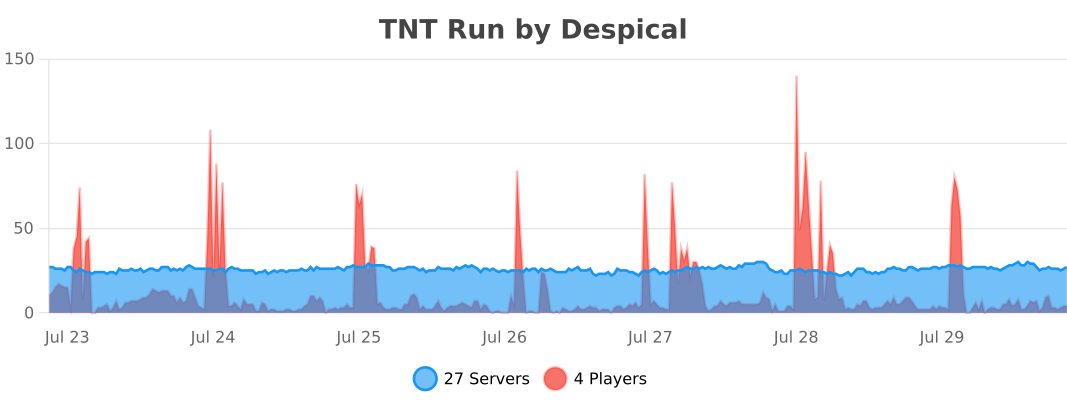
This plugin collects **anonymous** usage statistics through **bStats**.
This data (such as player count, server version, and Java version) helps us understand how the plugin is being used and allows us to make better development decisions. No private information is collected.
[](https://bstats.org/plugin/bukkit/TNT%20Run/8147)
### Enjoying the plugin?
We spend hundreds of hours making **TNT Run** the best minigame experience for your server. If you like the plugin, please consider leaving a **5-star review**!
*A huge thank you to everyone who has supported the project so far! ❤️*
Copyright 2026 © [Berke Akçen](https://github.com/Despical)
下载与版本
评论(0)
请 登录 后发表评论。
举报此资源
请登录后举报
赞助作者
请 登录 后赞助作者。
暂无评论,抢个沙发吧~