
GL-EcoAudit
作者:rebot | 分类:模组
Minecraft 版本: 1.21.4 1.21.5 1.21.6 1.21.7 1.21.8 1.21.9 1.21.10 1.21.11
平台: bukkit paper purpur spigot
标签: economy utility
GL-EcoAudit
Audit, track, and browse every economy transaction on your Paper 1.21.4 server.
GL-EcoAudit automatically records all /pay transactions between players and provides an intuitive in-game GUI menu system to browse sent and received payment history. Designed for performance and flexibility, it supports multiple database backends, configurable storage limits, automatic purging, and full Vault integration.
Links
- GitHub: https://github.com/GL-Systems/GL-EcoAudit
- Discord: https://discord.gg/kCe9zg3mKB
- Issues & Suggestions: Use our Discord server or GitHub Issues.
Features
Automatic Transaction Recording
Every time a player executes /pay, the plugin captures the sender, recipient, amount, and exact timestamp, and stores it in the database. Works with online and offline players.
In-Game GUI Menu
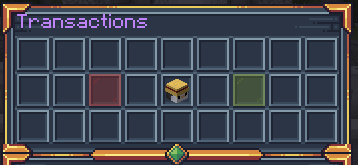
Players can open a graphical menu with /transactions to view:
- Their own head with current balance
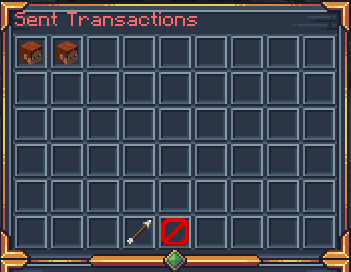
- A Money Sent button → paginated list of all sent transactions (recipient head, amount, date)
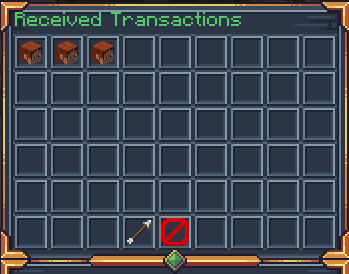
- A Money Received button → paginated list of all received transactions (sender head, amount, date)
- Navigation buttons: next page, previous page, back, and close
Multi-Database Support
Choose the storage backend that fits your infrastructure:
| Database | Type |
|---|---|
| SQLite | Embedded (default) |
| H2 | Embedded (MySQL-compatible mode) |
| MySQL | Remote |
| PostgreSQL | Remote |
| MongoDB | Remote (NoSQL) |
Configurable Transaction Limits
Control resource usage with:
- MAX_PER_PLAYER – Max stored transactions per player (sent and received tracked separately)
- LIMIT_BEHAVIOR – What happens when the limit is reached:
DELETE_OLDEST– Automatically removes the oldest recordSTOP_RECORDING– Silently drops new transactions
Auto-Purge
Enable automatic cleanup of old records by setting PURGE_AFTER_DAYS in config.yml. A background task runs every hour and deletes records older than the specified threshold.
Vault Integration
Works seamlessly with any Vault-compatible economy plugin (EssentialsX, CMI, etc.). Uses the Vault API to retrieve player balances and format currency amounts.
Commands
| Command | Aliases | Description | Permission |
|---|---|---|---|
/transactions |
/trans, /tx |
Opens the transaction history GUI | golden.ecoaudit.transactions |
/ecoaudit reload |
/ea reload |
Reloads all configuration files (config, language, database, menus) | golden.ecoaudit.admin |
/ecoaudit purge [days] |
/ea purge [days] |
Purges transaction records older than the specified number of days (default: 90) | golden.ecoaudit.admin |
Permissions
| Permission | Description | Default |
|---|---|---|
golden.ecoaudit.transactions |
Allows the player to use /transactions and view their own transaction history |
OP |
golden.ecoaudit.admin |
Allows the player to use /ecoaudit with reload and purge subcommands |
OP |
How to Use
For Players
- Type
/transactions(or/transor/tx) in chat. - The menu opens showing your head, your balance, and two buttons: Money Sent and Money Received.
- Click a button to browse the corresponding transaction list.
- Use the arrow buttons to navigate between pages.
- Click the Back button to return to the main menu or Close to exit.
For Administrators
- Use
/ecoaudit reloadafter editing any configuration file to apply changes without restarting the server. - Use
/ecoaudit purge 30to manually delete all records older than 30 days. - Configure auto-purge in
config.ymlusingPURGE_AFTER_DAYS.
Configuration
config.yml – Main Configuration
SERVER_NAME: "Survival"              # Server identifier stored in every transaction record

TRANSACTIONS:
  MAX_ENTRIES_PER_PAGE: 45           # Number of transactions shown per menu page
  MAX_PER_PLAYER: 100                # Maximum stored transactions per player (sent + received)
  LIMIT_BEHAVIOR: DELETE_OLDEST      # DELETE_OLDEST or STOP_RECORDING
  PURGE_AFTER_DAYS: 0                # Auto-purge after N days (0 = disabled)

FORMATTING:
  DATE_FORMAT: "dd/MM/yyyy hh:mm:ss a"   # Date/time format (SimpleDateFormat)
  ECONOMY_FORMAT: "#,##0.00"             # Economy amount format (DecimalFormat)
database.yml – Database Configuration
TYPE: "SQLITE" # SQLITE | H2 | MYSQL | POSTGRESQL | MONGO

INIT_TIMEOUT_SECONDS: 10

SETTINGS:
  SQLITE:
    FILE_NAME: "GL-EcoAudit"
  H2:
    FILE_NAME: "GL-EcoAudit"
  MONGO:
    AUTH_TYPE: "URI"
    URI: ""
    IP_ADDRESS: ""
    PORT: 27017
    DATABASE: "GL-EcoAudit"
    AUTH:
      USERNAME: ""
      PASSWORD: ""
  MYSQL:
    IP_ADDRESS: ""
    PORT: 3306
    DATABASE: "GL-EcoAudit"
    AUTH:
      USERNAME: ""
      PASSWORD: ""
  POSTGRESQL:
    IP_ADDRESS: ""
    PORT: 5432
    DATABASE: "GL-EcoAudit"
    AUTH:
      USERNAME: ""
      PASSWORD: ""
language.yml – Messages
All user-facing messages are fully customizable with hex color code support (&#rrggbb). You can edit every command response, error message, and notification the plugin sends to players.
menus/ – Menu Layouts (one file per menu)
Each menu has its own YAML file inside the menus/ folder:
| File | Description |
|---|---|
transactions-menu.yml |
Main menu layout (player head, sent/received buttons, border) |
transactions-sent.yml |
Sent transactions paginated list (entry name, lore, nav buttons) |
transactions-received.yml |
Received transactions paginated list (entry name, lore, nav buttons) |
For each menu you can customize:
- TITLE – Inventory title
- Slot positions – Where each button appears
- Material – Item type for each button
- Name and Lore – Display name and description with placeholders (
{player},{balance},{target},{amount},{date}) - Glow effect – Enchantment glint on/off
Installation
- Download the plugin
- Place the JAR in your server
plugins/folder. - Ensure Vault is installed along with an economy plugin (EssentialsX, CMI, etc.).
- Restart your server or run
/reload confirm. - The plugin will generate
config.yml,database.yml,language.yml, and themenus/folder automatically. - Edit the configuration files to suit your server and run
/ecoaudit reloadto apply changes.
Support
If you encounter bugs, have feature suggestions, or need help with configuration, join our Discord server:
Developed by GL-Studio.
请登录后举报
请 登录 后赞助作者。
暂无评论,抢个沙发吧~