
DiscordBridgeJP
作者:rebot | 分类:模组
Minecraft 版本: 1.21.8 1.21.9 1.21.10 1.21.11 26.1 26.1.1 26.1.2 26.2
平台: paper
标签: management social utility
DiscordBridgeJP
A JDA (Discord Bot) based bridge plugin connecting your Minecraft server with Discord — chat relay, account linking, role color sync, console integration, ban sync, Discord-leave detection, and more.
⭐ Key Features
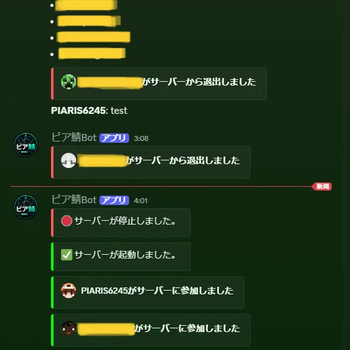
- Chat Bridge: Real-time two-way chat relay. Linked players' messages appear via Webhook with their Discord avatar and name.
- Account Linking: Link via an in-game code pasted into Discord. Supports multiple Minecraft accounts per Discord account.
- Role Color Sync: Reflects a linked player's Discord role color in chat, nametag, and tab list (each toggleable).
- Notifications: Join/leave/first-join/advancement/death notifications to Discord, fully customizable via
messages.yml. - Console Integration: Relays console logs to Discord; allowed roles can run server commands from Discord.
- Ban Sync: Bans on Minecraft or Discord automatically sync to the other side (via AdvancedBan).
- Discord-Leave Detection: Detects when a linked player leaves the Discord server and blocks their next login until they rejoin/re-verify.
- Maintenance Mode: Kick with a custom reason, bypass permission, and per-notification-type suppression.
- Multi-language: Japanese and English included; more languages can be added via
lang/.
⚡ Commands
| Command | Permission | Description |
|---|---|---|
/discordbridgejp reload |
admin | Reloads config/lang/messages.yml and restarts the Bot |
/discordbridgejp status |
admin | Checks Bot connection status |
/discordbridgejp language <code> |
admin | Switches display language |
/discordbridgejp namecolor <on\|off> <player> |
admin | Master toggle for role color sync per player |
/discordbridgejp silentlogin <add\|remove\|list> [player] |
admin | Manages the fully-silent join/leave list |
/discordbridgejp maintenance <on\|off> [reason] |
admin | Toggles maintenance mode |
/discordbridgejp timeout <player> |
admin | Manually blocks a player from logging in |
/discordbridgejp removetimeout <player> |
admin | Lifts a manual login block |
/discordbridgejp unlink <player> |
admin | Forcibly unlinks another player's account |
/discordbridgejp link |
link | Issues a Discord account link code |
/discordbridgejp unlink |
unlink | Unlinks your own Discord account |
Discord text commands are also supported. In the verification channel: !XXXXXXXX completes linking, !list shows linked accounts (admin only), !auth <player> <DiscordID> force-links an account (admin, or a configured role). In the chat channel: !list shows online players.
🔑 Permissions
| Node | Default | Description |
|---|---|---|
discordbridgejp.admin |
op | Grants all admin commands at once (upper-level shortcut; you don't need to grant each command individually) |
discordbridgejp.command.reload |
op | /discordbridgejp reload |
discordbridgejp.command.status |
op | /discordbridgejp status |
discordbridgejp.command.language |
op | /discordbridgejp language |
discordbridgejp.command.namecolor |
op | /discordbridgejp namecolor |
discordbridgejp.command.silentlogin |
op | /discordbridgejp silentlogin |
discordbridgejp.command.maintenance |
op | /discordbridgejp maintenance |
discordbridgejp.command.timeout |
op | /discordbridgejp timeout, removetimeout |
discordbridgejp.command.forceunlink |
op | /discordbridgejp unlink <player> (forcibly unlink another player) |
discordbridgejp.link |
true | Issue an account link code |
discordbridgejp.unlink |
true | Unlink your own account |
discordbridgejp.silentjoin |
false | Suppresses only the Discord join notification |
discordbridgejp.silentquit |
false | Suppresses only the Discord leave notification |
Each admin command can be granted individually via LuckPerms — you no longer need to grant full discordbridgejp.admin access just to allow a moderator to use one specific command.
⚙️ Technical Details
- Supported platforms: Paper 1.21.8+ (including Purpur, 26.1.x series)
- Requirements: Built with JDK 21, a Discord Bot with MESSAGE CONTENT INTENT and SERVER MEMBERS INTENT enabled
- Data storage: SQLite (
data.db) - Optional integrations: AdvancedBan (ban sync), LuckPerms (permission group checks), SuperVanishJP (silent join/leave)
📋 Setup
- Create a Discord Bot in the Discord Developer Portal, enable MESSAGE CONTENT INTENT and SERVER MEMBERS INTENT, and get the token
- Invite the Bot to your server with the needed permissions
- Set the token and channel IDs in
bot.yml - Run
/discordbridgejp reloadto finish setup
See the comments in config.yml, bot.yml, and messages.yml for the full list of settings.
📖 For more details, see the GitHub Wiki (Japanese only).
DiscordBridgeJP(日本語)
Minecraft ServerとDiscordをつなぐ、JDA(Discord Bot)ベースの連携プラグインです。チャット中継、アカウント連携、ロール色反映、コンソール連携、BAN同期、Discordサーバー離脱検知など一通り揃っています。
⭐ 主な機能
- チャット連携: MC↔Discordのリアルタイム双方向中継。連携済みプレイヤーはWebhookでDiscordのアバターと名前が表示されます。
- アカウント連携: ゲーム内で発行したコードをDiscordに貼るだけで連携完了。1つのDiscord垢に複数のMinecraft垢を紐づけ可能。
- ロール色反映: 連携済みプレイヤーのDiscordロール色をチャット欄・ネームタグ・タブリストに反映(各項目を個別にON/OFF可能)。
- 通知機能: 参加/退出/初参加/進捗達成/死亡をDiscordへ通知。
messages.ymlで文言・色を自由にカスタマイズ可能。 - コンソール連携: サーバーログをDiscordへ中継し、指定ロールはDiscordからサーバーコマンドを実行可能。
- BAN同期: AdvancedBanと連携し、Minecraft/Discordどちらでのバンも自動で双方向に同期。
- Discordサーバー離脱検知: 連携済みプレイヤーがDiscordサーバーを抜けたことを検知し、再参加/再認証するまで次回ログインをブロック。
- メンテナンスモード: 理由付きキック、バイパス権限、通知種別ごとの個別抑制に対応。
- 多言語対応: 日本語・英語を同梱、
lang/フォルダに追加するだけで言語を拡張可能。
⚡ コマンド一覧
| コマンド | 権限 | 説明 |
|---|---|---|
/discordbridgejp reload |
admin | config/言語/messages.ymlを再読込し、Botを再起動 |
/discordbridgejp status |
admin | Bot接続状態を確認 |
/discordbridgejp language <code> |
admin | 表示言語を切替 |
/discordbridgejp namecolor <on\|off> <player> |
admin | ロール色反映の個別マスタースイッチ |
/discordbridgejp silentlogin <add\|remove\|list> [player] |
admin | 入退室を完全サイレント化する個別指定 |
/discordbridgejp maintenance <on\|off> [理由] |
admin | メンテナンスモードの切替 |
/discordbridgejp timeout <player> |
admin | プレイヤーのログインを手動でブロック |
/discordbridgejp removetimeout <player> |
admin | 手動ブロックを解除 |
/discordbridgejp unlink <player> |
admin | 他プレイヤーの連携を強制解除 |
/discordbridgejp link |
link | Discordアカウント連携コードを発行 |
/discordbridgejp unlink |
unlink | 自分のDiscordアカウント連携を解除 |
Discord側のテキストコマンドにも対応。認証チャンネルで!XXXXXXXXを送信すると連携完了、!listで連携済みアカウント一覧(管理者のみ)、!auth <player> <DiscordID>で強制連携(管理者、または指定ロール)。チャットチャンネルで!listを送信するとオンラインプレイヤー一覧を表示します。
🔑 権限一覧
| 権限ノード | デフォルト | 説明 |
|---|---|---|
discordbridgejp.admin |
op | 管理コマンド全てをまとめて許可する上位互換権限(個別付与不要) |
discordbridgejp.command.reload |
op | /discordbridgejp reload |
discordbridgejp.command.status |
op | /discordbridgejp status |
discordbridgejp.command.language |
op | /discordbridgejp language |
discordbridgejp.command.namecolor |
op | /discordbridgejp namecolor |
discordbridgejp.command.silentlogin |
op | /discordbridgejp silentlogin |
discordbridgejp.command.maintenance |
op | /discordbridgejp maintenance |
discordbridgejp.command.timeout |
op | /discordbridgejp timeout, removetimeout |
discordbridgejp.command.forceunlink |
op | /discordbridgejp unlink <player>(他プレイヤーの強制解除) |
discordbridgejp.link |
true | アカウント連携コードの発行 |
discordbridgejp.unlink |
true | 自分の連携の解除 |
discordbridgejp.silentjoin |
false | 参加時のDiscord通知のみ抑制 |
discordbridgejp.silentquit |
false | 退出時のDiscord通知のみ抑制 |
各管理コマンドはLuckPermsで個別に付与できます。特定のコマンド1つだけを使わせたいモデレーターに、discordbridgejp.adminを丸ごと与える必要はありません。~~~~
⚙️ 技術詳細
- 対応プラットフォーム: Paper 1.21.8以降(Purpur含む、26.1.x系対応)
- 必須要件: JDK21でビルド、Discord Bot(MESSAGE CONTENT INTENT・SERVER MEMBERS INTENT必須)
- データ保存: SQLite(
data.db) - 任意連携先: AdvancedBan(BAN同期)、LuckPerms(権限グループ判定)、SuperVanishJP(入退室サイレント連携)
📋 セットアップ
- Discord Developer PortalでBotを作成し、MESSAGE CONTENT INTENT・SERVER MEMBERS INTENTを有効化してトークンを取得
- サーバーにBotを招待
bot.ymlにトークンと各チャンネルIDを設定/discordbridgejp reloadで起動完了
詳細な設定項目はconfig.yml・bot.yml・messages.yml内のコメントを参照してください。
より詳しくこのプラグインの中身を知りたい場合は、GitHubのWikiをご覧ください(日本語)。
请登录后举报
请 登录 后赞助作者。
暂无评论,抢个沙发吧~