
NewGen Team
作者:rebot | 分类:模组
Minecraft 版本: 1.21 1.21.1 1.21.2 1.21.3 1.21.4 1.21.5 1.21.6 1.21.7 1.21.8 1.21.9 1.21.10 1.21.11
平台: folia paper
标签: economy
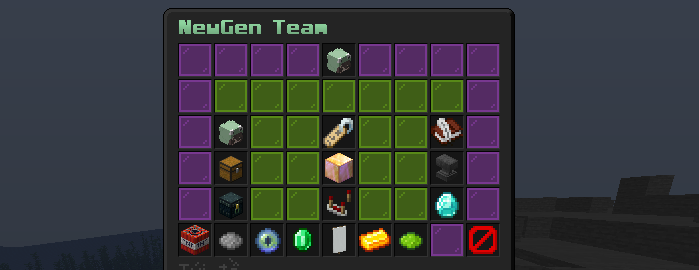
 # NewGen Team
**The modern foundation for teams, factions, and guilds on Paper and Folia**
Built from the ground up for Java 21, fully asynchronous, and driven entirely by configuration — no code changes required to reshape how your server's team system looks, feels, and behaves.
# NewGen Team
**The modern foundation for teams, factions, and guilds on Paper and Folia**
Built from the ground up for Java 21, fully asynchronous, and driven entirely by configuration — no code changes required to reshape how your server's team system looks, feels, and behaves.
           
[**Discord**](https://discord.gg/P3NSwtJ2aw) • [**Documentation**](#table-of-contents) • [**Installation**](#16-installation) • [**FAQ**](#19-faq)
Table of Contents
- Hero
- Why NewGen Team?
- Feature Overview
- Configuration System
- GUI System
- Theme System
- Language System
- Database
- Performance
- PlaceholderAPI
- Plugin Integrations
- Developer API
- Commands
- Permissions
- Installation
- Migration Guide
- Configuration Examples
- FAQ
- Roadmap
- Compatibility
- Screenshots
- Support
- License
2. Why NewGen Team?
Most team plugins on the market were designed years ago, for a server landscape that no longer exists. They assume a single database, a single language, a fixed GUI, and a fixed color scheme. Every server that wants something different is forced into workarounds, resource pack hacks, or forks that fall out of date within a season.
NewGen Team starts from a different premise: the plugin should adapt to the server, not the other way around.
That premise shapes every architectural decision:
- Configuration over code. Every visual element — menu layout, item placement, color palette, wording — lives in a YAML file, not in the jar. Updating the plugin should never mean losing your customization.
- Async by default. Every database operation, every heavy computation, runs off the main thread. On Folia, this isn't an afterthought bolted on top of a Bukkit-era codebase — the plugin was built against Folia's region-threading model from day one.
- One core, many backends. Whether a server runs a 20-player SQLite survival world or a 5,000-player network on PostgreSQL, the same codebase, the same feature set, and the same configuration format apply. Switching backends is a config change, not a migration project.
- Theming as a first-class feature. Colors are tokens, not hardcoded strings. MiniMessage powers every message, title, and GUI label, which means gradients, hover text, and click actions are available anywhere text appears.
- Two languages out of the box. English and Vietnamese ship as complete, professionally structured translations — not machine-translated afterthoughts — with automatic fallback and safe merging of new keys on update.
The result is a plugin that a small SMP can drop in with zero configuration and get a clean, functional team system, while a large network can reshape every pixel, every word, and every color to match its brand — without touching a single line of Java.
3. Feature Overview
Async Storage Engine
What it is: A storage layer built around non-blocking I/O, so no team lookup, bank transaction, or leaderboard query ever freezes the main thread or a Folia region thread.
Benefits: Consistent TPS under load, no "lag spike on team creation" reports, and safe behavior even when the database connection is temporarily slow or unreachable.
Technical explanation: All reads and writes are dispatched through a connection-pooled executor. Results are delivered back to the calling thread (main thread or the correct Folia region thread) only once the operation resolves, and an in-memory cache absorbs repeat reads so the database is rarely touched for hot data like placeholders or GUI rendering.
Configuration: Pool size, timeout, and backend selection all live in database.yml — see Database.
HikariCP-Backed Database Layer
What it is: Every SQL backend — SQLite, MySQL, MariaDB, PostgreSQL — is wired through HikariCP, the same connection pooling library trusted by high-throughput production systems outside of Minecraft.
Benefits: Fast connection acquisition, automatic recovery from dropped connections, and predictable resource usage even under bursts of activity (for example, many players creating teams at server restart).
Technical explanation: Each backend implements the same internal storage interface, so the plugin's business logic never needs to know which database is active. Drivers are bundled inside the jar — there is nothing extra to install for MySQL, MariaDB, or PostgreSQL support.
Configuration: database.yml → type, pool-size, connection-timeout.
MiniMessage Theme Engine
What it is: A centralized set of color tokens — primary, secondary, accent, muted, danger, success, warning, info — referenced throughout every message, GUI title, and lore line.
Benefits: A full re-theme of the plugin's visual identity takes seconds: change eight values in one file and every screen updates consistently, including gradients and hover effects supported by MiniMessage.
Technical explanation: Language files and menu files reference tokens like <primary> rather than literal color codes. At render time, tokens are resolved against theme.yml and passed through the MiniMessage parser, which supports gradients, click events, and hover events natively.
Configuration: theme.yml — see Theme System.
GUI Layout System
What it is: Every menu — the main team menu, admin panel, invite screen, and more — is described declaratively in a YAML file: which slot holds which item, what material, whether it glows, and whether it's visible at all.
Benefits: Server owners can rearrange, hide, or re-skin any menu without decompiling anything or waiting on a plugin update. A menu that doesn't fit a server's UX can simply be redesigned.
Technical explanation: Each entry under items: in a menu file binds a logical action (for example, bank) to a physical slot, material, glow state, and optional custom model data for resource-pack-driven textures. Text is never stored in the menu file — it's pulled from lang/*.yml at render time, keeping visuals and wording independently editable.
Configuration: menus/*.yml — see GUI System.
Multi-Language Support
What it is: Complete English and Vietnamese translations, with a fallback chain and safe key-merging so plugin updates never silently overwrite an admin's edits.
Benefits: International communities and Vietnamese-speaking servers both get a first-class experience, and adding a third language is a matter of copying a file — no code required.
Technical explanation: config.yml selects the active language. If a key is missing from the active language file, the loader transparently falls back to en_US. On plugin update, only newly introduced keys are appended to existing language files — existing translations and admin customizations are left untouched.
Configuration: config.yml → language, plus lang/vi_VN.yml and lang/en_US.yml.
Team Bank
What it is: A shared currency pool per team, integrated with Vault, supporting deposits, withdrawals, and full audit logging.
Benefits: Gives teams a shared economic goal, funds upgrades, and creates natural social coordination around resource pooling.
Technical explanation: Deposits and withdrawals fire BankDepositEvent and BankWithdrawEvent for other plugins to hook into, and every transaction is optionally written to the transactions/ log category for auditing.
Configuration: hooks.yml to enable Vault, chest.yml and levels.yml for related limits.
Team Home
What it is: A shared teleport point that any team member can set and use, subject to configurable cooldowns and permission rules.
Benefits: Reduces reliance on individual /sethome plugins for team coordination and keeps team bases centrally reachable.
Technical explanation: Home coordinates are stored per-team in the active backend and resolved asynchronously before the main-thread teleport is issued, keeping the teleport itself safe on both Paper and Folia.
Configuration: homes.yml.
Team Levels
What it is: A tiered progression system where teams unlock higher member caps, larger team chests, and other benefits by spending currency (Vault or PlayerPoints) to level up.
Benefits: Gives long-lived teams a sense of progression and a currency sink that integrates with a server's existing economy.
Technical explanation: Each tier in levels.yml defines a member cap and an upgrade cost. Leveling up fires TeamLevelUpEvent, letting other plugins react (for example, granting a cosmetic reward).
Configuration: levels.yml.
Team Chat
What it is: A togglable private channel visible only to team members, separate from global or local chat.
Benefits: Lets teams coordinate without spamming public chat, and integrates cleanly with servers that already have their own chat-formatting plugin.
Technical explanation: Team chat is intercepted at the chat-event level and rerouted only to online team members, with its own configurable format sourced from the active language file.
Configuration: lang/*.yml → chat.* keys, settings.yml for toggling behavior.
Daily Logging
What it is: Rotating, categorized log files that capture team activity, admin actions, storage errors, and transactions — separate from the server console.
Benefits: Gives server owners an audit trail for moderation and troubleshooting without digging through console scrollback.
Technical explanation: Logs are written per category (daily/, errors/, transactions/, admin/) into date-stamped files under plugins/NewGenTeam/logs/, with an optional debug: true flag for verbose diagnostics.
Configuration: logs.yml.
Folia Support
What it is: Native compatibility with Folia's regionized multithreading model, not a compatibility shim bolted onto Bukkit-era scheduling.
Benefits: Servers running Folia for high player counts get the same feature set, the same performance characteristics, and the same configuration as a standard Paper server.
Technical explanation: All scheduling is abstracted behind an internal scheduler service that dispatches to the correct region thread on Folia or the main thread on Paper, so teleports, block interactions, and GUI operations are always executed in the correct threading context.
4. Configuration System
NewGen Team splits its configuration across dedicated files rather than one monolithic config.yml, so each concern can be edited, version-controlled, and reasoned about independently.
| File | Purpose |
|---|---|
config.yml |
Language selection only |
settings.yml |
Core gameplay settings |
database.yml |
Storage backend and connection pool |
theme.yml |
Color tokens applied plugin-wide |
hooks.yml |
Enable or disable each third-party integration |
menus/*.yml |
Per-menu GUI layout |
lang/*.yml |
All player-facing text, per language |
levels.yml |
Tier levels, member limits, upgrade costs |
homes.yml |
Team home rules and cooldowns |
logs.yml |
File logging categories and debug mode |
chest.yml |
Team chest tiers and flush interval |
All files are generated on first run with bilingual comments explaining every key, so there is no need to consult external documentation just to understand what a setting does.
config.yml
# Select the active language.
# Available: en_US, vi_VN
language: en_US
settings.yml (excerpt)
team:
  max-name-length: 16
  min-name-length: 3
  allow-color-in-name: false
  disband-on-owner-leave: false

invites:
  expire-after-seconds: 300
  max-pending-per-player: 5
hooks.yml
hooks:
  packetevents: true    # Required — sign-based input
  vault: true            # Team bank economy
  playerpoints: false    # Alternate currency for tier upgrades
  placeholderapi: true   # %newgenteam_*% placeholders
5. GUI System
Every menu the plugin renders — main team menu, admin panel, invite list, bank screen — is defined in its own file under menus/, following the same schema.
Layout — a menu declares its title and row count, then a map of named items to slots:
title: "<primary>Team Menu"
rows: 6
items:
  bank:
    slot: 31
    material: GOLD_BLOCK
    glow: true
    custom-model-data: 1234
    enabled: true
  home:
    slot: 29
    material: RED_BED
    glow: false
    enabled: true
  members:
    slot: 33
    material: PLAYER_HEAD
    glow: false
    enabled: true
Slots are numbered left-to-right, top-to-bottom starting at 0. A 6-row inventory has slots 0–53.
Custom model data lets servers with a resource pack swap the rendered texture per item without changing the underlying material, which keeps compatibility with plugins and datapacks that key off vanilla materials.
MiniMessage is used for the title field and for every piece of item lore, which is itself sourced from the language file rather than the menu file — keeping visual layout and wording fully decoupled.
Themes apply automatically: any <primary>, <accent>, etc. token used in a menu title or in the referenced language keys resolves against the active theme.yml.
Permissions and visibility are controlled per item via enabled: true/false, and can be paired with permission nodes so different roles see different menu layouts.
Future customization: the menu schema is intentionally forward-compatible — new item properties (for example, per-item permission overrides or conditional visibility rules) can be added without breaking existing menu files, since unknown keys are ignored rather than causing errors.
6. Theme System
The theme system exists so that a server's brand identity — not the plugin author's default palette — is what players see.
theme.yml defines eight semantic tokens:
colors:
  primary:   "#5865F2"
  secondary: "#8A2BE2"
  accent:    "#FFD700"
  muted:     "#808080"
  danger:    "#E74C3C"
  success:   "#2ECC71"
  warning:   "#F1C40F"
  info:      "#3498DB"
These are referenced anywhere MiniMessage is parsed:
messages:
  team-created: "<success>Your team <primary><team_name></primary> has been created!</success>"
  bank-insufficient: "<danger>You don't have enough funds for this action.</danger>"
Because tokens are semantic rather than literal, a server can rebrand the entire plugin — from a corporate blue-and-gray theme to a vibrant faction-war red-and-gold theme — by editing eight lines, with every message, GUI title, and lore string updating consistently. MiniMessage's gradient and formatting syntax works inside token values as well, so primary itself can be a gradient definition rather than a flat color.
7. Language System
Two complete, professionally structured translations ship by default:
- English (
en_US) - Vietnamese (
vi_VN)
Fallback: if a key is absent from the active language file — for example, after a partial custom translation — the loader transparently falls back to the equivalent key in en_US, so players never see a raw key name or a blank message.
Custom languages: adding a new language is a matter of copying lang/en_US.yml to lang/<locale>.yml, translating the values, and setting language: <locale> in config.yml. No recompilation or code change is required.
Example key structure:
team:
  created: "<success>Team <primary><team_name></primary> created successfully."
  disbanded: "<danger>Your team has been disbanded."
gui:
  main-title: "<primary>{team_name}"
  bank-button: "<secondary>Team Bank"
chat:
  team-format: "<muted>[Team] <primary><player></primary>: <message>"
8. Database
| Backend | Setup required | Recommended for |
|---|---|---|
| SQLite | None — default | Small to medium single-server setups |
| MySQL | Existing MySQL server | Multi-server networks sharing data |
| MariaDB | Existing MariaDB server | Same as MySQL, drop-in compatible |
| PostgreSQL | Existing PostgreSQL server | Larger networks with existing Postgres infrastructure |
HikariCP pooling manages a bounded pool of live connections rather than opening a new connection per query, which is the single largest contributor to database-related lag on naive plugin implementations.
Reconnect and fallback: if the configured external database is unreachable at startup, the plugin logs the failure and falls back safely to SQLite rather than failing to load entirely — teams remain playable while the underlying issue is fixed.
Async everywhere: every query — team lookups, bank transactions, leaderboard generation — runs off the main thread (and off Folia region threads) through the pooled executor.
Caching: frequently accessed data (a player's team, cached placeholder values, leaderboard snapshots) is held in memory and only invalidated on relevant writes, so hot paths like placeholders rarely touch the database at all.
type: SQLITE   # SQLITE | MYSQL | MARIADB | POSTGRESQL
host: localhost
port: 3306
database: newgenteam
username: root
password: ""
pool-size: 10
connection-timeout: 5000
9. Performance
NewGen Team is built around a simple rule: nothing that can block should ever run on a thread that matters.
- Async storage: every database operation is dispatched to a pooled executor and never blocks the main thread or a Folia region thread.
- Placeholder cache: PlaceholderAPI values are served from an in-memory cache populated asynchronously, so a scoreboard or tab-list refreshing every second does not translate into constant database load.
- GUI cache: rendered menu structures are cached per configuration version, so opening a menu does not re-parse YAML and re-resolve MiniMessage tokens on every click.
- Scheduler abstraction: a single internal scheduler service picks the correct execution context (main thread, Folia region thread, or async pool) so the same code path is safe on both Paper and Folia without per-platform branches scattered through the codebase.
- Bounded connection pool: HikariCP prevents connection storms during high-activity moments like restart-time team lookups.
The combined effect is a plugin whose per-player overhead stays flat as concurrent team activity scales up, rather than degrading linearly with player count — which is what makes it viable on both a 20-player SMP and a several-thousand-player Folia network.
10. PlaceholderAPI
Identifier: newgenteam. Every placeholder below is served from the in-memory cache — none of them trigger a live database query.
| Placeholder | Description |
|---|---|
%newgenteam_name% |
Team name, empty string if the player has no team |
%newgenteam_name_display% |
Team name, or a configurable "No team" fallback |
%newgenteam_tag% |
Team tag/prefix |
%newgenteam_role% |
The player's role within their team (owner, officer, member) |
%newgenteam_owner% |
Name of the team's owner |
%newgenteam_members% |
Current member count |
%newgenteam_members_max% |
Maximum member count for the team's current tier |
%newgenteam_online% |
Number of currently online team members |
%newgenteam_level% |
Team's current tier |
%newgenteam_bank% (alias %newgenteam_balance%) |
Team bank balance |
%newgenteam_kills% |
Team's total kill count |
%newgenteam_deaths% |
Team's total death count |
%newgenteam_kdr% |
Team's kill/death ratio |
%newgenteam_rank% |
Team's leaderboard position, ranked by kills |
11. Plugin Integrations
| Plugin | Purpose | Required |
|---|---|---|
| PacketEvents | Powers sign-based text input (naming a team, entering a bank amount) without opening an anvil GUI | Yes |
| Vault | Backs the team bank economy against the server's existing economy plugin | No |
| PlayerPoints | Alternate currency source for team tier upgrades | No |
| PlaceholderAPI | Exposes %newgenteam_*% placeholders to scoreboards, tab lists, and holograms |
No |
Each integration is independently toggled in hooks.yml. Disabling an optional hook cleanly disables the related feature (for example, disabling PlayerPoints simply removes it as a payment option for tier upgrades) rather than causing errors.
12. Developer API
Package: me.newgen.team.api.event — all events extend the standard Bukkit Event class and are fully cancellable where cancellation makes sense.
| Event | Fired when |
|---|---|
TeamCreateEvent |
A team is created |
TeamDeleteEvent |
A team is disbanded |
TeamJoinEvent |
A player joins a team |
TeamLeaveEvent |
A player leaves a team |
TeamKickEvent |
A player is removed by an officer/owner |
TeamLevelUpEvent |
A team upgrades its tier |
BankDepositEvent |
Currency is deposited into the team bank |
BankWithdrawEvent |
Currency is withdrawn from the team bank |
Example — logging every bank deposit:
@EventHandler
public void onDeposit(BankDepositEvent event) {
    getLogger().info(event.getTeam().name() + " received " + event.getAmount());
}
Example — rewarding a level-up:
@EventHandler
public void onLevelUp(TeamLevelUpEvent event) {
    Team team = event.getTeam();
    int newLevel = event.getNewLevel();
    // grant a reward proportional to newLevel
}
Best practices:
- Register listeners with
EventPriority.MONITORwhen only observing (e.g. logging), and a lower priority when you intend to cancel an event. - Avoid blocking calls inside handlers for events fired from async contexts — check the event's Javadoc for its threading guarantees before performing I/O.
- Depend on the plugin as a
depend(notsoftdepend) in yourplugin.ymlif your integration is not optional.
13. Commands
Main command: /team — aliases: /t, /faction, /f, /guild, /g
| Command | Description |
|---|---|
/team |
Open the main team menu |
/team create <name> |
Create a new team |
/team invite <player> |
Invite a player to your team |
/team join <team> |
Request to join a team |
/team leave |
Leave your current team |
/team home |
Teleport to the team home |
/team chat |
Toggle team chat mode |
/team admin |
Open the admin management menu |
/team reload |
Reload configuration, theme, language, and menus |
14. Permissions
Permission prefix: *`newgenteam.`**
| Permission | Grants |
|---|---|
newgenteam.use |
Access to basic /team commands |
newgenteam.admin |
Access to the admin menu and admin-only actions |
newgenteam.reload |
Access to /team reload |
15. Installation
Requirements
- Paper or Folia, version 1.21.4+
- Java 21
- PacketEvents (required dependency — must be installed and loaded before NewGen Team)
Optional dependencies
- Vault — enables the team bank
- PlayerPoints — enables an alternate currency for tier upgrades
- PlaceholderAPI — enables
%newgenteam_*%placeholders
Steps
- Confirm your server meets the requirements above.
- Install PacketEvents and restart (or hot-load) the server so it initializes first.
- Install any optional dependencies you plan to use.
- Drop
NewGenTeam-x.x.x.jarinto yourplugins/folder. - Start the server. Configuration files are generated under
plugins/NewGenTeam/with bilingual comments. - Edit the generated files to match your server, then run
/team reloadto apply changes without a restart.
16. Migration Guide
Switching database backends is a configuration change, not a data-loss event — but note that NewGen Team does not include an automatic cross-backend data transfer tool. If you already have teams stored on one backend and want to move existing data to another, plan a manual export/import using your database tooling of choice before switching.
Moving to SQLite
- Set
type: SQLITEindatabase.yml. - Restart the server. A fresh
newgenteam.dbfile is created if none exists.
Moving to MySQL / MariaDB
- Create a database and a user with full privileges on it.
- Set
type: MYSQL(orMARIADB), and fill inhost,port,database,username,password. - Restart. The plugin creates its schema automatically on first connection.
Moving to PostgreSQL
- Create a database and a role with privileges on it.
- Set
type: POSTGRESQLand fill in connection details as above. - Restart. Schema creation is automatic.
If the configured backend is unreachable at startup, the plugin will log the failure and fall back to SQLite so the server remains playable while you fix the connection details.
17. Configuration Examples
Minimal single-server setup (SQLite, English):
# config.yml
language: en_US
# database.yml
type: SQLITENetwork setup (shared MySQL, Vietnamese):
# config.yml
language: vi_VN
# database.yml
type: MYSQL
host: db.internal.example.com
port: 3306
database: newgenteam
username: newgenteam_svc
password: "changeme"
pool-size: 20
connection-timeout: 5000Tier configuration example:
# levels.yml
levels:
  1:
    max-members: 5
    upgrade-cost: 0
  2:
    max-members: 10
    upgrade-cost: 5000
  3:
    max-members: 20
    upgrade-cost: 25000
Logging configuration example:
# logs.yml
enabled: true
debug: false
categories:
  daily: true
  errors: true
  transactions: true
  admin: true
18. FAQ
1. Does NewGen Team run on Folia?
Yes. Scheduling is abstracted internally, and the plugin declares folia-supported: true.
2. Does it also run on standard Paper?
Yes — the same jar runs on both Paper and Folia without any configuration difference.
3. Can I switch databases after teams already exist?
Yes, by editing database.yml, but there is no built-in tool to transfer existing data between backends — plan a manual migration first.
4. Where is SQLite data stored?
At plugins/NewGenTeam/newgenteam.db.
5. Does the plugin support MySQL and MariaDB at the same time?
No — one backend is active at a time, selected by type in database.yml.
6. Is PostgreSQL fully supported, or an afterthought?
It uses the same internal storage interface as every other backend, so functionality is identical.
7. Do I need to install a JDBC driver manually?
No — all drivers are bundled inside the plugin jar.
8. What happens if my external database goes down mid-session?
HikariCP will attempt to recover the pool; if it cannot, operations fail gracefully and are logged rather than crashing the plugin.
9. Is PacketEvents really required?
Yes — it powers sign-based text input used for naming teams and entering bank amounts.
10. What happens if PacketEvents isn't installed?
The plugin will fail to enable those specific input flows; install PacketEvents before NewGen Team to avoid this.
11. Can I use the plugin without Vault?
Yes — disable vault in hooks.yml and the team bank feature relying on it is cleanly disabled.
12. Can players pay for tier upgrades with PlayerPoints instead of Vault money?
Yes, if playerpoints is enabled in hooks.yml and configured as the payment source in levels.yml.
13. Are placeholders live database queries?
No — every placeholder reads from an in-memory cache, so there is no per-placeholder query cost.
14. How do I change the plugin's colors?
Edit the eight tokens in theme.yml — every message, GUI title, and lore line updates automatically.
15. Can I use gradients in the theme?
Yes — token values are parsed with MiniMessage, which supports gradient syntax.
16. My GUI text is in the wrong language — how do I fix it?
Set language in config.yml to the locale you want, then run /team reload.
17. How do I add a language that isn't English or Vietnamese?
Copy lang/en_US.yml to a new file named after your locale, translate the values, and set language accordingly in config.yml.
18. What happens to my custom translations when I update the plugin?
Only newly introduced keys are appended — your existing edits are preserved.
19. Two menu items are overlapping after I edited a menu file — why?
Two items assigned the same slot value will conflict; give each item a unique slot.
20. What does custom-model-data do in a menu item?
It lets a resource pack swap the rendered texture for that specific item without changing its underlying vanilla material.
21. Can I hide a menu item entirely?
Yes — set enabled: false on that item in the relevant menus/*.yml file.
22. Does /team reload require a server restart?
No — it reloads configuration, theme, language, and menus live.
23. Can I disband a team automatically if the owner leaves?
Yes — this is controlled by disband-on-owner-leave in settings.yml.
24. Is there a limit on team name length?
Yes, configurable via min-name-length and max-name-length in settings.yml.
25. Can invites expire?
Yes — invites.expire-after-seconds in settings.yml controls this.
26. What triggers TeamLevelUpEvent?
Any successful tier upgrade, whether paid via Vault or PlayerPoints.
27. Can other plugins cancel a team bank withdrawal?
Yes — BankWithdrawEvent can be listened to and cancelled by other plugins before the transaction completes.
28. Where are admin actions logged?
Under plugins/NewGenTeam/logs/admin/, if the admin category is enabled in logs.yml.
29. Does debug mode affect performance?
It adds verbose console output for diagnostics; it should be disabled in normal production use.
30. Is the plugin's source code open?
No — NewGen Team is distributed under an all-rights-reserved license; see License.
31. Can I request a custom feature or integration?
Feature requests can be raised on the Discord server.
32. Is there an API for third-party plugins to read team data directly?
Yes — see the Developer API section for the event package and usage examples.
19. Roadmap
Planned areas of future development include:
- Additional built-in menus (team leaderboard browser, cross-team diplomacy screen)
- Expanded event coverage in the Developer API (territory-related events)
- Optional territory/claim integration hooks
- Additional bundled language files beyond English and Vietnamese
- Expanded PlaceholderAPI coverage (per-member statistics)
- Web-based configuration companion tool
Roadmap items are not guaranteed release dates and may shift based on community feedback gathered through Discord.
20. Compatibility
| Platform | Supported |
|---|---|
| Paper | Yes, 1.21.4+ |
| Folia | Yes |
| Purpur | Expected to work (Purpur is a Paper fork); not separately tested each release |
| Java | 21 required |
| Minecraft versions | 1.21.4 and newer |
21. Screenshots
22. Support
- Discord: discord.gg/P3NSwtJ2aw — the primary channel for support, bug reports, and feature discussion.
- Issues: Report reproducible bugs with your server version, plugin version, and relevant log excerpts for the fastest response.
- Documentation: This README is the canonical reference for configuration, commands, permissions, and the developer API.
23. License
All Rights Reserved.
Copyright © NewGen Team. This software and its accompanying files may not be copied, modified, merged, published, distributed, sublicensed, decompiled, or sold, in whole or in part, without prior written permission from the copyright holder. Redistribution of this plugin, in original or modified form, outside of official distribution channels is not permitted.
Built for servers that expect more from their team plugin.
[Discord](https://discord.gg/P3NSwtJ2aw)
请登录后举报
暂无评论,抢个沙发吧~