
P_Tempo
作者:rebot | 分类:模组
Minecraft 版本: 1.21 1.21.1 1.21.2 1.21.3 1.21.4 1.21.5 1.21.6 1.21.7 1.21.8 1.21.9 1.21.10 1.21.11
平台: bukkit paper spigot
标签: game-mechanics utility
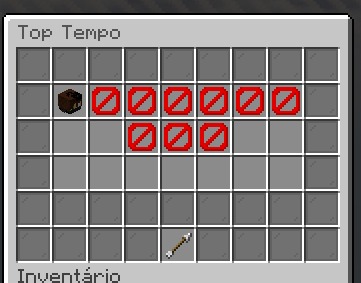
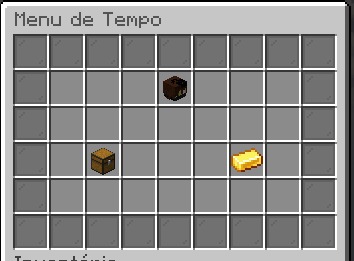
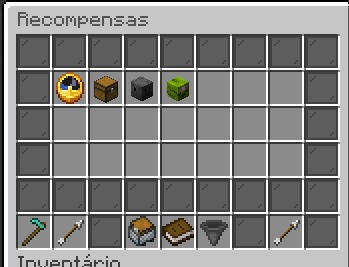
P_Tempo
Complete playtime, rewards, ranking, and progression plugin for Paper servers.
P_Tempo tracks how long players remain online, displays statistics in menus, builds a global ranking, and allows automatic rewards based on accumulated playtime. The plugin was developed with a focus on performance, data safety, customization, and integration with other plugins.
General information
| Information | Details |
|---|---|
| Version | 1.3.1 |
| Platform | Paper 1.21.3 or newer |
| Java | Java 21 |
| Author | Pedro |
| Main command | /ptempo |
| Alias | /tempojogado |
| Database | SQLite or MySQL |
Main features
Playtime tracking
- Tracks only the time a player remains online.
- Keeps the current session time updated without constant database queries.
- Saves players in batches and asynchronously.
- Allows administrators to view, add, set, remove, or reset playtime.
- Supports online players and known players who have already joined the server.
- Prevents accidental creation of records caused by incorrectly typed player names.
- Refreshes the ranking after administrative changes.
Database and data-loss protection
- Native SQLite and MySQL support.
- HikariCP connection pool included in the final plugin file.
- SQLite and MySQL drivers included in the plugin.
- Asynchronous saving to prevent main-thread freezes.
- Batch saving for online players.
- Automatic retries after temporary database failures.
- Progressive delay between retry attempts.
- Automatic SQLite backup before migrations when enabled.
- Versioned migrations for safely upgrading older databases.
- Local emergency journal for preserving data not yet confirmed by the database.
- Automatic recovery of pending saves when the database becomes available again.
- Reconciliation between the database and the journal during startup.
- Versioned snapshots that prevent older data from overwriting newer states.
- Legitimate administrative playtime reductions are also preserved.
- The latest player state is protected during server shutdown.
The local recovery file is named pending-player-saves.dat. It should not be deleted manually while data is still waiting for database confirmation.
Main menu
The main menu displays:
- Player head and name.
- Total accumulated playtime.
- Playtime in short format.
- Number of available rewards.
- Remaining time until the next reward.
- Current reward filter.
- Current hide-delivered-rewards setting.
- Data-loading status.
- Access to the rewards menu.
- Access to the global ranking.
All titles, items, materials, names, lore, slots, fillers, and custom models can be changed in menus.yml.
Rewards menu
- Rewards ordered by required playtime.
- Automatic pagination.
- Configurable number of slots.
- Filter for showing all rewards.
- Filter for showing only available rewards.
- Filter for showing only delivered rewards.
- Filter for showing only locked rewards.
- Option to hide already delivered rewards.
- Filter preference saved individually for each player.
- Hide-delivered preference saved individually for each player.
- Different appearance for available, delivered, and locked rewards.
- Optimized updates only when an item actually changes.
- Protection against unauthorized item movement.
Configurable rewards
Each reward can have:
- Its own identifier.
- Required playtime.
- Custom name.
- Custom material.
- Custom-texture player head.
- Custom Model Data.
- Custom lore.
- One or multiple commands.
- Commands executed by the console or by the player.
- Chat message after collection.
- Title and subtitle.
- Custom title fade-in, stay, and fade-out durations.
- Custom ActionBar message.
The {player} marker can be used in reward commands to represent the name of the player collecting the reward.
Example rewards may use economy, crate, or permission commands. These commands only work when the server has the plugins responsible for them.
Safe reward delivery
P_Tempo tracks every delivery stage to reduce the risk of duplication or loss:
- The delivery is registered before command execution.
- Every command has a database checkpoint.
- The next command only runs after the state is updated.
- A safe delivery can resume from the last confirmed point.
- An ambiguous state is blocked for administrative review.
- The plugin does not automatically repeat a command that may have delivered money, items, keys, or permissions.
- Only rewards confirmed as delivered count as collected.
- Old delivery records remain available even if the reward was removed from the configuration.
Administrators can inspect the delivery state and choose whether to confirm it, retry it, or reset the record.
Global ranking
- Top 10 displayed in chat.
- Visual ranking menu.
- Player heads in the ranking menu.
- Configurable number of positions.
- Asynchronous cache to avoid repeated database queries.
- Configurable maximum position for ranking placeholders.
- The latest valid cache remains available if a database update fails.
- Supports registered online and offline players.
Ranking hologram
When DecentHolograms is installed, the plugin can create a global hologram containing:
- Custom title.
- Each player's position.
- Player name.
- Short or full playtime.
- Configurable number of positions.
- Custom text for empty positions.
- Location saved in the configuration.
- Automatic interval-based updates.
- Manual updates through commands.
Playtime NPC
When Citizens is installed, the plugin can create an NPC that provides access to the system:
- Configurable name.
- Persistent location.
- Creation or movement by an administrator.
- Manual updates.
- Safe removal.
- Opens the menu when clicked.
- Configurable update interval.
- Fully optional integration.
PlaceholderAPI
When PlaceholderAPI is installed, P_Tempo provides placeholders for scoreboards, TAB lists, chat, holograms, and other compatible plugins.
API for other plugins
P_Tempo registers a public service through Bukkit's service manager. Other plugins can use this integration to:
- Read the current playtime of online players.
- Read offline-player playtime asynchronously.
- Obtain cached ranking positions.
- Set a player's playtime.
- Add playtime to a player.
Operations that may access the database are handled asynchronously.
Inventory security
The menus are protected against:
- Normal clicks used to move items.
- Shift-click.
- Dragging items across multiple slots.
- Hotbar number keys.
- Offhand swapping.
- Double-click.
- Creative-mode interactions.
- Repeated clicks while the menu is updating.
- Simultaneous collection of the same reward.
A configurable minimum delay between clicks is also available.
Skin system
- The player's own head in the profile.
- Player heads in the ranking.
- Optional skin lookup through Mojang services.
- Asynchronous requests.
- Configurable timeout.
- Cache with size limit and expiration.
- Configurable fallback username.
- Custom textures for rewards.
Safe reload
The reload command:
- Validates files before applying changes.
- Reloads messages, menus, rewards, skins, and integrations.
- Restarts tasks with the new intervals.
- Prevents duplicate tasks.
- Cancels the operation when the new configuration is invalid.
- Preserves the previous configuration when the new one cannot be applied.
- Blocks database changes while the server is running.
- Blocks reload while critical snapshots are waiting for confirmation.
Changes to the database type, SQLite file, MySQL address, port, database name, username, or password require a full server restart.
Dependencies and integrations
| Plugin | Required | Purpose |
|---|---|---|
| PlaceholderAPI | No | Provides external placeholders |
| DecentHolograms | No | Displays the ranking as a hologram |
| Citizens | No | Creates the NPC used to open the menu |
HikariCP, Gson, and the database drivers are already included in a correctly compiled final plugin file. They do not need to be installed separately.
Installation
- Use only the final file named
P_Tempo.jar. - Place the file in the server's
pluginsfolder. - Remove any older P_Tempo version before starting the server.
- Never install a file named
original-P_Tempo.jar, because it does not contain the bundled dependencies. - Start the server to generate the configuration files.
- Configure the database, menus, rewards, and integrations.
- Restart the server after changing any database setting.
Generated files
| File | Purpose |
|---|---|
config.yml |
Database, playtime, ranking, messages, cache, skins, and integrations |
menus.yml |
Complete menu layout |
recompensas.yml |
Rewards, requirements, items, commands, and notifications |
dados.db |
Default SQLite database |
pending-player-saves.dat |
Emergency recovery for unconfirmed saves |
Player commands
| Command | Description | Permission |
|---|---|---|
/ptempo |
Opens the main menu | ptempo.use |
/tempojogado |
Alias of the main command | ptempo.use |
/ptempo top |
Shows the top 10 in chat | ptempo.use |
Administrative commands
| Command | Description |
|---|---|
/ptempo reload |
Validates and reloads supported configuration changes |
/ptempo open <player> |
Opens the menu for an online player |
/ptempo holograma set |
Saves the current location as the hologram location |
/ptempo holograma update |
Immediately updates the hologram |
/ptempo npc set |
Creates or moves the NPC to the current location |
/ptempo npc update |
Updates the configured NPC |
/ptempo npc remove |
Removes the configured NPC |
/ptempo tempo add <player> <time> |
Adds playtime to a player |
/ptempo tempo set <player> <time> |
Sets a player's total playtime |
/ptempo tempo remove <player> <time> |
Removes part of a player's playtime |
/ptempo tempo reset <player> |
Resets a player's total playtime |
/ptempo recompensa reset <player> <id> |
Resets one specific reward |
/ptempo recompensa reset <player> all |
Resets all rewards for a player |
/ptempo recompensa status <player> <id> |
Displays the detailed delivery state |
/ptempo recompensa resolve <player> <id> delivered |
Administratively confirms that the delivery was completed |
/ptempo recompensa resolve <player> <id> retry |
Resumes the delivery from the recorded checkpoint |
/ptempo recompensa resolve <player> <id> reset |
Deletes the record and allows a complete new collection |
Reward resolutions
| Resolution | Recommended use |
|---|---|
delivered |
Use after confirming that the player correctly received the reward |
retry |
Use only when you are certain that the next command can run again without duplication |
reset |
Use to delete the entire delivery and allow collection again from the beginning |
The retry option requires the reward to still exist in recompensas.yml. If it was removed, use delivered or reset.
Accepted time formats
| Format | Meaning |
|---|---|
45s |
45 seconds |
30m |
30 minutes |
2h |
2 hours |
1h30m |
1 hour and 30 minutes |
2d |
2 days |
1d2h30m45s |
1 day, 2 hours, 30 minutes, and 45 seconds |
Units must remain in the order of days, hours, minutes, and seconds. Incomplete entries, repeated units, incorrect order, and values above the supported limit are rejected.
Permissions
| Permission | Description | Default |
|---|---|---|
ptempo.use |
Allows players to open the menu and view the ranking | All players |
ptempo.admin |
Allows administration of playtime, rewards, NPC, hologram, and reload | Operators |
PlaceholderAPI placeholders
Player data
| Placeholder | Result |
|---|---|
%ptempo_seconds% |
Total playtime in seconds |
%ptempo_time_seconds% |
Alias for total playtime in seconds |
%ptempo_time% |
Full readable playtime |
%ptempo_time_full% |
Full readable playtime |
%ptempo_time_formatted% |
Playtime formatted for display |
%ptempo_time_short% |
Short playtime format |
%ptempo_ready_rewards% |
Number of rewards ready to collect |
%ptempo_next_reward% |
Remaining time until the next reward or completion information |
Ranking
Replace <position> with the desired ranking position. The maximum value is defined in config.yml.
| Placeholder | Result |
|---|---|
%ptempo_top_<position>_name% |
Player name at the position |
%ptempo_top_<position>_nick% |
Alias for the player name at the position |
%ptempo_top_<position>_seconds% |
Position playtime in seconds |
%ptempo_top_<position>_time% |
Position playtime in short format |
%ptempo_top_<position>_time_short% |
Position playtime in short format |
%ptempo_top_<position>_time_full% |
Position playtime in full format |
Forms without the underscore after top are also accepted. For example, %ptempo_top1_name% and %ptempo_top_1_name% return the same result.
When a position has no player, name placeholders return No player and numeric placeholders return zero.
Internal menu placeholders
These placeholders are used inside menus.yml.
Player profile
| Placeholder | Result |
|---|---|
{player} |
Player name |
{time} |
Full playtime |
{time_short} |
Short playtime |
{seconds} |
Playtime in seconds |
{ready_rewards} |
Rewards ready to collect |
{next_reward_time} |
Remaining time until the next reward |
{filter} |
Current menu filter |
{hide_collected} |
Whether delivered rewards are hidden |
{data_status} |
Data-loading status |
The profile also accepts internal ranking placeholders such as {top_1_name}, {top_1_time}, {top_1_time_full}, and their position variations.
Reward items
| Placeholder | Result |
|---|---|
{reward_id} |
Reward identifier |
{reward_name} |
Reward name |
{reward_lore} |
Inserts the lore lines defined for the reward |
{reward_time} |
Required playtime in short format |
{reward_time_full} |
Required playtime in full format |
{remaining} |
Remaining time before unlocking |
{status} |
Current reward status |
{commands} |
List of configured commands |
{collected} |
Whether it has already been collected |
{available} |
Whether it is available |
{locked} |
Whether it is locked |
Pagination and filters
| Placeholder | Result |
|---|---|
{page} |
Current page |
{max_page} |
Total number of pages |
{total_rewards} |
Number of rewards in the current filter |
{filter} |
Current filter name |
{toggle_status} |
Hide-delivered setting status |
Ranking menu and hologram
| Placeholder | Result |
|---|---|
{rank} |
Ranking position |
{player} |
Player name |
{nick} |
Alias for the player name |
{seconds} |
Playtime in seconds |
{time} |
Short playtime |
{time_full} |
Full playtime |
Reward configuration
The system supports as many rewards as needed. Rewards are automatically loaded and ordered by their required playtime.
You can customize:
- Reward ID.
- Required playtime.
- Name and material.
- Head texture.
- Custom Model Data.
- Lore.
- Commands executed by the console or player.
- Collection message.
- Title, subtitle, and duration.
- ActionBar.
Rewards with invalid time values are ignored. Invalid materials use a safe fallback item and produce a console warning. Duplicate IDs are also reported.
Menu configuration
The menus.yml file allows customization of:
- Inventory titles and sizes.
- Filler items.
- Individual slots.
- Materials.
- Names and lore.
- Custom Model Data.
- Reward slots.
- Ranking-position slots.
- Back buttons.
- Pagination buttons.
- Filter button.
- Button for hiding delivered rewards.
- Appearance of available, delivered, and locked rewards.
- Appearance of filled and empty ranking positions.
Slots outside the inventory size are ignored to prevent errors.
Reward notifications
The plugin can notify players in chat when they reach the required playtime for a new reward. Activation and message content are configurable.
Collection can also display at the same time:
- Chat message.
- Title.
- Subtitle.
- ActionBar.
Important notes
- Use only the validated final JAR named
P_Tempo.jar. - Do not place
original-P_Tempo.jarin the plugins folder. - Make a backup before switching from SQLite to MySQL or from MySQL to SQLite.
- Database changes require a full restart.
- Do not delete
pending-player-saves.datduring database failures. - Test reward commands before making them available to all players.
- External commands depend on their respective plugins being installed and configured.
- Use administrative reward resolution carefully to avoid manual duplication.
P_Tempo — rewarding dedication, valuing progression.
请登录后举报
请 登录 后赞助作者。
暂无评论,抢个沙发吧~