Pocket Dimension
作者:rebot | 分类:模组
Minecraft 版本: 1.20.5 1.20.6
平台: fabric forge neoforge quilt
标签: game-mechanics magic utility
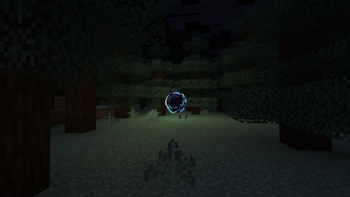

The ultimate solution to inventory problems





Important
Before you install, make sure to read the uninstallation section, as it isn't exactly straightforward.
When using data pack version make sure to also install the required resource pack.
About backport to Minecraft 1.20.1:
- New features will not be actively developed for this version.
- Only critical bugs will be addressed.
- Due to technical constraints, this version only supports vanilla Minecraft dimensions.
Overview
This data pack adds a multiplayer-friendly Pocket Dimension
Accessing Your Pocket Dimension
To access your Pocket Dimension you need an ancient artifact known as the Dimensional Tesseract. You can craft it using one of the following recipes:
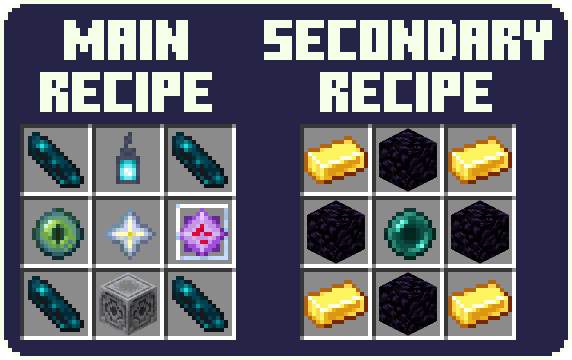
The secondary recipe can be disabled in the config
Activating the portal
To open the portal, hold the Dimensional Tesseract in hand and right-click. The portal remains open for 20 seconds. After this time, you can use the Dimensional Tesseract again.
By default, the portal will display the name of its owner. You can change it in config.
Entering the Dimension
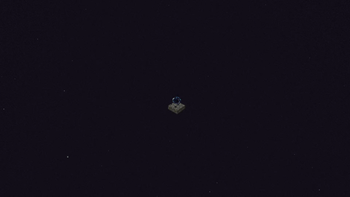
Stand in the portal while sneaking for 1 second and you'll be teleported to your Pocket Dimension. Make sure to watch your step, as initially it only contains a 3x3 bedrock platform floating over the void and an exit portal that leads back to the last point of entry of this specific Pocket Dimension.
After teleportation, there's a 1 second cooldown before you're able to teleport again.
Note that by default, any player can use the portal you created to enter your Pocket Dimension. You can change that in config with the /trigger PDConfig command.
Building Freedom
Inside the Pocket Dimension, you have complete freedom to build whatever you want. Your creations persist across visits.
However, using a Bed or a Respawn Anchor inside triggers an explosion.
Advancements
Explore a range of custom advancements within the Pocket Dimension, offering challenges and rewards.
Configuration
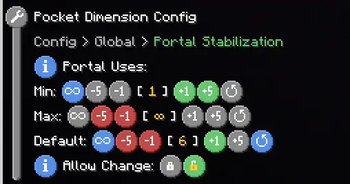
To open the configuration menu use the /trigger PDConfig command.
Default: **PUBLIC** - Portal Stabilization: The portal will close immediately after a set number of uses.
Default: **INFINITE** - Portal Name Display: - Show Name: Display the name of the portal's owner.
Default: **SHOW** - **[GLOBAL ONLY]** Display Position: Where to display the name.
Default: **IN FRONT** - Crafting: Allows you to disable the secondary crafting recipe.
Default: **ENABLED**
Additional Information
- Shaders may affect the sky in Pocket Dimension in unexpected ways.
- The entrance portal keeps the chunk it's located in loaded.
Installation
Place the downloaded data pack (.zip) file into .minecraft/saves/<world>/datapacks.
(<world> is the world to which you want to add the datapack)
Apply the required resource pack like you normally would.
The world needs to be restarted after the instalation.
Uninstallation
First of all,
You can safely disable the data pack by using the /function pocket_dimension:commands/disable command. Make sure to keep the data pack itself enabled!
Later, you can enable the data pack by using the /function pocket_dimension:commands/enable command.
As to full uninstallation
Simply removing the data pack file or using the /datapack disable... command, will result in the world not being able to be loaded. Minecraft most likely will say that the world has been corrupted. This is because level.dat references a custom dimension that cannot be generated without this data pack, thus preventing the loading of the world. You can easily resolved this issue by following the uninstallation steps listed below:
- Use the
/function pocket_dimension:commands/uninstallcommand to disable the datapack. - Close the world
- Find the save file called
level.datlocated in the world folder and, just to be safe, make a backup of it. - Remove the data pack from
<world>/datapacks/ - Open the save file to edit it. I suggest using https://irath96.github.io/webNBT/.
- In the file, navigate to
Data/WorldGenSettings/dimensionsand deletepocket_dimension:pocket_dimension. - Save the edited file and put it back into the world folder.
- Check whether everything is working properly, and you're good to go.
One more thing: players that were inside the Pocket Dimension when the datapack was removed, will appear in The Overworld but will retain the coordinates from the Pocket Dimension.
Technical details for those interested
- This data pack only creates a single dimension, but every player is placed in a different location inside of it.
- The location of each player's 'pocket' is determined on their UUID.
Credits
- Dimensional Tesseract and Portal textures made by Geastre
请登录后举报
请 登录 后赞助作者。
暂无评论,抢个沙发吧~