
No Pumpkin Blur – Clear Vision
作者:rebot | 分类:资源包
Minecraft 版本: 1.6.1 1.6.2 1.6.4 1.7.2 1.7.3 1.7.4 1.7.5 1.7.6 1.7.7 1.7.8 1.7.9 1.7.10 1.8 1.8.1 1.8.2 1.8.3 1.8.4 1.8.5 1.8.6 1.8.7 1.8.8 1.8.9 1.9 1.9.1 1.9.2 1.9.3 1.9.4 1.10 1.10.1 1.10.2 1.11 1.11.1 1.11.2 1.12 1.12.1 1.12.2 1.13 1.13.1 1.13.2 1.14 1.14.1 1.14.2 1.14.3 1.14.4 1.15 1.15.1 1.15.2 1.16 1.16.1 1.16.2 1.16.3 1.16.4 1.16.5 1.17 1.17.1 1.18 1.18.1 1.18.2 1.19 1.19.1 1.19.2 1.19.3 1.19.4 1.20 1.20.1 1.20.2 1.20.3 1.20.4 1.20.5 1.20.6 1.21 1.21.1 1.21.2 1.21.3 1.21.4 1.21.5 1.21.6 1.21.7 1.21.8 1.21.9 1.21.10 1.21.11 26.1 26.1.1 26.1.2 26.2
平台: minecraft
标签: gui tweaks utility

No Pumpkin Blur
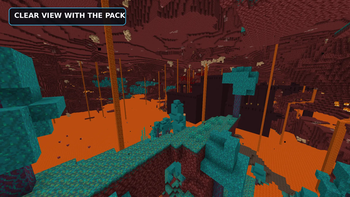
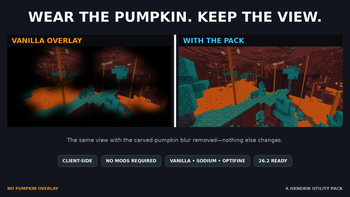
Wear a carved pumpkin without the dark pumpkin blur blocking your screen. No Pumpkin Blur—also known as No Pumpkin Overlay—replaces only the first-person carved-pumpkin overlay with a transparent texture, giving you a completely clear view while keeping the pumpkin equipped.
What it does
- Removes the carved pumpkin blur / vision overlay
- Changes no blocks, items, models, lighting, or gameplay
- Works client-side on single-player worlds and multiplayer servers
- Requires no mods, configuration, OptiFine, or Sodium
- Stays lightweight: one transparent texture and a tiny download
This is especially useful while exploring the End, building around Endermen, playing Hardcore, recording videos, or using carved pumpkins as custom hats.
Compatibility
The universal release supports the Minecraft versions listed on this page, including Minecraft 26.2. It works in vanilla Minecraft and alongside common clients such as Sodium and OptiFine because it uses the standard resource-pack system.
If another resource pack also changes pumpkinblur.png, place No Pumpkin Overlay above that pack in the resource-pack list so this transparent texture takes priority.
Installation
- Download the latest release.
- Open Minecraft and go to Options → Resource Packs.
- Select Open Pack Folder and place the downloaded ZIP inside.
- Enable No Pumpkin Overlay. Do not unzip it.
FAQ
Does this remove the carved pumpkin item or model?
No. It removes only the dark first-person screen overlay.
Does it work on servers?
Yes. This is a client-side visual resource pack and does not need to be installed by the server.
Does it require OptiFine or Sodium?
No. Both are optional.
More lightweight utility packs by Hxndrik: No Fog and Simple Fullbright.
请登录后举报
请 登录 后赞助作者。
暂无评论,抢个沙发吧~