
Shulker & Bundle
作者:rebot | 分类:模组
Minecraft 版本: 26.2
平台: fabric
标签: equipment storage transportation
Shulker & Bundles - Enhanced Inventory Management!
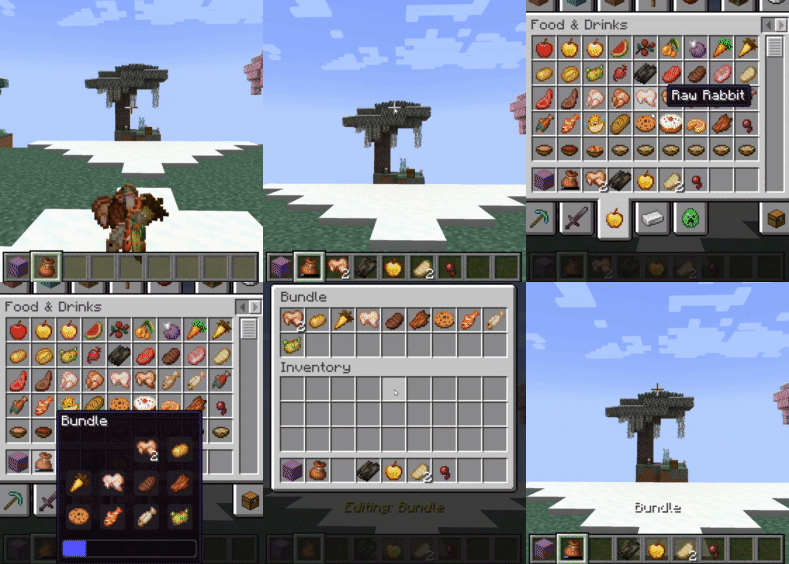
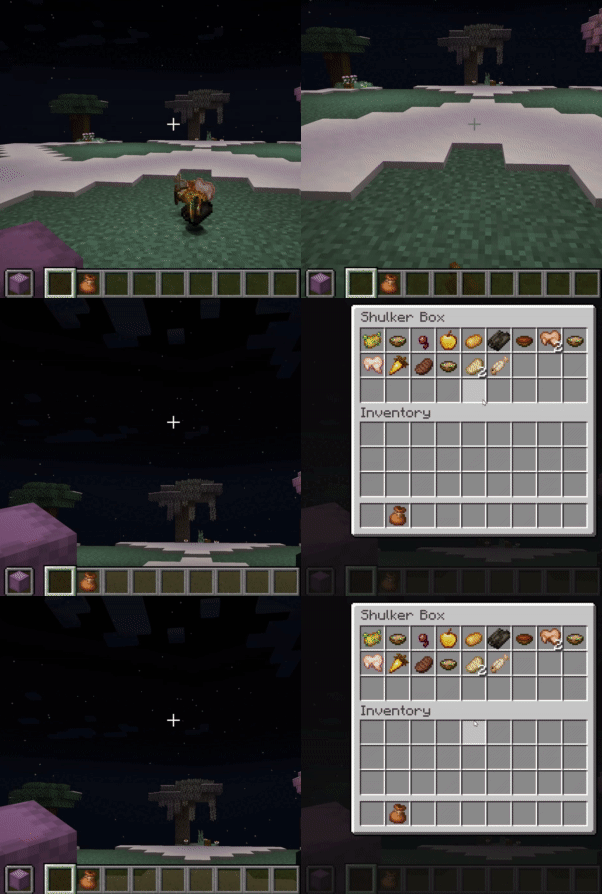
Tired of inventory overflow? Shulker & Bundles supercharges your storage solutions by allowing seamless interaction with Shulker Boxes and Bundles directly from your inventory! Pick up items into your off-hand Shulker or any Bundle, and access their contents using shift right-click while holding on the fly with intuitive GUIs.
📧 Contact Me & Support Information ### 💬 Primary Support Channel (Preferred) **All general questions, feature requests, and non-urgent bug reports should be posted in the appropriate channels on our [Discord Server](https://discord.gg/48sZCbdHzJ).** We actively monitor the server and will respond as soon as possible. This ensures that the whole community can benefit from the discussion and solutions. ### 🆘 Urgent Private Messaging (PM) Policy While we prefer all issues to be handled via the Discord server first, you are welcome to PM me directly under **specific urgent circumstances**: * **Allowed Reason:** Your server is **crashing** or experiencing **critical, game-breaking errors** directly related to one of my mods/plugins. * **Requirement:** You must be the **owner** of the server. * **Time Zone:** I am operating in the **(CET/CEST) Time Zone**. * **PM Hours:** Please only send private messages between **10:00 AM and 10:00 PM (Brussels Time)**. I will endeavor to answer your PM as soon as I can to be helpful and see what I can do to resolve your urgent issue. However, please understand that immediate responses are not guaranteed, and **private messaging is a professional courtesy, not an entitlement.** Thank you for your understanding and cooperation!New Support: Reinforced Shulker Boxes
Features
Direct GUI Access
- Shulker Box GUI: Shift-right-click a Shulker Box (in main or off-hand) to open its 27-slot GUI without placing it down!
- An "Editing Shulker: [Shulker Name]" placeholder appears in your hand while the GUI is open.
- Permission:
shulkerbundle.open - Note: Stacked shulker boxes in hand cannot be opened.
- Bundle GUI: Shift-right-click a Bundle (in main or off-hand) to open a dynamic custom GUI.
- The GUI size adjusts to 9, 18, or 27 slots based on the number of unique item types already within the bundle (max 27 unique types for manual interaction).
- An "Editing: [Bundle Name]" placeholder appears in your hand while the GUI is open.
- Note: The Bundle GUI cannot be opened if the bundle contains more than 27 unique item types.
- Permission:
shulkerbundle.open_bundle_gui
Automatic Item Collection
- Shulker Auto-Pickup (Off-hand): Items you pick up go directly into your off-hand Shulker Box if space is available.
- Permission:
shulkerbundle.hold.shulker - Notifications: Receive action bar messages showing "Shulker has X empty slots left" when items are picked up, specifically triggered by a new item filling a slot in the third row (slots 18-26).
- Exclusions: Will not pick up other Shulker Boxes, Bundles, or placeholder items.
- Note: Stacked shulker box items in the off-hand are not supported for auto-pickup.
- Permission:
- Bundle Auto-Pickup (Inventory & Off-hand): Items you pick up go directly into any available Bundles in your main inventory or off-hand.
- Permission:
shulkerbundle.hold.bundle - Notifications: Receive action bar messages indicating "Bundle has (X/64) items" if the bundle has 32 or more items but is not full, or "Bundles with space X" otherwise.
- Conditions: Auto-pickup into Bundles is skipped if the player is sneaking, the item is on the auto-pickup blacklist (Cake, Pumpkin Pie, or other Bundles), or if adding a new unique item type would exceed 9 unique types already in the bundle.
- Exclusions: Items marked with the
CrateBundleNoAutoPickupNBT tag are ignored.
- Permission:
Bundle Item Interaction Rules
- GUI Blacklist: Prevents
Cake,Pumpkin Pie,Shulker Boxitems, and otherBundleitems (unless empty) from being manually placed into a Bundle via the custom GUI. Placeholder bundles and shulkers are also blocked. - Manual Inventory Interaction Restrictions: Similar restrictions apply when trying to right-click items from your cursor into a Bundle in your inventory.
- Attempting to add blacklisted items or exceeding unique item limits via right-click will be blocked.
- Any non-empty Bundle cannot be put into another Bundle.
- Bundle Nesting Prevention (Left-Click): Prevents putting a Bundle held on the cursor into another Bundle in an inventory slot by left-clicking.
- Unique Item Limits: Auto-pickup into Bundles is limited to 9 unique item types. Manual insertion into the Bundle GUI is limited to 27 unique item types.
Commands (Admin & Personal)
/shulkerbundleor/sb: Shows the main help page for the mod.
Global Commands (Admin-Only)
Requires the shulkerbundle.admin permission (OP Level 2).
/sb global gui [shulker|bundle]: Toggles the ability to open GUIs for all players./sb global pickup [shulker|bundle]: Toggles auto-pickup functionality for all players./sb global notify [shulker|bundle]: Toggles action bar notifications for all players.
Personal Commands
These commands allow each player to toggle features for themselves. They are saved per-player on the server.
/sb personal gui [shulker|bundle]: Toggles your personal preference for opening GUIs./sb personal pickup [shulker|bundle]: Toggles your personal preference for auto-pickup./sb personal notify [shulker|bundle]: Toggles your personal preference for notifications.
Client-Side Configuration (via ModMenu)
- If you have ModMenu installed, you can access a detailed config screen.
- Settings are split into Singleplayer and Multiplayer categories, allowing you to have different preferences for each context.
- These toggles are an alternative to the
/sb personalcommands and give you full control over your experience.
How Features are Controlled (Permission Hierarchy)
This mod uses a 3-layer system to determine if a feature is active for a player.
- Player's Choice (Client-Side): The player must have the feature enabled in their personal settings (via the ModMenu config or
/sb personalcommand). If a player disables a feature, it will always be off for them, regardless of server settings. - Server's Global Setting: If the player has the feature enabled, the server then checks its global settings. If the feature is enabled globally (via
/sb global), the player can use it. - Server Permissions: If the feature is disabled globally, the server will then check if the player has the specific permission node for it (e.g.,
shulkerbundle.open).
- Master Override: The multiplayer config screen has a "Deny Server Permissions" toggle. When enabled, it acts as a "hard opt-out," forcing all of this mod's features to be disabled for you on the server, ignoring any global settings or permissions.
Server Administration
- Client Mod Detection: The server can detect if players have the mod installed. If a player joins without it, they will receive an action bar message with a clickable link to this page. This message only appears twice per player.
- Server Configuration: Server owners can disable this notification message by setting
notifyPlayer: falsein theshulkerbundle.jsonconfig file.
Click to view all permission nodes and their descriptions * `shulkerbundle.open`: Allows opening the Shulker Box GUI with shift-right-click. * `shulkerbundle.open_bundle_gui`: Allows opening the custom Bundle GUI with shift-right-click. * `shulkerbundle.hold.shulker`: Allows items to be automatically inserted into the off-hand Shulker Box. * `shulkerbundle.hold.bundle`: Allows items to be automatically inserted into Bundles in the player's inventory. * `shulkerbundle.notify.shulker`: Allows players to receive action bar notifications for Shulker Box fill status. * `shulkerbundle.notify.bundle`: Allows players to receive action bar notifications for Bundle fill status. * `shulkerbundle.admin`: Grants administrative permissions, including use of the global toggle commands. (Default: OP Level 2) * `shulkerbundle.command.use`: Allows use of the base `/shulkerbundle` (and `/sb`) command to view help pages. (Default: anyone)
Modpack Policy
- You ARE PERMITTED to include this mod in any modpack.
- Please do not modify the mod's JAR file directly.
- The modpack itself, or access to this mod within the modpack, must not be sold.
请登录后举报
请 登录 后赞助作者。
暂无评论,抢个沙发吧~