No Nether Particle
作者:rebot | 分类:资源包
Minecraft 版本: 1.20.2 23w42a 23w43a 23w43b 23w44a 23w45a 23w46a 1.20.3 1.20.4 24w03a 24w03b 24w04a 24w05a 24w05b 24w06a 24w07a 24w09a 24w10a 24w11a 24w12a 24w13a 24w14potato 24w14a 1.20.5-pre1 1.20.5-pre2 1.20.5-pre3 1.20.5 1.20.6 24w18a 24w19a 24w19b 24w20a 1.21 1.21.1 24w33a 24w34a 24w35a 24w36a 24w37a 24w38a 24w39a 24w40a 1.21.2-pre1 1.21.2-pre2 1.21.2 1.21.3 24w44a 24w45a 24w46a 1.21.4 1.21.5 1.21.6 1.21.7 1.21.8 1.21.9 1.21.10 1.21.11 26.1 26.1.1 26.1.2
平台: minecraft
标签: environment
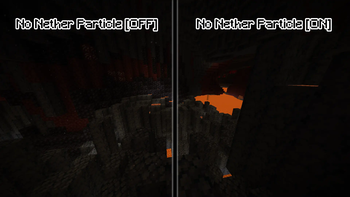
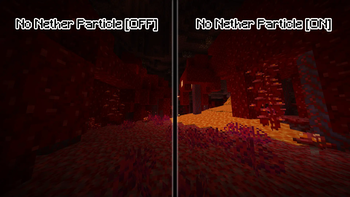
No Nether Particle
A simple resource pack made to get rid of the (sometimes annoying) environment particles from the nether.
Note that this resource pack does not disable the nether particles, it merely renders them invisible; Don't expect any performance improvements from this resource pack!
Older versions of No Nether Particle should keep on working with newer versions of Minecraft (unless the particle system changes), but if you don't want to have the "(Made for an older version of Minecraft)" warning, install the version that has the tag for the Minecraft version you're using.
Tip: If you're using the (Fabric) mods "Sodium" & "Sodium Extra", you can turn off particles in the settings. This way, the particles won't render at all and you'll therefore get a significant performance boost whilst in the Nether, and you won't need to install this resource pack alongside it. The particles are called: "Ash", "Crimson Spore", "Warped Spore" & "White Ash".
Yes you can use this resource pack in your modpack.
I will not be updating this resource pack to snapshot versions of Minecraft, though, like I said before, this resource pack should keep on working even with versions it doesn't officially support, the only caveat being you might get a warning in the resource pack menu.
Installation
For 1.20.x (releases with support for ONLY 1.20.x)
To install the resource pack, simply download the .zip file, extract it, and move the folder "§3No Nether Particle §6[...]" to .../.minecraft/resourcepacks, or wherever your minecraft installation is located.
For 1.21 and above & 1.19.4 and below
To install the resource pack, simply download the .zip file and move it to .../.minecraft/resourcepacks, or wherever your minecraft installation is located. If you want to remove the '.zip' extension in your resource pack selection screen, extract the downloaded .zip file and put that in your resource pack folder instead.
请登录后举报
请 登录 后赞助作者。
暂无评论,抢个沙发吧~