VexBot - PvP Against Bots 图标

VexBot - PvP Against Bots

作者:rebot | 分类:模组

价格:0 墨喵币 下载量:0 点赞:0 版本 1.8.0
本资源为搬运资源,原资源地址: https://modrinth.com/mod/vexbot
资源信息

Minecraft 版本: 1.21.11

平台: fabric

标签: equipment mobs utility
资源介绍

Vex Bot 1.7.0 - Descrption

PvP Methods ⚔️

  • Sword
  • Axe
  • Sheild
  • Crossbow & Bow
  • Cobweb (Toggleable)
  • Potions
  • TnT Minecart PvP (Toggleable)
  • Crystal PvP
  • Anchor PvP
  • Wind Charge Macing
  • Elytra mace
  • Spear Mace

Techniques ?

  • Crit Chaining
  • Combing
  • Sweeping Hit
  • W Tapping

Pathfinding & Ai ?

  • Avoids Obstacles (Lava, Powderd Snow, etc)
  • Allways Takes the best route
  • Revenge Mode
  • Follow Mode
  • Priority Targeting (Preffers Low Hp/Eating targets)
  • Auto Targeting (Configurable)

Difficulty System ⚖️

  • Easy → Medium → Hard → Expert → Perfect
  • Changes Reaction Time, Combo Chance, etc

Teams Features ?

  • Team System (Groups bots together)
  • Each Team has there own indivdivdual settings
  • Per-Team target lists (teams target specific people or multiple people)

Settings & GUI ⚙️

  • In-game GUI — configure all bot settings without commands
  • Per-team settings GUI with full toggles - Cart mode selector cycling through all 5 modes
  • Settings auto-save per world — survive server restarts

Custom Potion ?

  • Refills the kit that the potion is linked to. (By right Clicking)

Issue Tracker

https://vex-log-keeper.lovable.app

How to use

VexBot — How to Use check the tutorials at

(https://vex-log-keeper.lovable.app/tutorials)

Settings GUI

/vexbot settings — opens the main settings menu where you configure:

Difficulty — Easy / Medium / Hard / Expert / Perfect (controls reaction
speed, crits, combos)

  • Auto Target — bot automatically finds and attacks nearby players
  • Target Players / Bots / Mobs — what the bot will attack
  • Revenge Mode — bot attacks whoever hits it
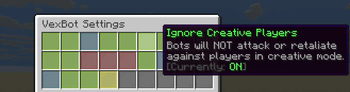
  • Ignore Creative — skip creative mode players
  • Use Elytra Mace — enable aerial elytra+mace drop combo
  • Use Ender Pearl — bot throws ender pearl to escape when low HP

Kits (Inventory Loadouts)

  1. Put the gear you want in your own inventory
  2. /vexbot createkit — saves your current inventory as a kit
  3. /vexbot givekit — opens GUI to give a kit to a bot
  4. /vexbot deletekit — delete a saved kit
  5. /vexbot kiticon — set a display icon for a kit in the menu

Teams

/vexbot teamcreate — create/edit team (bots + online players,
shortcuts to targets/settings)

/vexbot teammembers — roster only (who is on the team)

/vexbot teamtargets — who this team attacks (specific players, all players, etc.)

/vexbot teamsettings — per-team gameplay (difficulty, carting, revenge, …)

/vexbot teamgivekit — kit for every bot on the team

/vexbot teamdelete — delete a team

/vexbot teamjoin — you join a team’s human roster (no op)

/vexbot teamleave — leave your team roster

Follow Mode

/vexbot follow — bot follows a player without attacking

/vexbot follow stop — stops following

Quick Start (Fighting Bot)

  1. /vexbot spawn — spawn a bot
  2. Give it gear: /vexbot givekit (or manually give items)
  3. /vexbot settings → enable Auto Target + Target Players
  4. Set Difficulty to your preference
  5. The bot will start fighting automatically
📥 下载与版本
评论(0)
登录 后发表评论。

暂无评论,抢个沙发吧~

举报此资源

请登录后举报

🔥 相关推荐
Easy Auto Cycler

价格:0 墨喵币
下载量:0

查看详情
Better MC [NEOFORGE] BMC5

价格:0 墨喵币
下载量:0

查看详情
EnvironmentZ

价格:0 墨喵币
下载量:0

查看详情
Command GUI Buttons

价格:0 墨喵币
下载量:0

查看详情