
Chunker
作者:rebot | 分类:模组
Minecraft 版本: 26.1 26.1.1 26.1.2 26.2
平台: bukkit folia paper purpur spigot
标签: utility worldgen
Chunker - Official Support & Downloads
Join our Discord Community for help, support, issues, feedback, and discussions.
Click here to join: Join Our Discord
Contributions
PRs welcome
This repository is public. Fork the repo, create a branch, and open a pull request. I will merge changes that work and do not introduce issues. If I need changes I will leave feedback.
Quick checklist:
- Link the related issue if any.
- Add a short description and steps to test.
- Build must pass with
mvn clean packageusing Java 25.
Supported MC Versions
- Target version:
26.1.2 - Requires Java 25
- Older Java 21 / pre-26.1.2 server builds are no longer supported by 26.1.2 and newer
Supported Servers
- Paper
- Folia
- Paper-compatible forks such as Pufferfish, Purpur, and Leaf
Chunker still has fallback logic for non-Paper server paths, but the current plugin baseline is built for the 26.1.2 API and Java 25.


Overview
Chunker is designed to be more efficient and resilient than traditional pre-generators. Many pre-generators track thousands of chunks in memory, risking significant rollback or data loss if the server crashes. Chunker, by contrast, only tracks minimal state like the current iterator position, submitted progress, completed progress, and the generation center, so crashes or restarts have less impact on the generation process.
Chunker works best on Paper and Paper forks because it can use asynchronous chunk-loading through CompletableFuture. Folia uses its region scheduler path. On non-Paper server paths, Chunker falls back to synchronous loading behavior.
You can configure Chunker to run automatically only when there are no players online and to halt if a player joins. This behavior is controlled by auto_run in settings.yml. You can also adjust how aggressively each dimension runs by changing task_queue_timer and parallel_tasks_multiplier.
Optimized JVM Launch Parameters (start.bat)
View run.bat Source Code
```bat
@echo off
for %%f in (*.jar) do set JAR=%%f
REM Launching Java with Aikar-style flags
java ^
-Xms1G ^
-Xmx30G ^
-XX:+UseG1GC ^
-XX:+UnlockExperimentalVMOptions ^
-XX:G1NewSizePercent=30 ^
-XX:G1MaxNewSizePercent=40 ^
-XX:G1HeapRegionSize=8M ^
-XX:G1ReservePercent=20 ^
-XX:G1HeapWastePercent=5 ^
-XX:G1MixedGCCountTarget=4 ^
-XX:InitiatingHeapOccupancyPercent=15 ^
-XX:G1MixedGCLiveThresholdPercent=90 ^
-XX:G1RSetUpdatingPauseTimePercent=5 ^
-XX:SurvivorRatio=32 ^
-XX:+PerfDisableSharedMem ^
-XX:MaxTenuringThreshold=1 ^
-XX:+UseCompressedOops ^
-XX:+DisableExplicitGC ^
-XX:+AlwaysPreTouch ^
-XX:+ParallelRefProcEnabled ^
-XX:+UseNUMA ^
-XX:ParallelGCThreads=16 ^
-XX:ConcGCThreads=16 ^
-XX:MaxGCPauseMillis=50 ^
-Dusing.aikars.flags=https://mcflags.emc.gs ^
-Daikars.new.flags=true ^
-jar "%JAR%" --nogui
pause
```
Xms1GandXmx30Gshould be updated to match your server's minimum and maximum memory.-
Update both
XX:ParallelGCThreadsandXX:ConcGCThreadsto match your CPU thread count.
Paper Config
Note: On non-Paper servers, Paper async chunk functionality will not be used.
On Paper-based servers, you can tune chunk generation and I/O parallelism for better pre-generation throughput.
In your paper-global.yml or equivalent, consider increasing the parallelism for chunk generation and I/O:
chunk-loading-advanced:
  auto-config-send-distance: true
  player-max-concurrent-chunk-generates: -1
  player-max-concurrent-chunk-loads: -1

chunk-loading-basic:
  player-max-chunk-generate-rate: -1.0
  player-max-chunk-load-rate: -1.0
  player-max-chunk-send-rate: -1.0

chunk-system:
  gen-parallelism: default
  io-threads: 16
  worker-threads: 16

region-file-cache-size: 16- Adjust
io-threadsandworker-threadsto match or approach your CPU's thread count. - By default, Paper may not use all available CPU threads for chunk work.
- Lower
region-file-cache-sizeif running pre-generation on a fresh world with no players online.
Command Usage
The primary commands are:
/pregen <ParallelTasksMultiplier> <PrintUpdateDelay> <dimension> <Radius or "default"> [safety]
/pregenoff [dimension]
/pregen reset <dimension>
Examples
-
/pregen 4 10s minecraft:overworld default- Pre-generates the overworld.
- Queues 4 chunk-loading tasks per scheduler cycle.
- Prints progress logs every 10 seconds.
defaultuses the world border as the radius.
-
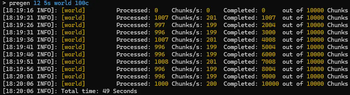
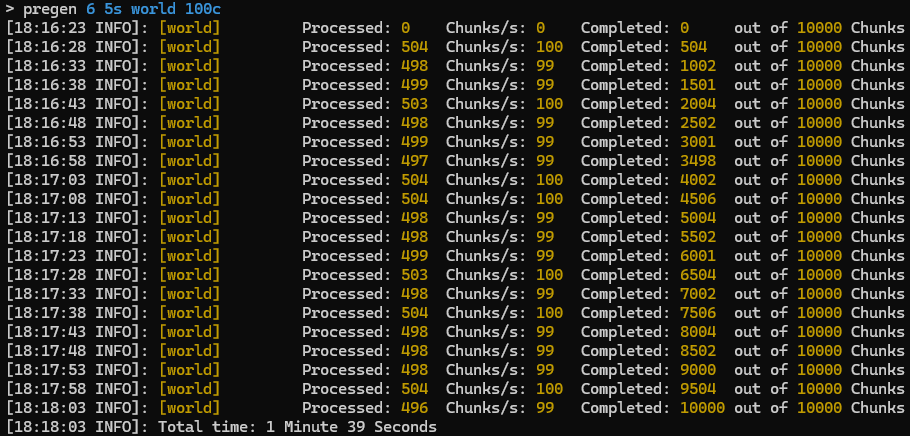
/pregen 6 5s minecraft:overworld 1000b- Pre-generates the overworld.
- Queues 6 tasks per scheduler cycle.
- Prints logs every 5 seconds.
1000bmeans a 1000-block radius, rounded to full region coverage.
-
/pregen 16 5s minecraft:the_nether 2r safety- Pre-generates the Nether.
- Queues safety-mode work in parallel using the
16multiplier. - Prints logs every 5 seconds.
2rmeans a 2-region radius, rounded to full region coverage.safetyforces the more conservative urgent async generation path.
-
/pregen 1 12h minecraft:the_end 100r- Pre-generates The End.
- Queues 1 task per scheduler cycle.
- Logs every 12 hours.
100rmeans a 100-region radius.
-
/pregen reset minecraft:the_nether- Deletes saved pre-generation progress for the Nether.
Command Parameters
- ParallelTasksMultiplier: Determines how many chunk-loading tasks are queued per scheduler cycle. On Paper, these tasks use async chunk APIs. Higher values can increase throughput but also increase CPU, memory, and disk pressure.
- PrintUpdateDelay: How often progress logs appear. Add suffix
s,m, orh. - dimension: The dimension to pre-generate. Use canonical namespaced keys such as
minecraft:overworldorminecraft:the_nether. Tab completion is supported. - Radius: The target radius with a suffix:
b- Blocks, for example20000bc- Chunks, for example500cr- Regions, for example30rdefault- Uses the world border
- safety: Optional. Forces the conservative urgent async safety path on Paper.
- /pregenoff [dimension]:
- No args = stops all active pre-generation tasks.
- With a dimension key = stops that dimension only.
Permissions
Defaults to OP.
chunker.pregen- Allows use of/pregenchunker.pregenoff- Allows use of/pregenoffchunker.reset- Allows use of/pregen reset <dimension>chunker.*- Grants all Chunker permissions
Configuration: settings.yml
# World Configuration for Chunker Plugin

# auto_run: Set to true if you want pre-generation to start automatically when no players are on the server.
# Acceptable values: true or false

# task_queue_timer: Determines how fast chunks are queued up. A value between 50-70 is recommended for modern AMD 5000 series and Intel 13th Gen CPUs in the Overworld.
# Adjust based on performance needs.

# parallel_tasks_multiplier: Sets how many async tasks are queued per scheduler cycle. 'auto' will distribute tasks based on your thread count for auto-run.
# You can also set a specific integer value. Higher values increase load.

# print_update_delay: How often to print information (s-Seconds, m-Minutes, h-Hours). Default is 5s.

# radius: Defines how far the pre-generator should run (b-Blocks, c-Chunks, r-Regions) or 'default' to pre-generate until the world border.

# Optional command safety mode:
# Add 'safety' after the radius to force Chunker's urgent async safety generation path on modern versions.
# Example: /pregen 4 5s minecraft:overworld 5r safety
# This keeps progress tied to completed chunks while still queuing safety work in parallel.

# center: Sets where the pregen spiral starts.
# - 'default' uses the world border center, or the world spawn if no border center is set.
# - '~ ~' always uses the current world spawn.
# - 'x z' uses fixed block coordinates, for example: "0 0" or "1500 -500".

minecraft:overworld:
  center: default
  auto_run: false
  task_queue_timer: 60
  parallel_tasks_multiplier: auto
  print_update_delay: 5s
  radius: default

minecraft:the_nether:
  center: default
  auto_run: false
  task_queue_timer: 60
  parallel_tasks_multiplier: auto
  print_update_delay: 5s
  radius: default

minecraft:the_end:
  center: default
  auto_run: false
  task_queue_timer: 60
  parallel_tasks_multiplier: auto
  print_update_delay: 5s
  radius: default
Quick Tips
- Begin with a lower
ParallelTasksMultiplier, then adjust upward while watching CPU, memory, and disk usage. - Paper and Folia paths provide much better performance than synchronous Bukkit-style loading.
- Use
print_update_delayof10sor longer to avoid excessive log output during long runs. - Use
safetyonly when you want the more conservative Paper generation path; omit it for maximum speed.
请登录后举报
暂无评论,抢个沙发吧~