
Random Assistant
作者:rebot | 分类:模组
价格:0 墨喵币
下载量:0
点赞:0
版本 1.4.2
本资源为搬运资源,原资源地址:
https://modrinth.com/mod/random-assistant
资源信息
Minecraft 版本: 1.20
平台: fabric
标签: utility
资源介绍
Random Drop Assistant
This is a mod that provides a hierarchical drop-tracking graph for Minecraft with random drops.

[ ]()
]()

The Red Book
Inside the survival inventory, there is a new book next to the recipe book. This is the loot table tracking book.
Loot Table Tracking
- The book will automatically track loot tables that have been found in the world.
- This includes block breaking, entity killing, fishing, chest looting, and more.
- The book will also track recipes you have crafted and blocks you interact with in the world.
- This includes stripping logs, waxing copper, and more.
- Crafting recipes and interactions are tracked so that you can see the paths you took to get to a specific item.
- All tracking is done via a custom implementation of the in-game statistics system so there is no need to worry about data loss.
- Consequently, unless this mod is installed server-side, the book will not be able to track loot tables as statistics are stored server-side.
Red Book Display
- The red book will open up a new widget to the right of the inventory, closing the recipe book if it is open.
- This widget will contain a list of every loot table that has been discovered, i.e. the loot table to get diamonds.
- Each loot table entry will have a preview of "Best Source == Number of Steps ==> Target Item"
- The "Best Source" is the block, entity or recipe that is naturally found (if possible) and has the least number of steps to get to the target item.
- Clicking on a loot table entry will open up that loot table's graph above the inventory.
- There is a settings button in the top right which will take you to the mod's settings.
Loot Table Graph
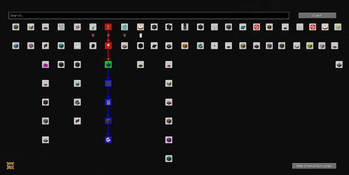
- The loot table graph will show the target item you selected in the red book.
- In the top left, there will be an icon indicating what your current target item is and a compass which you can click to re-center the graph on the target item.
- The graph will contain nodes and arrows connecting the nodes.
- Right-click a node to highlight the path from that node to the target item.
- Use the mouse wheel to zoom in and out.
Settings
The settings menu can be accessed by clicking the settings button in the top right of the red book.
- Unbroken Stars (default:
on)- Display star icons on unbroken blocks
- Silk-Touch Stars (default:
on)- Display star icons on broken but not silk-touched blocks
- Requires Unbroken Stars to be
on
- Enable Override (default:
off)- Enable all undiscovered loot tables
- This is not permanent and can be disabled at any time
- Randomize Colours (default:
off)- Randomize world and entity colours (Cosmetic)
- Search Depth (default:
6)- The maximum number of steps to search for a path to the target item
- Increasing this will increase the size of the graph and time it takes to generate the graph, thus, values over 15 are not recommended
- Highlight Radius (default
5)- The radius for how many blocks (that are unbroken) are highlighted when holding down the highlight key (default
v) - Values over 10 are not recommended when surrounded by a lot of unbroken blocks as highlighting blocks is somewhat intensive
- The radius for how many blocks (that are unbroken) are highlighted when holding down the highlight key (default
Dependencies
下载与版本
评论(0)
请 登录 后发表评论。
举报此资源
请登录后举报
赞助作者
请 登录 后赞助作者。
暂无评论,抢个沙发吧~