![Skull [Portable] 图标](https://cdn.modrinth.com/data/x5rDcrvh/68af4607afd63a7caac80e4411935e9bd7bc5321_96.webp)
Skull [Portable]
作者:rebot | 分类:模组
Minecraft 版本: 26.2
平台: fabric forge neoforge quilt
标签: decoration
Skull [Portable]
Obtain and Customize Player Heads in Survival!
📥How to Install
Choose if you want to download the pure Data Pack version or the Mod version and follow the steps accordingly.
Data Pack * **1)** Download the Datapack * **2)** Chose the world you want to install the Data Pack in and navigate to its "_datapacks_" folder * **3)** Copy the downloaded Data Pack file (Skull [Portable]) into this folder * **4)** Join the world and run/reload command
Mod
* **1)** Download the Mod
* **2)** Navigate to your mods folder (for the vanilla launcher the path is .minecraft/mods
* **3)** Put the downloaded .jar file (Skull [Portable]) into this folder
* **4)** Join the world and run /reload command
📖Features
Skull [Portable] allow you to Craft and Customize player heads using just a Book
and Quill.
How to craft and customize a Player Head
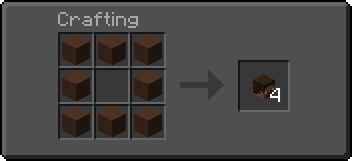
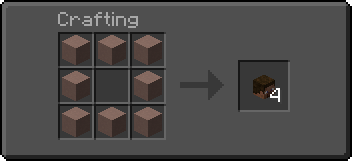
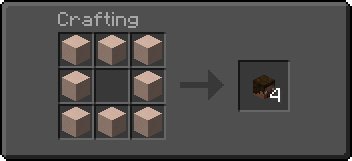
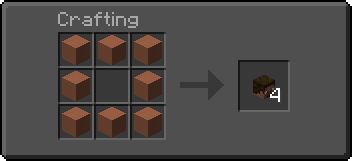
🎭Craft a Blank Player HeadA Blank Player Head can be crafted using any of the following materials:
|  |
For Developers and **copy** the value field
- **3)** **Paste** the copied value in a **Book and Quill**
- **4)** **Hold** the desired number of **player heads** in your **off-hand**
- **5)** **Hold** the **book** with the value in your **main-hand**
- **6)** **Swap hands** to **customize** the **head** (Default key to swap hands is F)
🔖Customize a Player Head using a player name
- **1)** **Sign** a **Book and Quill** with the **name of the player**
- **2)** **Hold** the desired number of **player heads** in your **off-hand**
- **3)** **Hold** the **signed book** in your **main-hand**
- **4)** **Swap hands** to **customize** the **head** (Default key to swap hands is F)
YouTube Showcase
Settings
You can access the settings upon reloading by clicking on the [Config] button or by running the following command -> /function skull_portable:config
The settings menu includes the following:
- [Player head] Replace signed book after use: (defaults to
True) - [Custom Head] Erase book pages after use: (defaults to
True)
📤How to Uninstall
Data Pack To uninstall the Data Pack run the command/function skull_portable:uninstall. When the uninstallation process is completed a confirmation message will be sent in the chat.
Mod
To uninstall the **Mod version** you need to run /function skull_portable:uninstall command. Then you close the game and remove the **jar** file from your .minecraft/mods folder.
🔗External links


请登录后举报
请 登录 后赞助作者。
暂无评论,抢个沙发吧~