CoordinateOffset
作者:rebot | 分类:模组
Minecraft 版本: 1.21.4 1.21.5 1.21.6 1.21.7 1.21.8 1.21.9 1.21.10 1.21.11 26.1 26.1.1 26.1.2 26.2
平台: paper purpur
标签: game-mechanics management

CoordinateOffset
A Minecraft Paper plugin that configurably obfuscates players' coordinates.









Minecraft offers a useful debug menu (F3) that allows anyone to easily see their coordinates in the world.
This makes it easy to save points of interest and share locations with friends (or enemies).
However, not all multiplayer servers want coordinates to be so easily accessible. /gamerule reducedDebugInfo can
administratively hide coordinates from the F3 menu, but it is trivial for a player to add a client-side mod that
shows them.
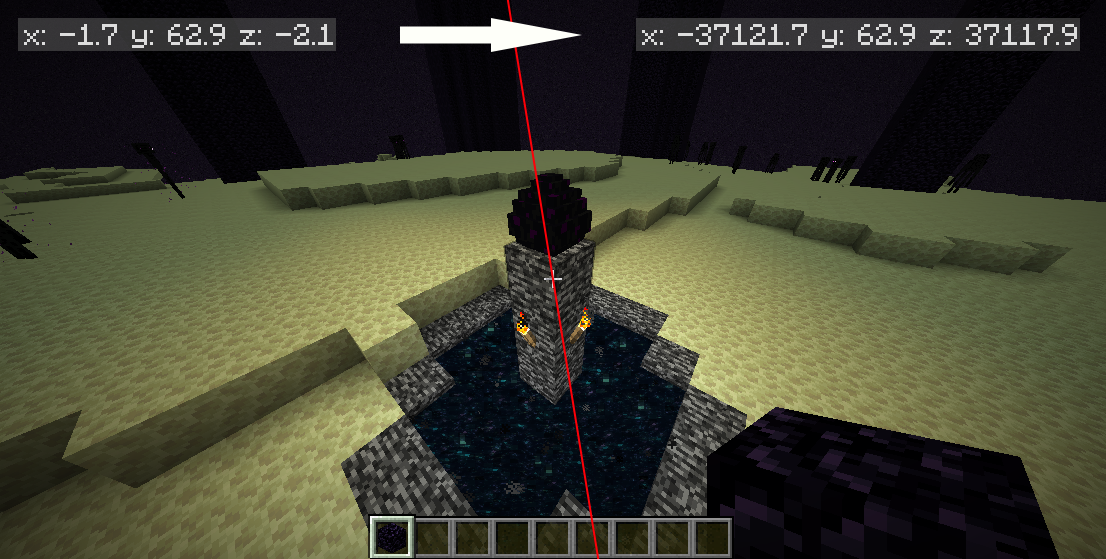
CoordinateOffset is a plugin for Paper-based Minecraft servers that modifies every coordinate in packets between the
server and client. The player still sees the exact same world they would normally see. But no matter which mods they
install, they cannot see their real coordinates.
Why?
This plugin isn't intended for all servers. Here are a few ideas that might make CoordinateOffset useful:
- Prevent metagaming: If you consider coordinate usage and sharing to be metagaming, this prevents it.
- Amplify in-game items: Coordinates no longer outclass compasses, lodestones, recovery compasses, and maps
when those coordinates are inconsistent. - Prevent coordinate leaks: If everyone sees different coordinates, players cannot derive each other's coordinates
from an accidental leak in a screenshot. - Guard the world seed: Any unknown offset makes seed-cracking tactics harder.
- Center the origin: Put the (0, 0) coordinate anywhere you'd like.
Features
- Fully-configurable, flexible methods of determining how to apply offsets
- Generate offsets randomly for each player, or use fixed offsets for multiple players
- Match offsets to the player's position, so they see themselves near the world's origin
- Optionally regenerate offsets based on various player actions, including death, world change, teleport, and server
join - Regenerate and set offsets immediately with commands
- Configure different offsets per-player, per-world, and with permissions
- Automatic scaling for offsets to ensure coordinates still align when using a nether portal
- Extensible API to flexibly get and set offsets
- Compatible with Distant Horizons, ViaVersion, and Velocity (must be installed on Paper, not Velocity itself)
Requirements and Installation
- An understanding of the
implications of installing and incompatible plugins
— this plugin WILL break things. - Paper or a fork for Minecraft 1.21.4–1.21.11
- PacketEvents (latest release or dev build for Spigot)
Some known incompatible plugins are: Most anticheats, Geyser.
After ensuring that you meet the requirements, just grab the latest
release and drop it in your server's plugins
folder. Then follow the steps below to configure how coordinates are shifted for each player.
Configuration
Main article: Configuration Guide
The main configuration file is automatically generated after the first run at plugins/CoordinateOffset/config.yml.
defaultOffsetProvider: randomThe default configuration contains five predefined "offset providers". An "offset" refers to the amount that the
player's coordinates should appear to be shifted from their real location. Get started by picking a strategy that
matches the type of offsetting you're trying to achieve:
constant- Specify the exact offset you want players to have.disabled- Players will see their real coordinates.random- Individually randomize each player's offset. Optionally re-roll offsets upon player actions.zeroAtLocation- Use an offset based on the player's starting location, so they see themselves near (0, 0).
Optionally re-center offsets upon player actions.permission- Assign permissions to players, likecoordinateoffset.offset.160.-240, to control their offset.
You can customize these providers further, use different providers for different players/worlds/groups, and define your
own providers. See the complete
Configuration Guide.
Commands and Permissions
See the Commands and Permissions Guide
for details.
API
You can use or extend CoordinateOffset in your own plugin by using the API. Please see the
API Guide.
Support
- Open an issue on GitHub to report a bug or request a feature.
- Join the Chips's Mods Discord for help.
Credits
Special thanks to Cavallium for developing
CoordinatesObfuscator, which CoordinateOffset is a fork of.
CoordinateOffset's packet translation logic was heavily modeled after the work done by CoordinatesObfuscator.
Libraries used:
请登录后举报
请 登录 后赞助作者。
暂无评论,抢个沙发吧~