
MessMod
作者:rebot | 分类:模组
Minecraft 版本: 1.17.1
平台: fabric
标签: game-mechanics optimization utility
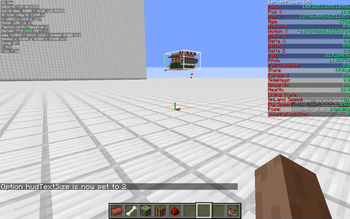
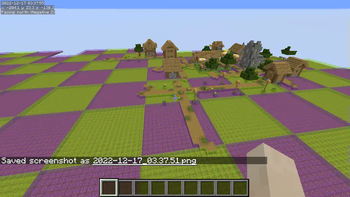
MessMod
A minecraft mod that contains many features ranging from world manipulation and information providing to bug fixes and so on, allowing you to take more control of the game, see more information, and do some work easier.
-
Don't want to use "/data" to obtain the velocity of entities? With this mod, press F3 + E and target the entity, you'll find something you wanted at a corner of the screen. (Or try sidebars)
-
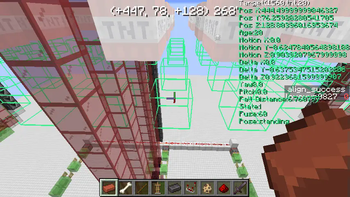
Got annoyed about flying TNTs rendered at some wrong positions? With this Mod, you will see the correct boundary boxes of these entities.
-
Bored with typing "/tick freeze" & "/tick step 1" over and over again? With this Mod, these operations could be finished simply via right-click if you are holding a brick or a bone.
-
Have broken some blocks by mistake? With this mod, it can be easily undone with the shortcut Ctrl + Z.
However, that is not everything, the detailed document is on Github.
And here is a fairly simplified version (and possibly more grammatical version) of the complete document.
Highlights
- More accurate hitboxes than ones on the vanilla client.
- Tool items which makes using
/tickmore convenient. - Real-time display of entity information.
- Controlling the game at the level of the source code.
- Multifunctional accessing paths.
- 8 easy-to-use renderers (see below).
- Exporting given areas as a new save.
- Undo / Redoing changes to blocks with
Ctrl + ZandCtrl + Y. - Chunk grids.
- Lazy loaded chunk simulation.
- And more...
Requirements
- Fabric Loader 0.8.0+.
- The fabric-carpet by gnembon. (Strongly recommended, but not necessary)
- Minecraft 1.16.4/1.16.5/1.17.1/1.18.2
- Everything the Minecraft requires.
A list of commands
/accessingpath
Manage custom nodes in accessing paths. (Some other features may be introduced in the future.)
/countentity
Counts entities, especially stacked ones, in a easier way.
/ensure
A block state checker to check if a block is rendered wrongly. If you got annoyed with "ghost blocks", it may be helpful.
/entityconfig
Currently, the command can only make some entities can/cannot step on blocks directly, more features may be introduced in later versions.
/entityfield
Access some Java fields of entities, using reflection. Deobfuscation is supported if the mapping is loaded.
/entitylog
An entity logger is, in other words, a simple tool that obtains some data from some specified entities and writes them to a file.
/entitysidebar
Manage the information lines in the entity sidebar, where you can see how something you have subscribed changes.
/explode
Something even more interesting but useless, it can do nothing but cause some explosions.
/exportsave
Export some given areas as a new save.
/freezentity
Pause|continue processing selected entities. It can be used to simulate lazy loaded chunks.
/hud
Manager custom lines in HUDs.
/lag
Freeze the game.
/lazyload
Simulate lazy loaded chunks.
/logmovement
Subscribe some entities to see how they are pushed by pistons, shulker boxes and shulkers.
/logchunkbehavior
Record some events related to chunks (e.g. loading, unloading and generation), which may be useful in some special researches.
/logpacket
Listen to packets between the server and the client(s).
/messcfg
Configure some features of the Mod (a detailed list of the supported options could be found in the next section).
/modify
Modify some properties of entities. That is similar to /data and /entityfield, but much easier to use.
/moventity
Move an entity, in whatever way you want.
/namentity
Name or rename some entities without anvil and naming tags.
/partlykill
Kill a part of selected entities instead of all of them.
/poi
A POI (a.k.a. Point of Interest) scanner and editor.
/raycast
Show the detail of raycasts, visually if you want. If you wonder what would happen if an ender pearl skims the surface of blocks, it may be useful.
/repeat
Repeat the execution of a command for some times.
/ride
Make some entities ride a vehicle.
/rng
Do some RNG manipulation.
/setexplosionblock
What would it be like if the explosion replace the broken block with diamond blocks instead of air? That will give you the answer.
/tileentity
Access the data of block entities, including adding, removing, reading, and editing (in this case \/data is more appropriate). What if a dropper has a block entity of a campfire?
Options (or rules)
The following options could be set with the command /messcfg <option> <value>. Hope their names are understandable enough.
- accessingPathInitStrategy
- allowSelectingDeadEntities
- allowTargetingSpecialEntities
- antiHostCheating
- attackableTnt
- blameThreshold
- blamingMode
- blockPlacementHistory
- blockShapeToBeRendered
- commandExecutionRequirment
- chunkLoadingInfoRenderer
- chunkLoadingInfoRenderRadius
- craftingTableBUD
- creativeUpwardsSpeed
- debugStickSkipsInvaildState
- dedicatedServerCommands
- disableChunkLoadingCheckInCommands
- disableEnchantCommandRestriction
- disableExplosionExposureCalculation
- disableProjectileRandomness
- enabledTools
- endEyeTeleport
- entityExplosionInfluence
- entityExplosionRaysLifetime
- entityExplosionRaysVisiblity
- entityLogAutoArchiving
- fillHistory
- fletchingTablePulseDetectingMode
- fletchingTablePulseDetector
- generateChunkGrid
- hideSurvivalSave
- hotbarLength
- hudAlignMode
- hudStyles
- hudTextSize
- interactableB36
- language
- maxClientTicksPerFrame
- maxEndEyeTpRadius
- minecartPlacementOnNonRailBlocks
- mobFastKill
- optimizedEntityPushing
- projectileChunkLoading
- projectileChunkLoadingPermanentence
- projectileChunkLoadingRange
- projectileRandomnessScale
- quickMobMounting
- railNoAutoConnection
- rejectChunkTicket
- renderBlockShape
- renderFluidShape
- renderRedstoneGateInfo
- serverSyncedBox
- serverSyncedBoxRenderRange
- skippedGenerationStages
- skipUnloadedChunkInRaycasting
- stableHudLocation
- strictAccessingPathParsing
- superSuperSecretSetting
- tntChunkLoading
- tntChunkLoadingPermanence
- tntChunkLoadingRange
- vanillaDebugRenderers
Key Binds
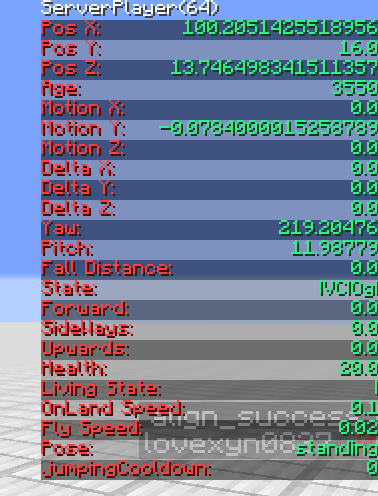
F3 + E: Toggle the HUD that displays the information of the entity which the player is looking at.
F3 + M : Toggle the HUD that displays the information of the local player.
F3 + S: Toggle the HUD that displays the information of the server-side player.
Ctrl + Z: Undo block placement or breaking. (Requires blockPlacementHistory)
Ctrl+ Y: Redo block placement or breaking. (Requires blockPlacementHistory)
Renderers
Entity information HUD: Information about the entity that the player is looking at is got at the end of server ticks, and the information of the local player is got at the end of client ticks. More information about that is available below.
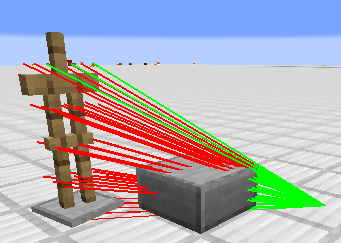
Explosion rays: It renders the lines between the center of an explosion and some chosen points in the hitboxes of entities affected by the explosion, which determines how much damage the entities will take, and how much the velocity of the entity will change, etc.
Server-side hitboxes: Don't always believe the hitboxes provided by F3 + B because they are adjusted by the client to make movements smoother and moves "slower" than the one on the server-side when the entity is moving. Sometimes vanilla hitboxes could even be missing if the server has experienced a very long tick but the client hasn't.
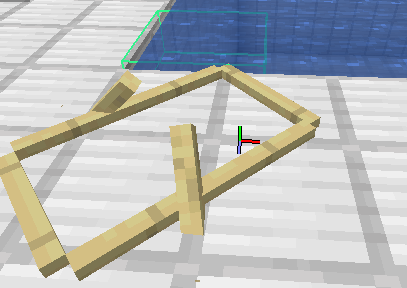
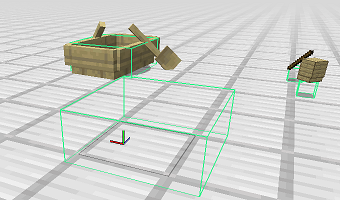
Data of fluid blocks: Display the bounding box, height, level, and a vector describing the flowing direction of the targeted fluid block.
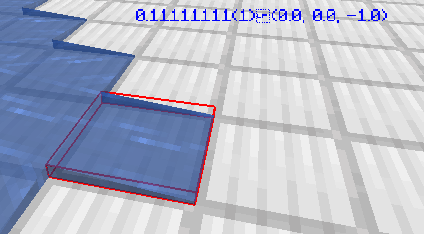
Bounding boxes of blocks: Display the bounding box of the targeted block.

The output level of redstone gates: Display the redstone signal level of the targeted redstone gate (i.e. repeaters and comparators).
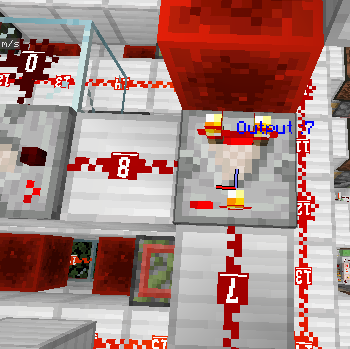
Tool Items (Requires fabric-carpet and option enabledTools)
Brick: Pause or continue ticking using /tick freeze provided by the Carpet
Bone: Continue ticking for some ticks when ticking is paused by /tick freeze. The number of the ticks equals the count of the stack of bones.
Netherite Ingot: Remove all non-player entities.
Accessing Paths
See the wiki.
Options In Entity Selectors
id
Select entities with a given numeric ID (field entityId, networkId).
side
Where the entities are selected from, the client or the server.
typeRegex
Possible values: A quoted regular expression.
Specify a regular expression matching the ID (including the namespace) of selected entities.
nameRegex
Possible values: A quoted regular expression.
Specify a regular expression matching the name of selected entities.
class
Possible values: A quoted regular expression.
Specify a regular expression matching the class (package name is optional) of selected entities.
Other Features
- Structure blocks can be seen when the player is very far from the block.
- Stacktraces will be printed when the Carpet Mod is not loaded. If the Carpet Mod is loaded, enabling the
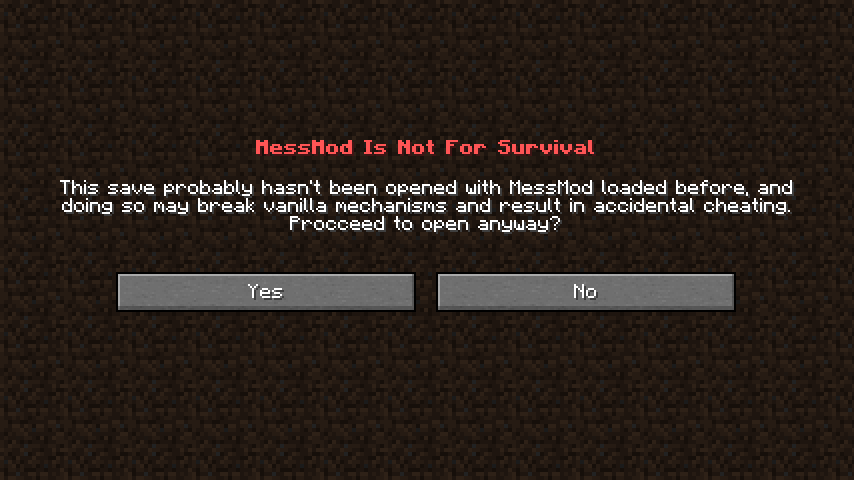
superSecretSettinghas the same effect. - A warning screen is poped when trying to open a survival with MessMod installed for the first time.
Notice
- The mod is still in development, some feature is not available or buggy, please tell me if you find something wrong.
- Dedicated servers are not supported well currently and there are many unsolved bugs related to the connection between the server and the client, so only use the mod in single-player mode or the host client of a LAN server.
- Some commands like /explode ~ ~ ~ 2147483647 true can freeze the server, be careful.
- The mod is not intended to be used in survival saves, as it may enable the players to cheat accidentally. To ensure this, option
hideSurvivalSavescould be enabled.
About
Initially, I started this mod in Feb 2021 to do some researches on the motion of entities, thus the HUDs, bounding box renderer, tool items and command /entityfield was the earliest features of this mod. Later, more features were introduced gradually if they were needed.
After April 2022, I speeded up the development of the mod, much more features were added while many previously added ones was completely refactored. By 2023/08/23, 28 commands, 70 options (or rules) and
9 renderers had been available.

请登录后举报
暂无评论,抢个沙发吧~