OptiFine for Fabric
作者:rebot | 分类:整合包
Minecraft 版本: 26.2
平台: fabric
标签: lightweight multiplayer optimization



OptiFine for Fabric v5 is in alpha testing!
OptiFine for Fabric v5 brings many exciting new features to the pack. During the alpha stage, v4 will continue to be supported and updated to the newest versions, rather than v5. Please report any bugs you find!
Looking for a modpack that has all the features OptiFine does? You're in the right place!
OptiFine for Fabric is a Fabric optimization modpack designed to being OptiFine-style features to Fabric, powered by modern Minecraft performance mods like Sodium, Iris, and more. Perfect for players searching for modern OptiFine alternatives.
⚡ Insane Performance Boost
- ? Lightweight optimization for smoother gameplay
- ?️ Runs great even on low-end systems
- ⚡ 8x FPS compared to Vanilla
- ? No stuttering frames
- ? Less lag
? Graphics Enhancements
- ? HD textures and resource pack support
- ? Built-in zoom functionality (just like OptiFine - but with more customibility!)
- ? Connected textures for seamless visuals
- ? Support for capes and custom models
- ? Dynamic lighting and shader compatibility
- ? Includes block & entity model enhancements
- ? Smooth animations and visual polish
✅ Better Than OptiFine
- ? Fabric compatibility
- ? More reliable and modular
- ? Actively maintained and updated for latest Minecraft versions
?️ Modding Flexibility
- ? Compatible with additional mods for custom setups
- ? Working on Lunar Client compatibility
FPS Comparison Chart
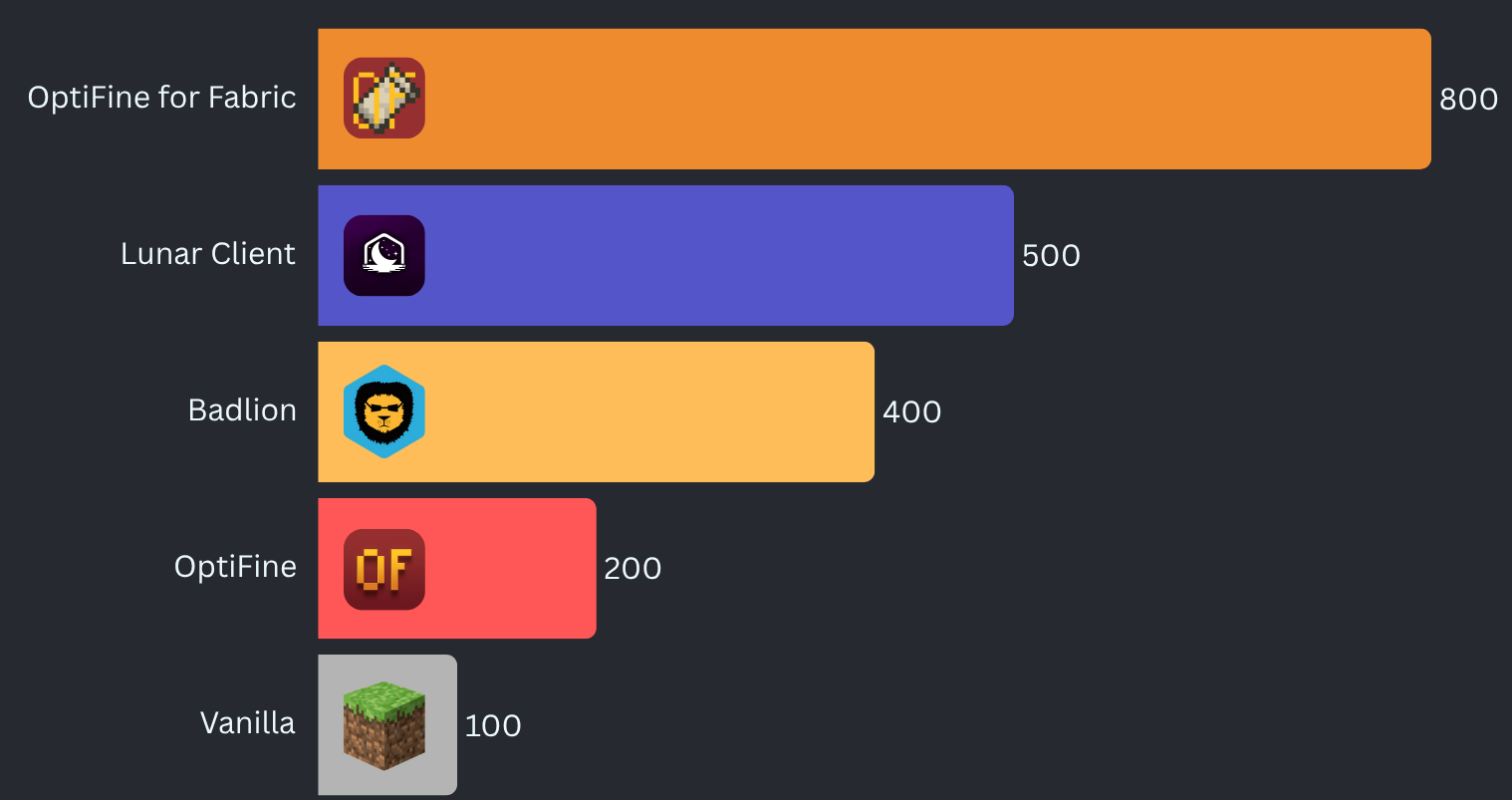
Benchmarked on a mid-range desktop computer.
What version should I use?
To get the correct version of OptiFine for Fabric for your setup:
- Open the
Versionstab. - Click Game versions.
- Select the Minecraft version you want to play on.
- Choose the latest stable release (the newest version without a suffix like
-alpha,-beta, or-dev).
How to compare versions:
Pick the version with the highest numbers from left to right. For example:
3.4.1is newer than2.5.33.5.2is newer than3.4.1
If no stable releases exist for your Minecraft version, you may use a dev, alpha, or beta build, but these may contain bugs or missing features.
A detailed explanation of the versioning system is available below.
Detailed Version Guide This pack uses a continuous, global versioning system. Every release follows this format: **`..[-channel]`** Examples: - `2.5.6` — stable - `2.5.7` — hotfix for `2.5.6` - `2.6.0-alpha` — alpha release The version number describes **the pack itself**, not the Minecraft version. Minecraft compatibility is shown separately on Modrinth. --- ## Version Number Breakdown ### Major — `` Large updates to the pack. This number only increases when the pack undergoes a significant redesign or major feature shift. ### Minor — `` Normal updates within a major version. This increases when the pack receives meaningful improvements, mod additions, compatibility changes, etc. ### Build — `` A global release counter. Every release (alpha, beta, release, etc.) uses the next available build number. This number does **not** reset when Minecraft updates. It also does **not** stay tied to a specific Minecraft version. Examples: - `2.5.6` → Minecraft 1.21.1 (stable release) - `2.5.7-alpha` → Minecraft 1.21.2 (alpha release) - `2.5.8` → Port to Minecraft 1.20.1 (stable release) - `2.5.9` → Minecraft 1.21.1 (patch) Build numbers simply increase as the pack evolves. --- ## Release Channels Channels appear after a dash and never inside the numeric version. - `-dev` — Experimental development builds. Unstable and incomplete, highly likely to not even work. - `-alpha` — Early testing builds. Features may be missing or broken. - `-beta` — Feature‑complete testing builds. Mostly stable. - **No suffix** — Stable release and/or hotfix. Fully tested and recommended. --- ## Choosing the Right Version - Use the **latest stable** version for your Minecraft version. - Only use **alpha**, **beta**, or **dev** builds if you need early access or want to help test. - Hotfixes for older Minecraft versions will always use the next global build number. --- ## Summary This versioning system: - Keeps version numbers simple and continuous - Works cleanly across all Minecraft versions - Avoids branching or resetting numbers - Makes prerelease channels obvious - Ensures every build has a unique, chronological version Minecraft compatibility is shown on Modrinth, while the version number reflects the evolution of the pack itself.请登录后举报
暂无评论,抢个沙发吧~