
GUIShop
作者:rebot | 分类:模组
Minecraft 版本: 1.13 1.13.1 1.13.2 1.14 1.14.1 1.14.2 1.14.3 1.14.4 1.15 1.15.1 1.15.2 1.16 1.16.1 1.16.2 1.16.3 1.16.4 1.16.5 1.17 1.17.1 1.18 1.18.1 1.18.2 1.19 1.19.1 1.19.2 1.19.3 1.19.4 1.20 1.20.1 1.20.2 1.20.3 1.20.4 1.20.5 1.20.6 1.21 1.21.1 1.21.2 1.21.3 1.21.4 1.21.5 1.21.6 1.21.7 1.21.8 1.21.9 1.21.10 1.21.11 26.1 26.1.1 26.1.2 26.2
平台: bukkit folia paper spigot
标签: economy game-mechanics


Overview
GUIShop is a powerful, feature-rich shop plugin that allows server owners to create beautiful GUI-based shops with extensive customization options. Say goodbye to confusing sign shops and chest-based systems. GUIShop provides players with an intuitive shopping experience while giving administrators complete control over pricing, items, and layout.
Key Features
- Easy-to-Use GUI System - Players browse shops through clean, organized inventory menus
- Multi-Page Shops - Create shops with unlimited pages for large item catalogs
- Dynamic Pricing - Optional supply/demand based pricing system
- Worth Display System - Shows item sell values directly in item lore (requires PacketEvents)
- Full GUI-Based Item Editor - Edit item prices, names, enchantments, and more through an intuitive GUI
- Drag-and-Drop Shop Building - Place and rearrange items in shops by simply dragging them
- Command Items - Sell commands that execute when purchased
- Custom Items - Full support for enchantments, potions, fireworks, and custom model data
- Native Spawner Support - Configure and sell mob spawners with any entity type
- Native Player Head Support - Use player UUIDs or Base64 skin textures for custom heads
- PDC Support - Uses Bukkit's Persistent Data Container API for reliable item identification
- Per-Item Permissions - Restrict specific items to certain player groups
- PlaceholderAPI Support - Use placeholders in shop names and lores
- Vault Integration - Works with any Vault-compatible economy plugin
- Built-In Economy - Optional internal economy system (no external economy plugin needed!)
- Alternate Sell GUI - Sell items without leaving the shop
- Transaction Logging - Track all purchases and sales
Screenshots
Click to view screenshots *Main Menu* 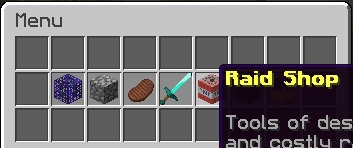 *Shop View* 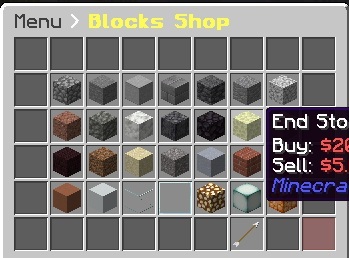 *Item Editor* 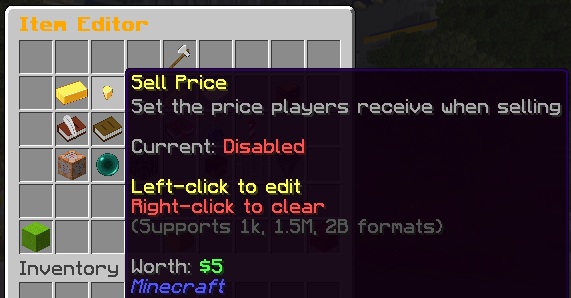 *Quantity Selector* 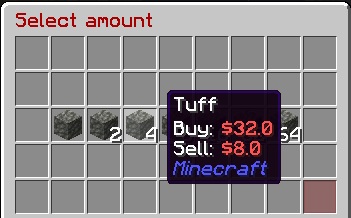 *Worth Display* 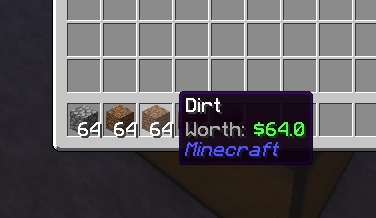Commands
Player Commands
/shop, /buy          - Open the shop menu
/sell                - Open the sell GUI
/value, /val         - Check the buy/sell value of held item
Admin Commands
/gs reload           - Reload all configuration files
/gs edit             - Enter creator mode for the main menu
/gs edit menu        - Enter creator mode for the main menu
/gs edit transaction - Enter creator mode for the transaction GUI
/gs edit [shop]      - Enter creator mode for a specific shop
/gs edit [shop] [page] - Edit a specific page of a shop
/gs parsemob <type>  - Validate a mob type for spawners
/gs toggleworth      - Toggle worth display for yourself (session only)
/gs iteminfo         - Display comprehensive info about held item
Economy Commands
(Only available when internal economy is enabled)
Player Commands:
/bal, /balance, /money          - Check your balance
/bal <player>                   - Check another player's balance
/pay <player> <amount>          - Send money to a player
/togglepay                      - Toggle payment notifications on/off
Admin Commands:
/gs eco give <player> <amount>  - Give money to a player
/gs eco take <player> <amount>  - Take money from a player
/gs eco set <player> <amount>   - Set a player's balance
/gs eco balance <player>        - Check a player's balance
/gs eco reset <player>          - Reset to starting balance
All amounts support abbreviations: 1k, 1.5M, 100B, etc.
Item Info Command
The /gs iteminfo command is a powerful debugging and configuration helper. Hold any item and run the command to see:
- Material type and display name
- All lore lines
- Enchantments in config-ready format (e.g.,
SHARPNESS:5 UNBREAKING:3) - Potion info in config-ready format (type, splash, extended, upgraded)
- Firework info in config-ready format (flight, explosions, colors)
- All PDC (Persistent Data Container) values
- Custom NBT data
This makes it easy to configure complex items - just create the item you want, then use /gs iteminfo to get the exact format needed for your shops.yml.
Permissions
guishop.use          - Access to the shop (default: op)
guishop.shop.*       - Access to all shop items (default: op)
guishop.shop.<shop>.<item> - Access to specific items
guishop.reload       - Permission to reload the plugin (default: op)
guishop.creator      - Access to the in-game shop editor (default: op)
guishop.value        - Access to /value command (default: true)
guishop.sell         - Access to /sell command (default: true)
guishop.admin        - Full admin access (default: op)
Configuration
GUIShop uses several configuration files for maximum flexibility:
- config.yml - General plugin settings, commands, titles, buttons
- shops.yml - Shop layouts and item definitions
- menu.yml - Main menu configuration
- messages.yml - All plugin messages (fully customizable)
- worth.yml - Worth display system configuration
GUI-Based Item Editor
GUIShop features a powerful, fully GUI-based item editor that eliminates the need for manual config editing. Configure every aspect of shop items through intuitive click-based menus.
How It Works
- Enter creator mode with
/gs edit(for menu) or/gs edit <shop>(for shops) - Left-click to drag and drop items - move items within the shop, rearrange positions, or place new items from your inventory into the shop
- Right-click or Shift+click any item to open the Item Editor GUI
- Click on any setting to modify it through chat input or nested selection GUIs
- Changes save automatically when you close the inventory
Creator Mode Controls
Left-click     - Pick up / place items (works between shop and your inventory)
Right-click    - Open Item Editor for the clicked item
Shift+click    - Open Item Editor for the clicked item

Navigation Buttons (pagination, back, balance):
Left-click     - Pick up and move the button
Right-click    - Open Item Editor for the button
Shift+click    - Activate the button (navigate pages, go back, etc.)
Item Editor Features
- Buy/Sell Prices - Set prices with support for abbreviated formats (1k, 1.5M, 100B)
- Item Type - Switch between SHOP, COMMAND, SHOP_SHORTCUT, and DUMMY types
- Display Names - Set shop display name and purchased item name
- Custom Lore - Add descriptive lore lines to items
- Enchantments - Add/remove enchantments through a visual enchantment picker
- Potion Effects - Configure potion type, duration, and amplifier via GUI
- Firework Properties - Set flight duration, explosion shapes, colors, and effects
- Spawner Mob Type - Select mob type from a visual entity picker
- Commands - Configure commands to run on purchase
- Permissions - Set required permissions per item
- Quantity - Set stack size given on purchase
Worth Display System
GUIShop includes a powerful worth display feature that shows item sell values directly in the item lore. This uses packet manipulation to display worth client-side only, meaning your actual items are never modified.
Requirements: PacketEvents plugin
Worth Display Configuration (worth.yml) ```yaml enabled: true format: "&7Worth: &a%worth%" position: BOTTOM add-blank-line: true only-show-sellable: true not-sellable-format: "&7Worth: &cNot sellable" # Hide worth in specific inventories blacklisted-inventories: - "Auction House" - "Crate Preview" # Hide worth on items with specific names blacklisted-item-names: - "Crate Key" - "Vote Token" # Hide worth on equipped armor hide-armor-slots: true ```Advanced Item Types
Command Items
Sell commands that execute when purchased. Use placeholders like {PLAYER_NAME}, {PLAYER_UUID}, {PLAYER_WORLD}, or any PlaceholderAPI placeholder:
'19':
  type: COMMAND
  id: NETHER_STAR
  shop-name: '&6VIP Rank'
  buy-price: 10000
  sudo: false          # Run as console (default) or as player (true)
  commands:
    - 'lp user {PLAYER_NAME} parent set vip'
    - 'broadcast {PLAYER_NAME} purchased VIP!'
Available Placeholders:
| Placeholder | Description |
|-------------|-------------|
| {PLAYER_NAME} | Player's name |
| {PLAYER_UUID} | Player's UUID |
| {PLAYER_WORLD} | Player's current world |
| {PLAYER_BALANCE} | Player's economy balance |
All placeholders also work in %placeholder% format. PlaceholderAPI placeholders are also supported if PAPI is installed.
Sudo Mode: Set sudo: true to run commands as the player instead of console. Useful for commands that check player permissions or are player-only.
Enchanted Books
'20':
  type: SHOP
  id: ENCHANTED_BOOK
  buy-price: 1000
  enchantments: 'SHARP:5 FIRE_ASPECT:2'
Potions
Configure potions with the potion-info section. Supports regular, splash, and lingering potions.
# Regular Potion (Extended Speed)
'21':
  type: SHOP
  id: POTION
  buy-price: 500
  potion-info:
    type: SPEED
    splash: false
    lingering: false
    extended: true
    upgraded: false

# Splash Potion (Healing II)
'22':
  type: SHOP
  id: SPLASH_POTION
  buy-price: 600
  potion-info:
    type: HEALING
    splash: true
    lingering: false
    extended: false
    upgraded: true

# Lingering Potion
'23':
  type: SHOP
  id: LINGERING_POTION
  buy-price: 700
  potion-info:
    type: POISON
    splash: false
    lingering: true
    extended: true
    upgraded: false
Potion Info Fields:
| Field | Description |
|-------|-------------|
| type | Potion effect (SPEED, HEALING, STRENGTH, POISON, etc.) |
| splash | Whether it's a splash potion |
| lingering | Whether it's a lingering potion |
| extended | Extended duration version |
| upgraded | Level II/stronger effect version |
Spawners
Native spawner support with any valid entity type (use /gs parsemob <type> to validate):
'22':
  type: SHOP
  id: SPAWNER
  buy-price: 50000
  mob-type: ZOMBIE
  shop-name: '&6Zombie Spawner'
Fireworks
'23':
  type: SHOP
  id: FIREWORK_ROCKET
  buy-price: 100
  firework-info:
    flight: 2
    explosions:
      - shape: ball_large
        flicker: true
        trail: true
        colors: [11743532, 2437522]
        fade-colors: [1973019, 15790320]
Player Heads
Support for player UUIDs or Base64 skin textures:
# Using player UUID
'24':
  type: SHOP
  id: PLAYER_HEAD
  buy-price: 1000
  skull-uuid: 'player-uuid-here'

# Using Base64 skin texture (from minecraft-heads.com, etc.)
'25':
  type: SHOP
  id: PLAYER_HEAD
  buy-price: 500
  skull-uuid: 'eyJ0ZXh0dXJlcyI6eyJTS0lOIjp7InVybCI6Imh0dHA6Ly90ZXh0dXJlcy5taW5lY3JhZnQubmV0L3RleHR1cmUvYWJjMTIzIn19fQ=='
Statistics & PlaceholderAPI
GUIShop tracks player shop statistics and integrates with PlaceholderAPI for use in scoreboards, holograms, and chat.
Tracked Statistics
- Total money spent (buying from shops)
- Total money earned (selling items)
- Total items bought/sold
- Top 3 most bought items per player
- Top 3 most sold items per player
Available Placeholders
%guishop_total_spent%           - Money spent (with commas)
%guishop_total_spent_formatted% - Money spent (abbreviated: 1.5M)
%guishop_total_earned%          - Money earned (with commas)
%guishop_total_earned_formatted% - Money earned (abbreviated)
%guishop_items_bought%          - Items purchased count
%guishop_items_bought_formatted% - Items purchased (abbreviated)
%guishop_items_sold%            - Items sold count
%guishop_items_sold_formatted%  - Items sold (abbreviated)
%guishop_top_bought_1%          - #1 most bought item (Material: Qty)
%guishop_top_sold_1%            - #1 most sold item (Material: Qty)
Statistics are stored in SQLite (plugins/GUIShop/Data/player_statistics.db).
Dynamic Pricing System
GUIShop includes a built-in supply/demand economy system that makes item prices fluctuate based on trading activity.
How It Works
- When items are bought: Supply decreases → prices increase
- When items are sold: Supply increases → prices decrease
- Over time: Prices gradually normalize back to base values
Configuration
Enable in config.yml:
dynamic-pricing: trueConfigure in dynamicpricing.yml:
price-change-per-item: 0.01    # 1% change per item
max-price-multiplier: 2.0      # Up to 200% of base price
min-price-multiplier: 0.5      # Down to 50% of base price
normalization-rate: 0.001      # How fast prices return to normal
normalization-interval: 300    # Seconds between normalization ticks
Per-Item Overrides
Configure different volatility settings for specific items:
item-overrides:
  DIAMOND:
    price-change-per-item: 0.005  # More stable (0.5% per item)
    max-price-multiplier: 1.5
    min-price-multiplier: 0.75
Linked Pricing
Make items affect other items' prices - perfect for crafting relationships:
item-overrides:
  DIAMOND_BLOCK:
    affects:
      DIAMOND: 9.0           # 1 block = 9 diamonds in crafting
      DIAMOND_ORE: 1.0       # Also affects ore prices

  BREAD:
    affects:
      WHEAT: 3.0             # 1 bread = 3 wheat in crafting
When a player buys 1 DIAMOND_BLOCK, DIAMOND prices change as if 9 diamonds were bought. This creates realistic economic relationships based on crafting recipes!
Per-Item Control
Exempt specific items from dynamic pricing:
'0':
  id: DIAMOND
  buy-price: 100
  sell-price: 50
  dynamic: false  # Uses static pricing
Admin Commands
| Command | Description |
|---|---|
/gs market status |
View system status |
/gs market info <item> |
Check item's market status |
/gs market reset <item> |
Reset item to base price |
/gs market resetall |
Reset all prices |
Developer API
GUIShop provides a comprehensive API for developers to integrate with:
API Examples ```java // Check if an item can be sold boolean canSell = GUIShopAPI.canBeSold(itemStack); // Get buy/sell prices BigDecimal buyPrice = GUIShopAPI.getBuyPrice(itemStack, quantity); BigDecimal sellPrice = GUIShopAPI.getSellPrice(itemStack, quantity); // Sell items programmatically GUIShopAPI.sellItems(player, SellType.COMMAND, items); // Worth Display API BigDecimal worth = GUIShopAPI.getItemWorth(itemStack); BigDecimal stackWorth = GUIShopAPI.getStackWorth(itemStack); // Per-player worth toggle GUIShopAPI.toggleWorthForPlayer(player); GUIShopAPI.enableWorthForPlayer(player); GUIShopAPI.disableWorthForPlayer(player); // Hook for persistent per-player worth settings GUIShopAPI.setExternalWorthCheck(player -> { return myPlugin.hasWorthDisabled(player.getUniqueId()); }); ```Full API documentation available on the Wiki.
Dependencies
Required:
- Vault (for economy API)
Optional:
- Economy Plugin (EssentialsX, CMI, etc.) - OR use GUIShop's built-in economy!
- PacketEvents (for worth display feature)
Folia Support:
GUIShop fully supports Folia - Paper's regionized multithreading fork for improved performance on large servers. No additional configuration required!
- PlaceholderAPI (for placeholder support)
Note: GUIShop includes its own economy system! Enable it in
economy.ymlto use GUIShop as your server's economy without needing EssentialsX or similar plugins.
Installation
- Download GUIShop and place it in your plugins folder
- Install Vault and an economy plugin (EssentialsX, CMI, etc.) - OR enable GUIShop's internal economy
- (Optional) Install PacketEvents for worth display
- (Optional) Install PlaceholderAPI for placeholder support
- Restart your server
- Configure shops in
plugins/GUIShop/shops.yml - Use
/gs reloadto apply changes
Support
请登录后举报
请 登录 后赞助作者。
暂无评论,抢个沙发吧~