
Cobblemon MiniGames
作者:rebot | 分类:模组
Minecraft 版本: 1.21.1
平台: fabric
标签: game-mechanics minigame utility
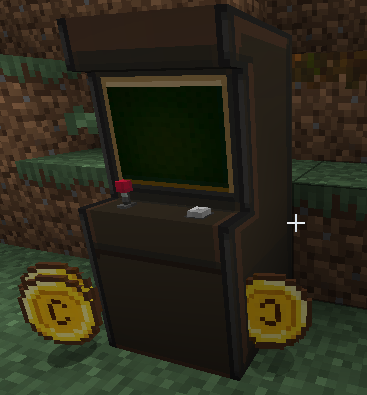

Turn your Cobblemon world into a place players want to visit between adventures.
Cobblemon MiniGames adds a fully playable arcade experience with a craftable machine, seven minigames, Arcade Coins, a Coin Case, and a reward shop. Win coins from Roulette, Slot Machine, Flappy Bird, Block Stacker, Snake, Derby, and Voltorb Flip, then spend them on configurable rewards for your server.

Minigames
Roulette

Roulette is inspired by the Pokemon Emerald roulette table. When the player enters, they pick a table wager first. The left table uses the normal low wager, the right table uses a higher wager, and every seventh Minecraft day the right table becomes the service-day table with its own configured wager.
After choosing a table, the player bets on a Pokemon column, a color row, or an exact square. A spin consumes the table wager and drops one ball onto the wheel. Winning pays wager * multiplier, and the round keeps the landed balls until six balls have been placed or no valid squares remain. If the player leaves mid-round and comes back later, the active roulette round is resumed.
Payouts are based on the selected area:
- Column bets pay x6, x4, or x3 depending on how many balls in that column are already occupied.
- Row bets pay x4 or x3 depending on how many balls in that row are already occupied.
- Exact square bets pay x12 if the ball lands on that square.
- When the board is cleared, the next entry returns to table selection.
Slot Machine

Slot Machine is inspired by the Pokemon Emerald slot machine. The player inserts one to three coins, starts the reels, then stops each reel with the action button. One coin activates the middle line, two coins activate top, middle, and bottom, and three coins activate all five lines including the diagonals.
Bet Max inserts up to three coins and starts the spin when all three have been accepted. Wins pay Arcade Coins immediately. Replay and power matches count as wins for the machine flow, but replay pays zero coins and power builds Pika Power. Pika Power can trigger Reel Time, which gives a short special sequence and may grant slower bonus spins.
Current symbol payouts:
- Cherry pays 2 coins on the middle line, or 4 coins on top/bottom cherry lines.
- Lotad pays 6 coins.
- Azurill pays 12 coins.
- Power pays 3 coins and adds Pika Power.
- Mixed 7 pays 90 coins.
- Red 7 pays 300 coins.
- Blue 7 pays 300 coins and marks the next Reel Time as lucky.
- Replay counts as a match but pays no coins.
Flappy Bird

Flappy Bird spends the configured entry cost, then starts a countdown. The player flaps Butterfree through the obstacle gaps. Each cleared obstacle gives one point and increases the speed by 0.05x, starting at 2.00x and capped at 7.00x. On crash, the run pays score * 2 Arcade Coins.
Block Stacker

Block Stacker spends the configured entry cost, then asks the player to stop moving blocks row by row. Missing every block ends the run. Reaching row 6 offers a 50-coin cash-out, row 7 offers 250 coins, and row 8 pays the 1000-coin top prize. At each cash-out prompt, the player can take the current reward or keep going.
Snake

Snake spends the configured entry cost, then lets the player guide Onix around the field. Every berry adds one point and grows the snake. Hitting a wall or the snake body ends the run and pays score * 2 Arcade Coins.
Derby

Derby generates six racers, then lets the player choose one and place a bet in 10-coin steps. The maximum bet is the amount of Arcade Coins the player currently has, rounded down by the 10-coin step. A selected racer must finish first to win. Payout depends on the racer odds shown on the bet slip.
The bet slip can show these odds:
- Payout 1: x1.1, so a 10-coin bet returns 11.
- Payout 2: x1.2, so a 10-coin bet returns 12.
- Payout 3: x1.3, so a 10-coin bet returns 13.
- Payout 4: x1.5, so a 10-coin bet returns 15.
- Payout 5: x2, so a 10-coin bet returns 20.
- Payout 6: x3, so a 10-coin bet returns 30.
- Payout 7: special Feebas jackpot, capped by the global coin limit.
Voltorb Flip

Voltorb Flip is a risk-and-reward puzzle inspired by the Game Corner Expansion version of Voltorb Flip. Starting a run spends the configured entry cost, then shows a 5x5 board of hidden cards. Each card is either a Voltorb, a 1, a 2, or a 3. The clues on the right and bottom edges show the total card value and the number of Voltorb cards in each row or column.
The goal is to reveal every 2 and 3 card without revealing a Voltorb. Revealing a 1 is safe, but it does not increase the payout. Revealing a 2 or 3 multiplies the current board value. Players can switch between reveal mode and note mode, then mark hidden cards with notes for 1, 2, 3, or Voltorb while solving the board.
Completing a board adds that board's value to the run bank and offers a choice: cash out or continue to the next level. Higher levels have larger possible payouts, but also more Voltorbs. If the player cashes out, the banked Arcade Coins are paid to the player. If the player reveals a Voltorb, the run bank is lost and the payout is 0.
Unlike the original Game Corner game, this version lets players leave during an active board. The board state is preserved, so they can come back later and continue the same run. Leaving does not pay out the current bank; the player must cash out from a completed-board prompt to receive the stored winnings.
Coin Case
The Coin Case stores virtual Arcade Coins in the item data. If the player has a Coin Case in their inventory, game payouts go into it first. Players can also use the Coin Case screen to deposit physical coins from the inventory or withdraw stored coins back into item stacks.
Important details:
- The shared coin cap is 999999.
- Payouts are stored in the Coin Case first when one is present.
- Withdrawals only create as many physical coins as the inventory can hold.
Recipes
MiniGames Coin Case

Ingredients:
- 1 Cobblemon Relic Coin
- 4 Leather
MiniGames Coin

Ingredients:
- 1 Cobblemon Relic Coin
- 4 Iron Nuggets
MiniGames Machine

Ingredients:
- 4 any Planks
- 2 Gold Ingots
- 2 Iron Ingots
- 1 Emerald
Configuration
Server configuration lives in config/cobblemonminigames/config.yml.
| Key | Value | Description |
|---|---|---|
snake.coinToPlay |
1 |
Arcade Coins consumed when a Snake run starts. |
flappybird.coinToPlay |
1 |
Arcade Coins consumed when a Flappy Bird run starts. |
blockstacker.coinToPlay |
1 |
Arcade Coins consumed when a Block Stacker run starts. |
voltorbflip.coinToPlay |
10 |
Arcade Coins consumed when a Voltorb Flip run starts. |
roulette.leftTableBet |
1 |
Wager used by the normal left roulette table. |
roulette.rightTableBet |
3 |
Wager used by the normal right roulette table. |
roulette.serviceDayBet |
6 |
Wager used by the right roulette table every seventh Minecraft day. |
Shop configuration lives in config/cobblemonminigames/shop/. Each shop file should be named after the mod id that provides the rewards inside it. For example, use cobblemon.yml for Cobblemon rewards, mega_showdown.yml for Mega Showdown rewards, or my_mod.yml for rewards from another mod.
Every shop file contains categories, each category contains subcategories, and each subcategory contains purchasable rewards. Item rewards use type: item; Pokemon rewards use type: pokemon.
Example:
categories:
  - id: supplies
    name: Supplies
    icon: minecraft:chest
    subcategories:
      - name: Pokeballs
        items:
          - type: item
            id: cobblemon:poke_ball
            quantity: 1
            price: 10
      - name: Starters
        items:
          - type: pokemon
            id: cobblemon:bulbasaur
            level: 5
            shiny: false
            price: 300
Useful fields:
id: category id, item id, or Pokemon id depending on where it appears.name: display name for a category or subcategory.icon: item id used as the category tab icon.type:itemorpokemon.quantity: item stack size for item entries.level,shiny,aspect: optional Pokemon entry settings.price: Arcade Coin price.rarity: optional reward rarity name; defaults to common.
Client Keybinds
Client keybinds live in config/cobblemonminigames/keybinds.yml. The file is generated with every action as a list of keys (one entry per line), like this:
/cobblemonminigames reloadkeybindreloads the keybinds from the file without restarting the game.
roulette:
  confirm:
  - KEY_SPACE
  - KEY_ENTER
  - KEY_A
  quit:
  - KEY_ESCAPE
  up:
  - KEY_UP
  down:
  - KEY_DOWN
  left:
  - KEY_LEFT
  right:
  - KEY_RIGHT
  bet_up:
  - KEY_KP_ADD
  - KEY_EQUAL
  bet_down:
  - KEY_KP_SUBTRACT
  - KEY_MINUS
When editing, an action may keep several keys (a list, as above) or be a single key written inline, e.g. up: KEY_W. Use familiar key names such as KEY_W, KEY_SPACE, KEY_ENTER, or KEY_F1. For convenience, KEY_W, GLFW_KEY_W, and W all resolve to the same key.
| Key | Value | Description |
|---|---|---|
| Printable keys | KEY_A, KEY_1, KEY_SPACE, KEY_MINUS, KEY_EQUAL |
Normal keyboard keys. |
| Function keys | KEY_F1 to KEY_F25 |
Function keys. |
| Navigation keys | KEY_UP, KEY_DOWN, KEY_LEFT, KEY_RIGHT, KEY_HOME, KEY_END |
Movement and navigation keys. |
| Editing keys | KEY_ENTER, KEY_TAB, KEY_BACKSPACE, KEY_DELETE, KEY_INSERT |
Common menu/editing keys. |
| Keypad keys | KEY_KP_0 to KEY_KP_9, KEY_KP_ADD, KEY_KP_SUBTRACT |
Numeric keypad keys. |
| Modifier keys | KEY_LEFT_SHIFT, KEY_RIGHT_CONTROL, KEY_LEFT_ALT |
Modifier keys if a server pack wants them as direct actions. |
Keybind Actions
| Key | Value | Description |
|---|---|---|
roulette.confirm |
KEY_SPACE, KEY_ENTER, KEY_A |
Confirm table, place bet, or continue after a result. |
roulette.quit |
KEY_ESCAPE |
Leave the roulette screen. Active rounds are preserved. |
roulette.up |
KEY_UP |
Move roulette selection up. |
roulette.down |
KEY_DOWN |
Move roulette selection down. |
roulette.left |
KEY_LEFT |
Move roulette selection left. |
roulette.right |
KEY_RIGHT |
Move roulette selection right. |
roulette.bet_up |
KEY_KP_ADD, KEY_EQUAL |
Move to the next available roulette table wager before entering the table. |
roulette.bet_down |
KEY_KP_SUBTRACT, KEY_MINUS |
Move to the previous available roulette table wager before entering the table. |
slotmachine.primary |
KEY_A, KEY_SPACE, KEY_ENTER |
Start reels, stop the current reel, or repeat a winning bet. |
slotmachine.bet |
KEY_DOWN |
Insert one coin. |
slotmachine.max_bet |
KEY_UP |
Insert up to three coins and start when max bet is reached. |
slotmachine.info |
KEY_I |
Open or close the slot info screen. |
slotmachine.quit |
KEY_ESCAPE |
Leave the slot machine, or close info/Reel Time when that overlay is active. |
flappybird.flap |
KEY_SPACE, KEY_A, KEY_UP, KEY_ENTER |
Start from ready/game-over states, or flap while playing. |
flappybird.quit |
KEY_ESCAPE |
Leave the Flappy Bird screen. |
blockstacker.primary |
KEY_SPACE, KEY_ENTER, KEY_A |
Start, drop blocks, or confirm the Keep Going prompt. |
blockstacker.left |
KEY_LEFT |
Select Yes at the Keep Going prompt. |
blockstacker.right |
KEY_RIGHT |
Select No at the Keep Going prompt. |
blockstacker.back |
KEY_B |
Cash out at the Keep Going prompt, or leave from regular states. |
blockstacker.quit |
KEY_ESCAPE |
Leave the Block Stacker screen. |
snake.start |
KEY_SPACE, KEY_ENTER, KEY_A |
Start a Snake run from ready/game-over states. |
snake.quit |
KEY_ESCAPE |
Leave the Snake screen. |
snake.up |
KEY_UP |
Turn up. |
snake.down |
KEY_DOWN |
Turn down. |
snake.left |
KEY_LEFT |
Turn left. |
snake.right |
KEY_RIGHT |
Turn right. |
derby.confirm |
KEY_SPACE, KEY_ENTER, KEY_A |
Pick racer, start race, or continue after a result. |
derby.back |
KEY_B, KEY_BACKSPACE |
Go back from betting to racer select, or leave from racer select. |
derby.quit |
KEY_ESCAPE |
Leave Derby. |
derby.up |
KEY_UP |
Increase Derby bet by 10 coins. |
derby.down |
KEY_DOWN |
Decrease Derby bet by 10 coins. |
derby.left |
KEY_LEFT |
Previous racer. |
derby.right |
KEY_RIGHT |
Next racer. |
voltorbflip.confirm |
KEY_SPACE, KEY_ENTER, KEY_A |
Start a run, reveal or mark the selected card, or continue after completing a board. |
voltorbflip.back |
KEY_B, KEY_BACKSPACE |
Toggle note mode while playing, cash out after completing a board, or leave from the ready screen. |
voltorbflip.quit |
KEY_ESCAPE |
Leave Voltorb Flip. Active boards are preserved. |
voltorbflip.up |
KEY_UP |
Move the cursor up. |
voltorbflip.down |
KEY_DOWN |
Move the cursor down. |
voltorbflip.left |
KEY_LEFT |
Move the cursor left. |
voltorbflip.right |
KEY_RIGHT |
Move the cursor right. |
voltorbflip.note_prev |
KEY_Q, KEY_LEFT_BRACKET |
Select the previous note value. |
voltorbflip.note_next |
KEY_E, KEY_RIGHT_BRACKET |
Select the next note value. |
Server Notes
/cobblemonminigames reloadrequires permission level 2 and reloads the server configs.- Game payouts are Arcade Coins. Shop contents and prices are controlled through the shop YAML files.
- If a player has a Coin Case, payouts are stored there first.
Credits
- Roulette and Slot Machine are inspired by the Pokemon Emerald Game Corner.
- Voltorb Flip, Flappy Bird, Block Stacker, Snake, and Derby are inspired by games from Pokemon Emerald GameCorner Expansion by heyopc.
请登录后举报
暂无评论,抢个沙发吧~