
Harry Potter | And The Wizarding World
作者:rebot | 分类:模组
Minecraft 版本: 26.2
平台: fabric forge neoforge quilt
标签: adventure cursed magic



Information
Beta 3 is the ONLY stable version right now!! (and has alot more content). I suggest downloading 0.3 over 0.2.1a
To see more behind the scenes, join my Discord
-
This Project contains spoilers to the Harry Potter Book series by J. K. Rowling.
-
ALL CREDIT goes to J. K. Rowling, including: Spells, items, etc.. She created every aspect of Harry Potter, I simply coded them into minecraft.
_(Credit to The_Freenix for the amazing hogwarts map I used in the banner!)_
Roadmap Release 1.0 (Next Update)
Roadmap Release 1.0 (Next Update) Beta 0.3 (Latest Update)
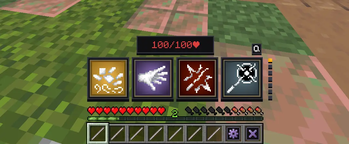
Changelog ## Changelog Beta 0.3 ### Additions - **Expelliarmus:** This damage charm is essential for wizarding combat! Use to disarm your opponents! - **Levioso Spell:** A "must know" controll charm used to levitate your enimies into the air, allowing you to attack! - **Depulso Spell:** A brand new charm used to fling your enimies away from you! cooldown 5s - Changes - Updated Spell Trail API to render particles better ### Bug Fixes - fixed levioso all item dupe glitch from 0.3a - fixed audio issues - Spell Trails are revamped and include better particles and real physics so they can **bounce off blocks!!** - **Duel HP:** when in the spell wheel, basic cast and other spells do damage to your custom health to make duels last longer and become more immersive. To heal your HP, block a spell with the sheild charm, Protego! There are currently no other ways to properly heal your duel HP but than reseting your `current_duel_hp` score, or reaching 0, then it resets to 100. - **Overlay/GUI API:** Enables developers to make custom GUIs or Overlays in their extension pack! - **Spell Trail API:** Enables developers to quickly create spells VFX and full hit/detection/physics logic! - **HP API** allows developers can manipulate player's duel HP health - **Cooldown API:** Enables developers to add their own icons and cooldowns to the spell wheel. Use with the **Spell Trail API**, to make custom spell creation very easy and fast! - Cooldown Icons now update when the player is not on the spells page, and is not in the spell wheel. - Optimized performance of the Spell Wheel significantly. - Cooldown Icons on the spell wheel now have customizable FPS instead of a hardcoded 1fps. *(format: seconds/time)* - Added a full global storage reset to the settings menu. - Updated the visuals of all item descriptions. - The Wand Crafting table now rotates to the players orientation when placed... (like it should have alr bro) - Wands now display like a wand in the main hand/off hand, and in the first person main hand/off hand. - Added a /loot command for all items - Revamped the startup *(/reload)* message to include a visibility toggle and a reset storage option. - /reload now does not override many spell wheel/spell trail states - Advancement page was updated to include a new background and all spells. - Added a custom license - Updated the textures of the spell wheel control buttons. ### Changes - Protego no longer heals your current health, but your duel HP - Protego's cooldown changed from 6s to 4s ### Bug Fixes - Lumos is finally multiplayer!! (I NEVER HAVE TO TOUCH IT AGAIN!!! untill it has upgradess ofc :D). - Settings can no longer close on escape, to prevent the settings button cooldown from ticking. - The spell wheel no longer scales with player's GUI settings or window size/resolution to prevent the layout from disorting. - When in the spell wheel, droped wands replace with YOUR wand instead of a random players.. - Updated the hit detection on entities to be more accurate. - And MANY other small ones that I don't want to list.Introduction
If you've ever read the Harry Potter book series by the author, J. K. Rowling, then you have most likely wondered.. "These books are incredible.. I WISH IT WAS IN MINECRAFT!". Well Im proud to present, Harry Potter | And The Wizarding World! Its a fan made datapack and Mod that brings exactly everything you've ever read in the Harry Potter series, right into your survival world or server.
Harry Potter | And the Wizarding World is desigend to be integrated into a survival world, so you can experience Harry Potter outside of an adventure map!
Duel your friends with your choice of 27 wands, customize your spell wheel with over 30+ spells(not fully added yet), and experience the magical world of Harry Potter with your friends like never before!
Features
Crafting - This is a datapack, so I can not add items to the creative inventory. If you want an alternitave to crafting though, run `loot give @s loot pack:` With this command you can get the Wand Crafting Table, and all 3 Wand Cores ## Recipes RecipesWand Crafting Table
 - 3 Oak Planks - 2 Amethyst Shards - One Book - One DiamondPhoenix Feather
 - 4 Honeycomb - 2 Gold Ingots - 2 Amethyst Shards - 1 FeatherDragon Heartstring
 - 4 Magma Cream - 2 Fermented Spider Eyes - 2 Amethyst Shards - 1 Crimsion Hyphae -Unicorn Hair
 - 4 Ghast Tears - 2 Echo Shards - 2 Amethyst Shards - 1 Phantom MembraneWand Crafting Table
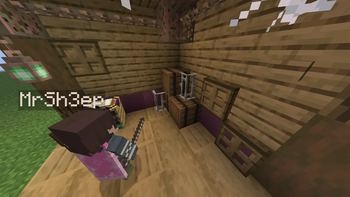
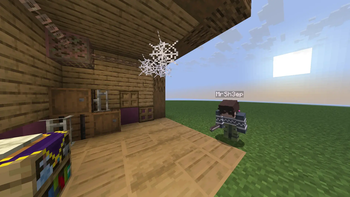
Wand crafting is made easy with a custom crafting system! Simply throw your choice of wood and wand core onto the wand crafting table, and the wand will apear right on top!

(This is an example of crafting a Mangrove Unicorn Hair Wand!)
Wand Crafting Materials
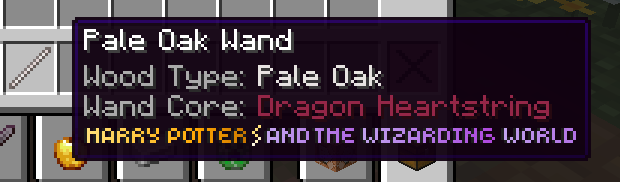
Wand Cores:- Phoenix Feather
- Dragon Heartstring
- Unicorn Hair
Wood Types:
wood types are stripped woods. Ex: Oak Stripped Wood
- Oak
- Spruce
- Dark Oak
- Birch
- Acacia
- Jungle
- Cherry
- Mangrove
- Pale Oak

**Exit Button:** The Exit button will simply **exit the spell wheel**, returning all of your **hotbar items**, including your main wand! Spells Expelliarmus ## Expelliarmus > Expelliarmus is an essential damgage spell when it comes to dueling. cast this powerful charm and disarm your enimies wand! very powerful..
 Basic Cast
## Basic Cast
- Basic cast is a simple damage spell, triggerd with `shift left click` keybind. Use it to damage your enimies inbetween combos with other spells.

Protego
## Protego
- Protego, or the shield charm, is a utility spell that allows players to fully block incoming spell attacks! simply press `Q` keybind to activate.

Basic Cast
## Basic Cast
- Basic cast is a simple damage spell, triggerd with `shift left click` keybind. Use it to damage your enimies inbetween combos with other spells.

Protego
## Protego
- Protego, or the shield charm, is a utility spell that allows players to fully block incoming spell attacks! simply press `Q` keybind to activate.

Known Bugs
if any bugs appear, try reseting your wand wheel player data with /function pack:main/spellwheel/wheel/function/reset_player_data or use the button in the spell wheel settings menu. If that still does not work, run a hard reset with /function pack:main/spellwheel/wheel/reset_global_storage
and then run /reload
If you find any bugs, please share them on my GitHub Page
请登录后举报
请 登录 后赞助作者。
暂无评论,抢个沙发吧~