
GalaxyByne's Economy
作者:rebot | 分类:模组
Minecraft 版本: 1.20 1.20.1 1.20.2
平台: fabric forge quilt
标签: economy

! ! ! This is a deprecated data pack. Download the new version here.
Galaxy's Server Economy
Features:
- Balance System
- Pay System
- Stock Market
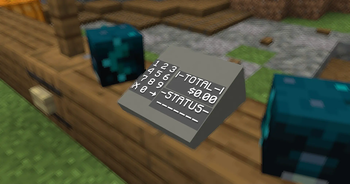
- Debit Cards / Payment Terminals
Usage Instructions:
Balance System:
Use /trigger ShowBalance to see your balance\
To depoit / withdraw Diamonds from your account, you'll need to summon some interactions:\
Use /function galaxyseconomy:summon_atm/[direction] to summon the preset ATM.\
Use /kill @e[tag=ATM,distance=..1] to remove an ATM.\
Note:
-
Replace [direction] with either north, east, south, or west. Use the direction the ATM is facing.
You can also customize ATMs.\
Use/summon interaction ~ ~ ~ {width:[width here]f,height:[height here]f,response:1b,Tags:["bank_interaction","bank_diamond_sell"]}to summon a deposit interaction.\
Use/summon interaction ~ ~ ~ {width:[width here]f,height:[height here]f,response:1b,Tags:["bank_interaction","bank_diamond_buy"]}to summon a withdraw interaction.\
Note: -
Replace [width here] and [height here] with a positive number describing the interaction's size
Pay System:
Use
/trigger Pay set [amount]to pay the nearest Player in a 10-block radius
Stock Market:
The Stock Market also uses interactions to buy/sell stock (ores):\
Use
/summon interaction ~ ~ ~ {width:[width here]f,height:[height here]f,response:1b,Tags:["bank_interaction","bank_[stock]_<sell/buy>"]}to summon a stock interaction.\
Note:
- Replace [width here] and [height here] with a positive number describing the interaction's size
- Replace <sell/buy> with either "sell" or "buy" depending on your needs
- Replace [stock] with any stock. Stocks include:
- redstone
- lapis
- iron
- copper
- gold
- emerald
-
netherite
Set stock prices with
/scoreboard players set [Stock] Stock [amount]\
Note:
- Replace [amount] with the price in cents
- i.e. $3.79 -> 379
- Replace [Stock] with any stock
- First letter needs to be caps here
-
emerald -> Emerald
Debit Cards / Payment Terminals:
Use
/give @s name_tag{display:{Name:'{"text":"Debit Card","color":"light_purple","italic":false}'},DebitCard:1b}to give yourself a Debit Card.\
Note:
-
If you know how to, you may modify this item's attributes (like name, lore, etc.). Just make sure the tag
DebitCard:1bis still there.Use
/function galaxyseconomy:summon_payment_terminal/[direction]to summon a Payment Terminal.\
Stand on it and use/trigger ClaimPaymentTerminalto claim it.\
Use/kill @e[tag=PaymentTerminal,distance=..1]to remove a Payment Terminal.\
Use/give @s name_tag{display:{Name:'{"text":"Payment Terminal Key","color":"light_purple","italic":false}'},TerminalKey:1b}to give yourself a Payment Terminal Key.\
The Payment Terminal has its own "bank account". Use the Key on the Tap Card button to claim your earnings.
Note:
- Replace [direction] with either north, east, south, or west. Use the direction facing your customers
- This will spawn/kill a Payment Terminal at your feet
-
If you know how to, you may modify the Key item's attributes (like name, lore, etc.). Just make sure the tag
TerminalKey:1bis still there.Use
/tag @s add EconomyBankSubscriberto "subscribe" to a premium subscription that allows you to:\
Use/trigger SellAll[Stock]to sell all blocks of stock in your inventory.\
Use/trigger BuyAll[Stock] set [amount]to buy stacks of blocks of stock.\
Note: - Replace [Stock] with any stock
- First letter needs to be caps here
- emerald -> Emerald
- Replace [amount] with any positive integer that describes the amount of stacks of blocks of stock you'd like to buy
Bugs / Questions:
Please report any bugs / suggestions / questions on the linked discord
请登录后举报
请 登录 后赞助作者。
暂无评论,抢个沙发吧~