
Contour Shaders
作者:rebot | 分类:光影包
Minecraft 版本: 1.16.5 1.17 1.17.1 1.18 1.18.1 1.18.2 1.19 1.19.1 1.19.2 1.19.3 1.19.4 1.20 1.20.1 1.20.2 1.20.3 1.20.4 1.20.5 1.20.6 1.21 1.21.1 1.21.2 1.21.3 1.21.4 1.21.5 1.21.6 1.21.7 1.21.8 1.21.9 1.21.10 1.21.11 26.1 26.1.1 26.1.2
平台: iris optifine
标签: cartoon fantasy vanilla-like
Contour Shaders
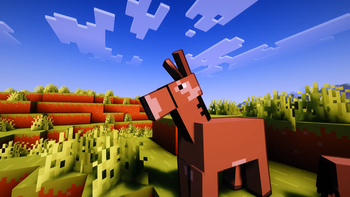
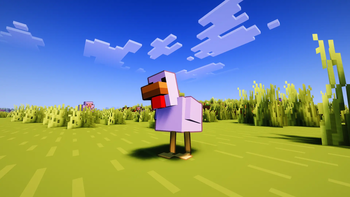
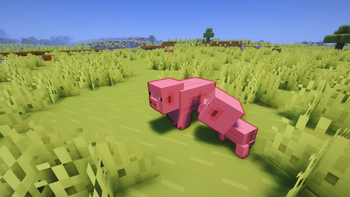
Ever watched a Minecraft trailer and wondered how the mobs got those clean, vibrant outlines? Now you can bring that exact official art style into your own game.
✦ What is Contour Shaders?
Contour Shaders introduces dynamic, color-coded entity outlines to every mob, player, and dropped item in your world.
Instead of a flat, intrusive black border, the outline color intelligently adapts to the entity itself—giving a Creeper a rich green outline and a Cow a deep brown border. It perfectly replicates the iconic aesthetic seen in official Minecraft trailers and promotional art.
✦ Key Features
-
Intelligent Outlines: Every mob naturally pops out from the environment without losing the game's immersive feel.
-
Pixel-Perfect Scaling: Outlines remain crisp, clean, and proportional at any render distance.
-
That "Trailer" Aesthetic: Experience your world as if you're playing inside official Minecraft artwork.
-
Fully Customizable: Easily tweak thickness, darkness, and distance falloff directly from the in-game shader options.
-
Rainbow Outline Mode: Make the outline cycle through rainbow colors, with support for animated or fixed hue.
-
Built on Greatness: Built on top of Complementary Shaders, ensuring the rest of your world still features industry-standard lighting, water, etc.
?️ Requirements
- Minecraft Java Edition
- Iris Shaders (v1.6 or higher)
- A graphics card supporting OpenGL 3.3 or higher
⚙️ Settings You Can Tweak
| Setting | What it does |
|---|---|
| Outline Thickness | How thick the outline appears |
| Outline Darkness | How dark the outline color is |
| Base Distance | Distance where thickness starts shrinking |
| Outline on Hand | Toggle outline on your held item |
| Rainbow Mode | Enable rainbow coloring on the outline |
| Rainbow Animated | Toggle animated or fixed hue |
| Rainbow Fixed Color | Pick a specific hue when animation is off |
| Rainbow Speed | How fast the rainbow cycles |
? Quick Installation
- Ensure Iris Shaders is installed.
- Navigate to: Options ➔ Video Settings ➔ Shader Packs ➔ Open Shader Pack Folder
- Drop the downloaded .zip file into the folder.
- Select Contour Shaders in-game and click Apply.
- Enjoy your new look!
? Join the Community
Got questions, want to report a bug, or just want to show off your screenshots? Join the official Discord server!
Get instant update notifications, beta testing access, and community support.
? Credits
Base Shader: Built on top of Complementary Shaders by the Complementary Development team. Visit them at Complementary Dev
Modifications: The custom adaptive outline system was developed by me (Eleeter) and Edren, integrated into the Complementary codebase.
Distributed as a Modified Pack in full compliance with the Complementary License Agreement 1.6.
请登录后举报
暂无评论,抢个沙发吧~