
ShadowTrace
作者:rebot | 分类:模组
Minecraft 版本: 26.2
平台: fabric
标签: utility
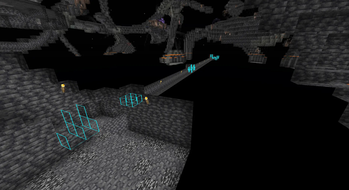
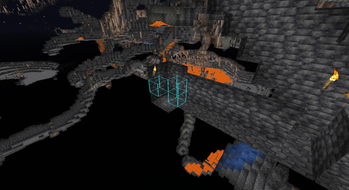
ShadowTrace
ShadowTrace is a Minecraft mod designed to give players a powerful tool for visualizing historical block data directly within the game world. The mod allows users to inspect where and when specific ore blocks were mined, helping server staff detect suspicious mining patterns and possible x-ray usage. Through client-side rendering, ShadowTrace highlights mined blocks in the 3D world with clearly visible colored outlines, making it easy to investigate and analyze block changes.
ShadowTrace is not a standalone mod - it requires the ShadowTrace server plugin to function properly. The server side plugin handles all data queries and sends relevant information to the mod via custom packets. This ensures a clean and efficient separation of logic, where the server handles data processing, and the client focuses on visualization.
Together, the ShadowTrace plugin and mod create a seamless investigative toolset tailored for moderation and anti-cheat purposes on Minecraft servers.
Download the ShadowTrace Server Plugin here.
ShadowTrace is a lightweight mod inspired by the Watson mod, offering a simpler way to visualize removed blocks in Minecraft. While Watson includes many advanced tools, ShadowTrace focuses solely on showing blocks that players have mined or removed. It integrates with CoreProtect and provides a clean, easy-to-use GUI, making it ideal for quickly spotting suspicious activity without the extra complexity.
Features
- View historical mining activity of players.
- See exact coordinates of mined blocks.
- Filter lookups by player and timeframe (e.g.
1m,1h,1d). - Renders blocks as colored outlines in the world.
- Each block type has its own distinctive color for easy identification.
- Supports up to 300 blocks per search, optimized for visibility.
- Works both for online and offline players.
- Uses a custom packet system for efficient data transfer.
- Press G to open the ShadowTrace GUI.
Config file
Add whatever color you want to the different blocks, in hex. You can also add other blocks that you want specific colors on. You can find the configuration file in .minecraft/config/shadowtrace.
{
  "copper_ore": "#bc633d",
  "gold_ore": "#ffaa00",
  "redstone_ore": "#ff0000",
  "nether_gold_ore": "#ffaa00",
  "deepslate_redstone_ore": "#ff0000",
  "deepslate_emerald_ore": "#00cd12",
  "diamond_ore": "#00f2ff",
  "iron_ore": "#e9c0a4",
  "deepslate_copper_ore": "#bc633d",
  "ancient_debris": "#851b00",
  "lapis_ore": "#002bff",
  "spawner": "#9900ff",
  "coal_ore": "#000000",
  "deepslate_iron_ore": "#e9c0a4",
  "deepslate_lapis_ore": "#002bff",
  "emerald_ore": "#00cd12",
  "deepslate_coal_ore": "#000000",
  "deepslate_gold_ore": "#ffaa00",
  "deepslate_diamond_ore": "#00f2ff"
}
Remember to restart the Minecraft client after changing the colors in the configuration file for the changes to take effect.
请登录后举报
请 登录 后赞助作者。
暂无评论,抢个沙发吧~