
stunnable
作者:rebot | 分类:模组
Minecraft 版本: 1.21.11
平台: fabric
标签: game-mechanics utility
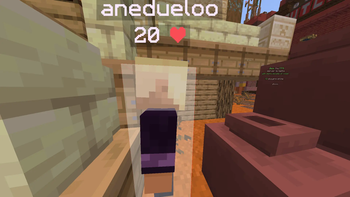
🟢 Stunnable Mod
A minimal, high-performance client-side Fabric mod that adds highly customizable, reactive visual rendering boxes and outlines around target players within reach range.
Perfect for maintaining spatial awareness and monitoring stun / interaction ranges with fluid animations, rainbow effects, and breathing transitions. 🌟
📋 Table of Contents
- ⚡ Quick Start
- 🧠 How It Works — Core Architecture
- ⚙️ Configuration Options
- ✨ Visual Effects System
- 🔌 Integration & ModMenu
⚡ Quick Start
-
Ensure you have:
- Fabric Loader
- Fabric API
- Cloth Config
- AutoConfig
-
Drop the
stunnable.jarfile into your:
.minecraft/mods-
Launch the game.
-
Open the configuration screen directly through ModMenu. 🛠️
Customize:
- Colors 🎨
- Rainbow rendering 🌈
- Breathing opacity transitions 🫁
- Outline width 📏
- Fill opacity 🔥
Perfectly tune the HUD style to your preference.
🧠 How It Works — Core Architecture
The mod operates entirely client-side, hooking directly into Minecraft's rendering lifecycle to draw smooth overlays around nearby targets. 🖥️
🔄 Core Initialization
The mod uses standard Fabric entry points for initialization and configuration setup.
StunnableClient
Implements:
ClientModInitializerResponsible for:
- Client-side initialization
- Secondary configuration handling
Stunnable
Implements:
ClientModInitializerResponsible for:
- Registering AutoConfig schemas
- Hooking into Fabric render lifecycle events
🎨 Rendering Lifecycle Hook
Inside Stunnable.java, the mod subscribes to:
WorldRenderEvents.END_MAIN.register(context -> {
    ...
});
This ensures:
- Rendering updates every frame
- No game tick delay
- No block update dependency
- Extremely smooth visual tracking
📐 Positioning & Calculation Pipeline
🎯 Reach Restrictions
The mod dynamically extracts player interaction range using entity attributes:
double reach = mc.player.getAttributeValue(Attributes.ENTITY_INTERACTION_RANGE);📦 Relative Delta Rendering
Bounding boxes are translated into camera-relative local coordinates to eliminate render jitter:
AABB box = player.getBoundingBox().move(-camPos.x, -camPos.y, -camPos.z);🚫 Target Exclusions
The renderer loops through loaded players while excluding the local player:
if (player != mc.player && playerPos.distanceTo(player.position()) <= reach)⚙️ Configuration Options
The mod includes a complete configurable rendering system accessible through:
- ModMenu
- Cloth Config UI
- AutoConfig config files
🖼️ Render Category
Controls:
- Box visuals
- Outline width
- Opacity
- Base colors
| Option | Type | Default | Purpose |
|---|---|---|---|
fillColor |
Color Picker (Hex) | 0x00FF00 |
Inside box face color |
outlineColor |
Color Picker (Hex) | 0x00FF00 |
Bounding edge color |
onlyOutline |
Boolean | false |
Disables fill rendering |
fillOpacity |
Bounded Discrete (0-100) | 50 |
Fill transparency |
outlineWidth |
Bounded Discrete (1-5) | 2 |
Line thickness |
🌈 Effects Category
Handles:
- Dynamic colors
- Animated transparency
- Procedural visual effects
| Option | Type | Default | Purpose |
|---|---|---|---|
rainbowMode |
Boolean | false |
Enables HSV rainbow cycling |
rainbowSpeed |
Bounded Discrete (1-20) | 5 |
Hue transition speed |
rainbowFillOnly |
Boolean | true |
Rainbow affects fill only |
breathingEnabled |
Boolean | false |
Enables opacity breathing |
breathingSpeed |
Bounded Discrete (1-20) | 5 |
Breathing cycle speed |
breathingStrength |
Bounded Discrete (0-100) | 50 |
Breathing intensity |
✨ Visual Effects System
🌈 Color Mathematics (HSV → RGB)
When rainbow mode is enabled, colors are generated dynamically using time-synchronized HSV calculations.
This creates:
- Smooth gradients
- No stuttering
- Continuous spectrum transitions
private int hsvToRgb(float hue, float saturation, float value) {
    int h = (int) (hue * 6);
    float f = hue * 6 - h;
    float p = value * (1 - saturation);
    float q = value * (1 - f * saturation);
    float t = value * (1 - (1 - f) * saturation);

    float r, g, b;

    switch (h % 6) {
        case 0 -> {
            r = value;
            g = t;
            b = p;
        }
        case 1 -> {
            r = q;
            g = value;
            b = p;
        }
        case 2 -> {
            r = p;
            g = value;
            b = t;
        }
        case 3 -> {
            r = p;
            g = q;
            b = value;
        }
        case 4 -> {
            r = t;
            g = p;
            b = value;
        }
        case 5 -> {
            r = value;
            g = p;
            b = q;
        }
        default -> {
            r = 0;
            g = 0;
            b = 0;
        }
    }

    return ((int) (r * 255) << 16)
        | ((int) (g * 255) << 8)
        | (int) (b * 255);
}
🫁 Breathing Mathematics
The breathing system modifies opacity using a smooth trigonometric sine wave cycle:
float cycle = (float) (
    Math.sin(time * config.breathingSpeed * 0.003)
    * 0.5 + 0.5
);

float strength = config.breathingStrength / 100f;

breathMod = 1f - (
    1f - (0.3f + 0.7f * cycle)
) * strength;
This produces:
- Smooth pulsing transitions
- Non-linear fade behavior
- Adjustable animation intensity
📐 Low-Level Vertex Buffers
Rendering is handled natively through Minecraft's internal vertex pipelines using VertexConsumer.
🟩 Filled Boxes
Uses:
RenderTypes.debugFilledBox()Constructs all six faces manually:
- Bottom
- Top
- North
- South
- East
- West
Example:
buffer.addVertex(pose, minX, minY, minZ)
    .setColor(r, g, b, a);

buffer.addVertex(pose, maxX, minY, minZ)
    .setColor(r, g, b, a);

buffer.addVertex(pose, maxX, minY, maxZ)
    .setColor(r, g, b, a);

buffer.addVertex(pose, minX, minY, maxZ)
    .setColor(r, g, b, a);
📏 Outline Boxes
Uses:
RenderTypes.LINESMaps explicit line segments across bounding coordinates with normals and width parameters.
private void vertex(
    Matrix4f pose,
    VertexConsumer buffer,
    float x,
    float y,
    float z,
    float r,
    float g,
    float b,
    float a,
    float nx,
    float ny,
    float nz,
    float w
) {
    buffer.addVertex(pose, x, y, z)
        .setColor(r, g, b, a)
        .setNormal(nx, ny, nz)
        .setLineWidth(w);
}
🔌 Integration & ModMenu
The mod integrates directly with ModMenu for instant GUI configuration access.
📄 ModMenuIntegration.java
package frqme.isa.dev.stunnable.config;

import com.terraformersmc.modmenu.api.ConfigScreenFactory;
import com.terraformersmc.modmenu.api.ModMenuApi;
import me.shedaniel.autoconfig.AutoConfig;

public class ModMenuIntegration implements ModMenuApi {

    @Override
    @SuppressWarnings("removal")
    public ConfigScreenFactory<?> getModConfigScreenFactory() {
        return parent ->
            AutoConfig
                .getConfigScreen(ModConfig.class, parent)
                .get();
    }
}
This automatically bridges:
- Cloth Config
- AutoConfig
- ModMenu
Without requiring:
- Commands
- Manual GUI handling
- Custom screen registration
🛠️
请登录后举报
请 登录 后赞助作者。
暂无评论,抢个沙发吧~