Overview
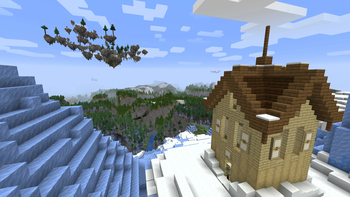
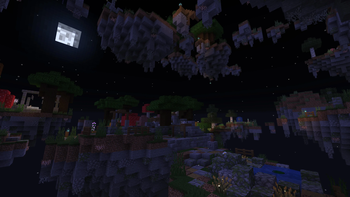
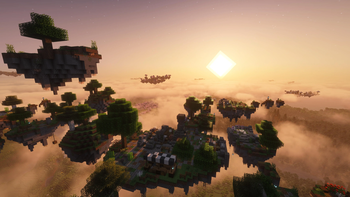
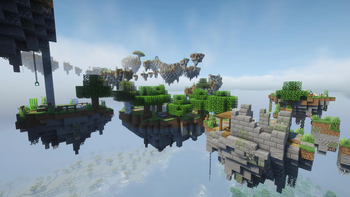
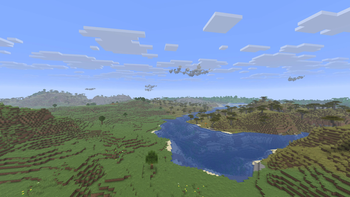
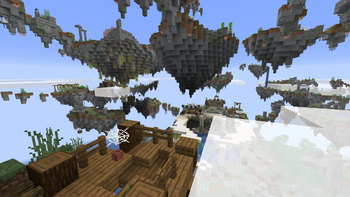
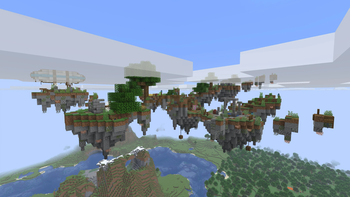
The "Lost Sky Islands" datapack (also available as a mod) adds clusters of sky
islands to your Minecraft world. These sky islands are generated as Minecraft
structures and can vary in size. You can find ruins of some lost civilization
on these islands, some of which may hold valuable treasures. If you ever feel
bored living on the ground, you can also use the islands to start a sky base.
This datapack is balanced against vanilla progression. The block palettes are
also chosen to better fit vanilla worlds (e.g., wool blocks are only used in
building parts where they make sense, not in general terrain texturing).
Therefore, adding this datapack shouldn't break the vanilla experience.
This datapack is also designed to allow easy customization, so you can tweak it
to fit your play style, or to better integrate it in a modpack.
Installation
Datapack File (.zip) Installation
- For single-player worlds, simply add the datapack during world creation and
enable it just like installing other datapacks.
- For servers, put the datapack in the
datapack folder within your world
folder.
Mod File (.jar) Installation
You can easily install it like other mods by putting the .jar file under your
Minecraft instance's mods folder. Supported mod loaders include Forge,
NeoForge, and Fabric.
IMPORTANT: For Fabric, you also need to install Fabric API.
Compatibility
Minecraft Compatibility
This datapack should be compatible with all Minecraft versions between 1.21.10
and 26.2, including 1.21.10 and 26.2.
Mod Compatibility
Since this datapack only adds new structures in the sky, it should be compatible
with common worldgen mods. Although the sky islands may look a bit small if you
use mods like Tectonic, because they are designed around vanilla scale.
If you use another mod/datapack that also adds structures in the sky, there is
a small chance of overlapping structures.
Permission
Feel free to include this mod/datapack in your modpacks.
Although the license is ARR, you're permitted to customize the behaviors of this
datapack without directly modifying the original .jar or .zip file by
creating another datapack or use tweaker mods. See the "Customization" section
below for more details.
Customization
To customize the behaviors of this datapack, you can create a new datapack to
override JSON definitions in this datapack (you need to make sure it loads after
this datapack/mod), or use more advanced tools like KubeJS.
When not explicitly stated, all JSON or structure NBT file paths below are
relative to the data folder in the datapack.
IMPORTANT: Overlays are used to support multiple Minecraft versions.
Depending on the Minecraft version you are using, you may need to use files
from the corresponding overlay for reference. For example, if you want to
override lostskyislands/worldgen/placed_feature/cave_ore_rare_1.json, for
Minecraft 1.21.10, you can simply refer to the file under the root data
directory as the baseline. However, for Minecraft 26.1, you will need to refer
to the same named file under the overlay directory patch_26_1 as the baseline.
Expand to View Technical Details
## Structure Placement
To change the biomes in which sky islands can generate, override the following
biome tag:
`lostskyislands/tags/worldgen/biome/has_structure/sky_islands_plain.json`.
To change the spacing or separation of the sky island structures, override
`lostskyislands/worldgen/structure_set/sky_islands.json`. By default, sky
islands have a slightly larger separation than villages, so they don't clutter
the sky view.
To customize each individual sky island structure's properties (e.g., height
range, spawn overrides, etc.), override the structure definitions files under
`lostskyislands/worldgen/structure`.
## Loot Tables
All loot tables for chests, barrels, decorated pots can be found under
`lostskyislands/loot_table/chests`, allowing detailed controls of loot
generation.
For common chests, barrels, decorated pots on any island:
* `lostskyislands/loot_table/chests/barrel_supplies.json`
* `lostskyislands/loot_table/chests/common_pot_standard.json`
For chests, barrels, decorated pots on specific islands:
* `lostskyislands/loot_table/chests/barrel_garden.json` - On some flower garden
islands.
* `lostskyislands/loot_table/chests/barrel_ladder.json` - On vertical connector
islands with ladders.
* `lostskyislands/loot_table/chests/barrel_mill.json` - On islands with windmill
ruins.
* `lostskyislands/loot_table/chests/common_pot_animal_pen.json` - On islands
with animal pens.
* `lostskyislands/loot_table/chests/common_pot_cave_supplies.json` - On islands
with caves.
* `lostskyislands/loot_table/chests/common_pot_treasure.json` - On islands with
fancy shrines.
* `lostskyislands/loot_table/chests/sky_doc_chest.json` - On islands with sky
docks.
For chests, barrels, decorated pots hanging below islands:
* `lostskyislands/loot_table/chests/hanging_chest.json`
* `lostskyislands/loot_table/chests/hanging_pot.json`
For chests, barrels, decorated pots in island caves:
* `lostskyislands/loot_table/chests/barrel_mushrooms.json` - Inside caves with
mushroom gardens only.
* `lostskyislands/loot_table/chests/barrel_cave_supplies.json`
* `lostskyislands/loot_table/chests/cave_side_room_chest.json`
* `lostskyislands/loot_table/chests/cave_side_room_pot.json`
For underwater chests, barrels, decorated pots (usually in ponds, pools):
* `lostskyislands/loot_table/chests/underwater_chest_standard.json`
* `lostskyislands/loot_table/chests/underwater_chest_treasure.json`
* `lostskyislands/loot_table/chests/underwater_pot_standard.json`
* `lostskyislands/loot_table/chests/underwater_pot_treasure.json`
For chests, barrels, decorated pots in building parts:
* `lostskyislands/loot_table/chests/apothecary_products.json`
* `lostskyislands/loot_table/chests/apothecary_supplies.json`
* `lostskyislands/loot_table/chests/blacksmith_products.json` - Finished
products like tools, armor pieces, etc., in blacksmith ruins.
* `lostskyislands/loot_table/chests/blacksmith_supplies.json` - Supplies or raw
materials like coal, raw ores, etc., in blacksmith ruins.
* `lostskyislands/loot_table/chests/house_barrel_common.json`
* `lostskyislands/loot_table/chests/house_chest_common.json`
* `lostskyislands/loot_table/chests/library_treasure.json`
* `lostskyislands/loot_table/chests/market_stall_common.json`
* `lostskyislands/loot_table/chests/masons_house_supplies.json`
* `lostskyislands/loot_table/chests/tavern_food.json`
* `lostskyislands/loot_table/chests/tavern_supplies.json`
* `lostskyislands/loot_table/chests/tavern_treasure.json`
* `lostskyislands/loot_table/chests/temple_treasure.json`
For chests, barrels, decorated pots in aircraft parts:
* `lostskyislands/loot_table/chests/airship_supplies.json`
* `lostskyislands/loot_table/chests/airship_cargo.json` - Contains more treasure
items compared to "airship_supplies".
For suspicious gravel in house ruins:
`lostskyislands/loot_table/archaeology/house_ruin.json`.
## Monster Spawners
By default, no standard monster spawners will generate. The corresponding
template pool is configured to contain an empty part. If you wish to have
monster spawners generated on the sky islands, you will need to override
`lostskyislands/worldgen/template_pool/spawner/standard_spawner.json` to include
part with desired monster spawners. These parts must be 1x2x1, with the jigsaw
block at the bottom and the spawner block on top. See the example parts under
`lostskyislands/structure/common/spawner`. You can create new parts with new
spawner types based on these examples.
If configured correctly, these monster spawners will generate in some building
ruins and caves.
## Armor Stand Entities
Some building parts will generate armor stand entities with armor pieces on
them. If you want to customize the armor pieces there, you need to override this
template pool:
`lostskyislands/worldgen/template_pool/entity/armor_stand_metal_armor.json`. The
armor stand entity structure parts must be 1x3x1, with the jigsaw block at the
bottom and the armor stand entity sitting on top of it. You can refer to
examples under `lostskyislands/structure/common/entity`.
## Artifacts
### Artifact Generation
Some islands will generate a structure part with an artifact holder, which is an
item display entity designed to hold an artifact item (together with an
interaction entity to enable player interaction). Fancy particles will appear
around the artifact until it is taken by a player. An example structure part is
`lostskyislands/structure/common/treasure/artifact_pedestal_sword_1.nbt`, where
an enchanted diamond sword is inserted inside a stone pedestal. To add
customized artifacts (e.g., some fancy sword from a mod), you will need to
create similar parts of size between 3x3x3 and 3x7x3, and override the following
template pool to include your parts:
`lostskyislands/worldgen/template_pool/treasure/artifact_pedestal.json`.
This datapack includes some custom commands to make it easier to create such
structure parts. An example procedure to create a new artifact pedestal part:
1. Load `lostskyislands/structure/common/treasure/artifact_pedestal_sword_1.nbt`
in your dev world using a structure block.
2. Run `/function lostskyislands:dev/enable_dev_mode` (note that dev mode is
persistent per world unless you disable it with
`/function lostskyislands:dev/disable_dev_mode`).
3. Hold the artifact item in your main hand, stand at the center of the block
you want to place the artifact, and run
`/function lostskyislands:dev/create_artifact_display`. Note that for swords,
pickaxes, shields, and tridents there are several specialized functions. For
example, `lostskyislands:dev/create_artifact_display_sword_in_stone` will
transform the sword's position as if it is inserted into the block you are
standing on. If your item has different translations/rotations than vanilla
ones, you may need to adjust the item display entity's transformation
properties by yourself.
4. Export the part under a new name.
5. Include the new part in the template pool.
## Ore Generation
Some islands with caves generates ores using feature pool elements. To customize
the ore generation, you can to override these files to customize possible ores
to generate and their frequency:
`lostskyislands/worldgen/configured_feature/cave_ore_*.json`.
You may also adjust the weights for common, uncommon, rare ores in
`lostskyislands/worldgen/template_pool/feature/cave_ores.json`.
## Bees
Certain islands will generate beehives with bees in them. If you want to include
modded beehives or bees, you can override the following template pool:
`lostskyislands/worldgen/template_pool/decor_beehive_stand.json`. The beehive
parts used in this pool should have a size of 1x2x1. You can use
`lostskyislands/structure/common/decor/beehive_stand_full_with_bees.nbt` as an
example.

暂无评论,抢个沙发吧~