
Discord 2FA
作者:rebot | 分类:模组
Minecraft 版本: 1.16 1.16.1 1.16.2 1.16.3 1.16.4 1.16.5 1.17 1.17.1 1.18 1.18.1 1.18.2 1.19 1.19.1 1.19.2 1.19.3 1.19.4 1.20 1.20.1 1.20.2 1.20.3 1.20.4 1.20.5 1.20.6 1.21 1.21.1 1.21.2 1.21.3 1.21.4 1.21.5 1.21.6 1.21.7 1.21.8 1.21.9 1.21.10 1.21.11 26.1 26.1.1
平台: bungeecord
标签: management utility

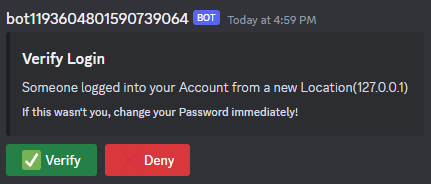

🛡️ Why Discord2FA?
Token-grabbing is one of the biggest threats facing Minecraft players today. With Discord2FA, every login is verified through Discord — meaning even if someone steals a player's Minecraft credentials, they still can't get in without access to their Discord account.
Beyond security, Discord2FA makes a great verification gate: players must link and verify through Discord before they can interact with your server, significantly reducing alt accounts and anonymous trolling.
⚙️ Setup
- Download the correct jar for your platform (Spigot, Paper, Velocity...)
- Create a Discord Bot at Discord Developer Portal and invite it to your server
- Configure config.yml with your bot token, guild ID, and channel ID
- Restart your server
🖥️ Supported Platforms
| Platform | Module | Notes |
|---|---|---|
| Paper | paper |
1.16.5+ |
| Spigot | spigot |
1.16.5+ |
| BungeeCord | bungeecord |
Proxy; optional verification/post-verification servers |
| Velocity | velocity |
Proxy; same options as BungeeCord |
🧩 Permissions
Discord2FA uses grant-by-default permissions for link/unlink and op-only for admin:
| Permission | Default | Description |
|---|---|---|
discord2fa.link |
true | Use /link. |
discord2fa.unlink |
true | Use /unlink. |
discord2fa.admin |
op | Use /discord2fa (version, status). |
🗂️ Configuration
# Language: EN, DE, FR, IT, PL, RO, RS, TR, UA
language: en

# Storage: MYSQL or FILE
storage: "FILE"
fileAsFallback: true

database:
  ip: ""
  name: ""
  user: ""
  password: ""

discord:
  token: ""
  guild: ""
  channel: ""

# Commands usable before verification
allowedCommands: ["/link"]

# Require all players to link Discord
forceLink: false

# Skip re-verification for known IPs
rememberIPAddresses: true
Support and Troubleshooting
For any further assistance or troubleshooting, please reach out to our support server on Discord.

请登录后举报
请 登录 后赞助作者。
暂无评论,抢个沙发吧~