
McOSM
作者:rebot | 分类:模组
Minecraft 版本: 1.12.2
平台: forge
标签: utility worldgen
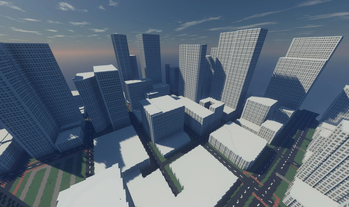
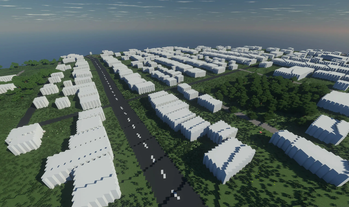
McOSM
A Mod that imports OpenStreetMap data into Minecraft, fully compatible with CubicChunks, Terra121 and the Build The Earth map projection.
Features
- Making building shells.
- Making each house the right height based on its OSM data height.
- Adding windows on buildings based on how many floors they have.
- Set building material based on OSM material data.
- Set building material based on OSM building color data.
- Making roads.
- Creating different road types based on OSM data.
- Including walkways, stairs and corridors inside houses. (
TODO) - Automatically making tunnels. (
TODO) - Adding pedestrian crossings to roads.. (
TODO)
- Making railroads. (
TODO)- Building train platforms. (
TODO)
- Building train platforms. (
- Making vegetation
- Making trees, tree rows and hedges based on OSM data.
- Gui to auto download API data and build in one command.
- Load data from a file or from the API.
- Building in Cubic or Non-Cubic chunk worlds.
Commands
There are several commands to load map data into minecraft, here are all of them:
/osmor/osm [lat1] [lon1] [lat2] [lon2]to open the download and build gui/osmshellto start building the building right under you without a gui/osmfile [path]to open data from a file and open the build gui/osmapi [lat1] [lon1] [lat2] [lon2]to copy a link of the api url to your clipboard to manually open it/osm stopto stop all current tasks/osmcoords <to/from> <x/lat> <z/lon>to convert GPS coordinates to/from ingame coordinates
Usage
-
Go on a map (like Google maps), then find the latitude and longitude of the northwest and southeast corners of the area you want to download (How?), and save those coordinates for later.
-
Then run the
/osmcommand which will open the builder gui -
Select the features you want on the left (The [Global/Local] toggle changes the building placement from on the terra121 map location to locally around the player)
-
Then paste the latitude/longitude you copied from earler into coordinate boxes. the map preview should now vaguely line up (It doesn't enterly line up! As long as it isn't on the other side of the earth it should be fine)
-
Then click the
DownloadButton and wait for it to download, If it wasn't successful it should say an error in the output box -
If it successfully downloaded, you can click on the
Startbutton to start building (you don't have to be in the chunks its building in for it to build)
Important:
When using the mod in a Terra121 world, turn the map direction to upright and BTE projecttion!
Also turn off roads and building outlines for the best result!
请登录后举报
请 登录 后赞助作者。
暂无评论,抢个沙发吧~