
HUD manager AKA hudman
作者:rebot | 分类:模组
Minecraft 版本: 1.21.4
平台: fabric
标签: library management utility
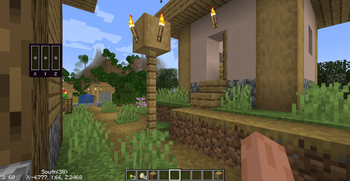
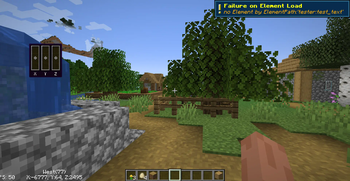
Hud Manager
On another custom HUD mod
But this time it's aimed towards the power user
At the moment this mod is very not user friendly i'm working on to change that
The future of the mod
Due to current life events I have taken a little bit of a break I've been working on some C projects of recent and I haven't been able to get around to this mod It is not dead but on hiatus
Important
Do not use mod version 1.7.0 to 1.8.0 They are broken use 1.8.1
? What's this mod?
a client side minecraft mod that I’ve created in my free time for mc1.21.4
the main feature of the mod is To allow the user to create custom HUD using a config file written in Json.
Fun fact: this was originally just made as a test mod to see if I can even write mods
✅ Features:
- A Detailed Json config file
- Many customizable built-in hud elements
- Expandability: this mod can be expanded upon by other mods
- Performant: Due to its minimal design it's really fast
- and for the dev's The API is quite easy More info on Github
- A new preset system That allows you to create pseudo elements using preexisting elements
? How do you get this thing working
you'll find the config file while in the config folder.
Here's an example config file:
{
    "ver":"v1.0",
    "elements": [ // The list of elements to be shown on your screen
        {
            "elementId": "hudman:velocity_vector", // The element you want on your screen
            "cords": {"x": 100, "y": 110}, // Where you want the element
            "width": 0, // This one doesn't work and might be removed
            "height": 0, // same with this one too
            "scale": 0.75, // Scales your element
            "pairGameHudElement": "", //Just leave this blank
            "enable": true, // If this is false then the mod will not render your element
            "strings": [ // Element Specific settings
                "doTooltip" // To render a tool tip background for this element
            ]
        }
    ],
    "debug": false, // Leave this off this is for the devs
    "errorNotification": false // To show a notification on screen if an element doesn't work
}
This will add this hud element to your game
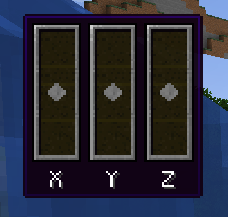
This element visualizes your velocity. it also has a very nice tooltip background
This was enabled by "doTooltip" The strings section is very versatile but it is very dependent on the element
Let's list off the elements
hudman:cords: Puts the cords on your screen is customizablehudman:text: This puts text on your screenhudman:compass: It just a little text compass showing what direction you're facinghudman:velocity_vector: The one shown abovehudman:fps: This one puts the FPS on your screen- And more to come
? How to contribute
Info on how to contribute code can be found here
Please be warned that my spelling is terrible due to my dyslexia and I use text to speech a lot
请登录后举报
暂无评论,抢个沙发吧~