Simple Animal Pens 图标

Simple Animal Pens

作者:rebot | 分类:模组

价格:0 墨喵币 下载量:0 点赞:0 版本 1.1.2
本资源为搬运资源,原资源地址: https://modrinth.com/mod/simple-animal-pens
资源信息

Minecraft 版本: 1.21.11 26.1 26.1.1 26.1.2 26.2

平台: fabric forge neoforge quilt

标签: mobs storage utility

资源介绍

Simple Animal Pens is a datapack that let players store infinte amounts of mobs in a single block. The pack strive to full support of all vanilla features as well as compatibility with other packs (and even mods in some cases).

Please report bugs on this project github page or my discord server

Fabric loader requires fabric API

Support Ponder lib

Uses Smithed conventions for compatability

items:

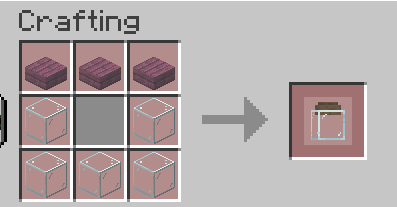
  • Animal jar.

    the animal jar let you collect and store the animals into it.

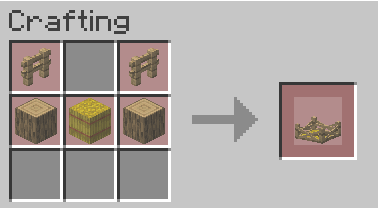
  • Animal pen.

    the pen is block that let you place the jar in the world. in order to do that first collect some animals in your jar then right click on empty pen

Commands:

Give jar:

loot give @p loot sap:animal_jar

Give pen:

loot give @p loot sap:animal_pen

Changing pack settings:

dialog show @s sap:settings
Technical details to modifiy the pack behavior If you want to add support for new mobs that not supported by default, this section will guide you keep in mind you must use the same namespaces for it to work. > NOTE : when you see `ENTITY` inside function or tag you need to put the entity name without the namespace instead e.g. "minecraft:cow" -> "cow" ## 1-adding mob adding the mob into the entity tag `#sap:fit_in_jar` you can edit the whole tag if you want to remove animal, or you can just addon top of it with replace : false ``` { "replace": false, "values": [ "minecraft:cow", "minecraft:pig", "minecraft:sheep", "minecraft:chicken", "minecraft:turtle", "minecraft:bee", "minecraft:rabbit" ] } ``` ### 2-adding right click functions create new item tag inside sap named `used_on_ENTITY` and specify what items can be used on this mob then create new function named `interact_with_ENTITY` in ``` sap:click_functions/loot/ ``` inside the function you can run whatever you want. you can split the function into 2 or more if you want more than 1 click function or diffrent tools the default file for bee looks like that ``` execute if items entity @p[tag=this] weapon.mainhand *[minecraft:custom_data~{smithed:{ignore:{functionality:1b}}}] run return fail scoreboard players set @s sap.function_cooldown 12000 scoreboard players operation @s sap.function_cooldown -= @s sap.entity_count scoreboard players add @s sap.function_cooldown 100 execute as @p[tag=this] run function sap:click_functions/loot/specific/collect_honey ``` inside the specific function you can add sounds,clear items,give items,particals etc ### 3-breeding to add viable food for breeding create(or use the vanila one) item tag under the MINECRAFT namespace called `ENTITY_food` ### 4-Tool for breaking tool needed to break the farm controlled by the item tag sap:tool_to_break ### 5-Tool for killing tool needed to kill entity in the farm controlled by the item tag sap:tool_to_kill
下载太慢?试试 墨喵加速站,支持 Modrinth 和外网直链高速下载! 用的人越多,下载的越快!
下载与版本
评论(0)
登录 后发表评论。

暂无评论,抢个沙发吧~

举报此资源

请登录后举报

🔥 相关推荐
Custom Cursor Reload

价格:0 墨喵币
下载量:0

查看详情
Heartaches

价格:0 墨喵币
下载量:0

查看详情
Blue The Pack

价格:0 墨喵币
下载量:0

查看详情
Allay Drops│悅靈掉落物

价格:0 墨喵币
下载量:0

查看详情