OnTime 图标

OnTime

作者:rebot | 分类:模组

价格:0 墨喵币 下载量:0 点赞:0 版本 4.0.0
本资源为搬运资源,原资源地址: https://modrinth.com/mod/ontime
资源信息

Minecraft 版本: 1.20.1

平台: forge

标签: library management utility
资源介绍
# OnTime ⏱️ A powerful and flexible timer mod for Minecraft. Create custom timers with on-screen display, dynamic time expressions, event triggers, and a built-in web admin panel — ideal for minigames, events, modpacks and automated server tasks. [![Modrinth Downloads](https://img.shields.io/modrinth/dt/ontime?style=for-the-badge&logo=modrinth&label=Modrinth&color=00AF5C&logoColor=white)](https://modrinth.com/mod/ontime) [![CurseForge Downloads](https://img.shields.io/curseforge/dt/1478348?style=for-the-badge&logo=curseforge&label=CurseForge&color=f16a20&logoColor=white)](https://www.curseforge.com/minecraft/mc-mods/ontime) [![Fabric](https://img.shields.io/badge/Fabric-1.20.1%20%7C%201.21.1--1.21.11%20%7C%2026.1--26.2-dbd0b4?style=for-the-badge)](https://fabricmc.net/) [![NeoForge](https://img.shields.io/badge/NeoForge-1.21.1--1.21.11%20%7C%2026.1--26.2-f16a20?style=for-the-badge)](https://neoforged.net/) [![Forge](https://img.shields.io/badge/Forge-1.20.1-e04e14?style=for-the-badge)](https://minecraftforge.net/) [![Environment](https://img.shields.io/badge/Env-Client%20%26%20Server-4a90d9?style=for-the-badge)](https://modrinth.com/mod/ontime) [![Wiki](https://img.shields.io/badge/Docs-Wiki-0969da?style=for-the-badge&logo=github&logoColor=white)](https://github.com/MateoF024/OnTime/wiki) [![Issues](https://img.shields.io/badge/Report-Issues-red?style=for-the-badge&logo=github&logoColor=white)](https://github.com/MateoF024/OnTime/issues)

✨ Features

? Timer System

  • Create and manage multiple named timers
  • Countdown and count-up modes
  • Start, pause, resume, stop, reset and remove timers at any time
  • Add or override time on active timers
  • Timers persist across server restarts and auto-resume where they left off
  • Repeat mode — loop a timer a set number of times or infinitely, with optional cooldown between repeats
  • Timer sequences — chain timers so the next starts automatically when the current finishes, with optional cooldown between steps
  • Per-timer files — every timer lives in its own config/ontime/timers/<name>.json, ideal for backups and version control
  • Export / Import / Clone — share timers between worlds or instances with /timer export, /timer import, /timer clone

? Dynamic Time Expressions

  • Define a timer's duration with a math expression that's evaluated when the command runs
  • Supports + - * / %, parentheses, and live variables: players_online, score(<objective>, <holder>), ftb_quest_completed(<id>), ftb_reward_claimed(<id>)
  • Available on /timer expr create, /timer expr set, /timer expr add

? Conditions & Triggers

  • Score conditions — finish (or start) a timer when a scoreboard objective reaches a target
  • Condition expressions — full boolean DSL with &&, ||, !, >, <, >=, <=, ==, !=, plus values like time_remaining, time_elapsed, players_online, score(...)
  • Vanilla event triggers — fire timers on player_death, dimension_change (any or specific dimension), advancement (specific ID)
  • FTB Quests triggers — fire on quest completion or reward claim by hex ID
  • Each condition/trigger can be configured to either start or finish the affected timer

?️ Server-Controlled Display

  • Real-time on-screen overlay synced to all connected players
  • Smooth, jitter-tolerant client rendering — the counter updates like a real wall clock with no visual desync
  • 10 position presets: Boss Bar, Action Bar, Top/Center/Bottom variants, and Custom
  • Per-player visibility control — admins can show or hide the timer for specific players
  • Adjustable scale (0.1× to 5.0×)
  • Dynamic color gradient based on remaining time (configurable thresholds and colors)
  • All display settings are managed server-side and pushed to clients automatically
  • Timer titles — decorative text above, below, left or right of the counter, as plain text or tellraw-style JSON, per timer (/timer title)
  • Active timer synced to scoreboardontime_active objective updated every second, usable with /execute if score
  • Jade compatibility — when the timer overlaps Jade's overlay, Jade is gently displaced; restored automatically

? Sound

  • Configurable tick sound, volume and pitch via /timer sound
  • Per-player sound toggle managed by admins via /timer silent

⚡ Command Execution

  • Attach any server command to a timer, executed automatically on completion
  • Scheduled commands — fire commands at intermediate times and chain several commands per point, on top of the classic finish command (/timer commands)
  • Command delay — optional configurable pause between commands that run as a sequence
  • Placeholder system: use {name}, {time}, {seconds}, {ticks}, {target}, {mode} in commands

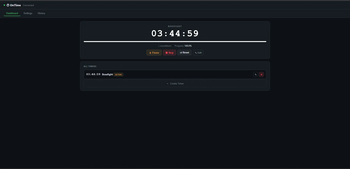
? Web Admin Panel

  • Built-in HTTP+SSE dashboard served by the mod itself — no extra server needed
  • View all timers in real time, start/pause/stop/reset, edit names/durations/commands/conditions, browse the history log, change display config
  • Auto-closes after 5 minutes of inactivity (with a 1-minute warning to ops); clean shutdown on server stop
  • Start/stop on demand: /timer webpanel start [port], /timer webpanel stop, /timer webpanel info
  • Default port: 25580

? History Log

  • Every timer completion is recorded in config/ontime/history.json with name, duration, mode, command and timestamp
  • Browsable from the web panel

⚙️ Configuration

  • In-game config screen via Cloth Config (and ModMenu on Fabric)
  • JSON config files in config/ontime/
  • Optional WebSocket server for external integrations (panels, Discord bots) — enable in config.json. Default port: 25581

? API & Integrations

  • OnTime API — create, query, control timers and register event callbacks (onStart, onFinish, onPause, onResume, onTick)
  • External finish conditions — register a custom Supplier<Boolean> that can stop a timer from another mod
  • Custom renderer API — replace the timer HUD renderer entirely from a client-side mod
  • LuckPerms support — per-node permission control for every subcommand, with OP-level fallback
  • Entrypoint system — Fabric entrypoints and NeoForge/Forge IMC
  • Placeholder API integration (Fabric)
  • FTB Quests integration (compileOnly, auto-detected at runtime)
  • Jade integration (auto-detected at runtime)

? Quick Command Reference

# Lifecycle
/timer create <name> <h> <m> <s> [countUp] [command]
/timer set <name> <h> <m> <s>
/timer add <name> <h> <m> <s>
/timer start <name>
/timer pause
/timer stop
/timer reset [name]
/timer remove <name>

# Dynamic expressions (advanced)
/timer expr create <name> <expression>
/timer expr set <name> <expression>
/timer expr add <name> <expression>

# Behavior
/timer command <name> [command]
/timer commands <name> add <h> <m> <s> <command>
/timer commands <name> add finish <command>
/timer commands <name> list | remove <index> | clear
/timer title <name> <above|below|left|right> <text|clear>
/timer title <name> [clear]
/timer repeat <name> [count] [cooldownSeconds]
/timer sequence <name> [nextName|clear] [cooldownSeconds]
/timer condition <name> <objective> <score> [target] | clear | if <expr> | if_start <expr>
/timer trigger <name> <player_death|dimension_change|advancement|ftb_quest|ftb_reward> [...] [start|finish] | clear

# Sharing
/timer export <name>
/timer import <filename> [newName]
/timer clone <source> <dest>

# Web panel
/timer webpanel start [port]
/timer webpanel stop
/timer webpanel info

# Display
/timer position <preset>
/timer sound <soundId> [volume] [pitch]
/timer scale <value>
/timer hide [targets]
/timer silent [targets]

# Misc
/timer list
/timer help [page|command]

? Localization

Available in English, Spanish (AR / ES / MX).


? Links

Wiki Issues


Created by MateoF24 — Licensed under MIT

下载太慢?试试 墨喵加速站,支持 Modrinth 和外网直链高速下载! 用的人越多,下载的越快!
下载与版本
评论(0)
登录 后发表评论。

暂无评论,抢个沙发吧~

举报此资源

请登录后举报

🔥 相关推荐
Leather From the Dead

价格:0 墨喵币
下载量:0

查看详情
World Finder

价格:0 墨喵币
下载量:0

查看详情
Crazy Combat

价格:0 墨喵币
下载量:0

查看详情
KubeJS Oritech

价格:0 墨喵币
下载量:0

查看详情