
X-Commands
作者:rebot | 分类:模组
Minecraft 版本: 1.18.2 1.19 1.19.1 1.19.2 1.19.3 1.19.4 1.20 1.20.1 1.20.2 1.20.3 1.20.4 1.20.5 1.20.6 1.21 1.21.1 1.21.2 1.21.3 1.21.4 1.21.5 1.21.6 1.21.7 1.21.8 1.21.9 1.21.10 1.21.11 26.1 26.1.1 26.1.2 26.2
平台: bukkit folia paper purpur spigot
标签: management utility
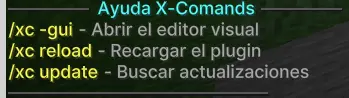
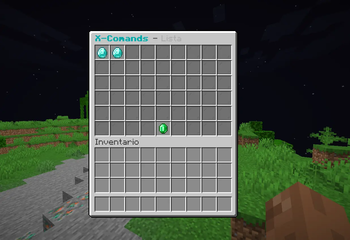
Manage your custom commands easily and visually.
X-Commands is a simple yet powerful plugin that allows you to create, edit, and manage custom commands for your server directly from an intuitive GUI or via advanced CLI commands.
✨ Features
- ? Folia & Paper Ready: Built for modern high-performance servers.
- ? Modern Color Support: Native support for MiniMessage, RGB (
&#RRGGBB), and Legacy (&). - ? Visual & CLI Management: Create and edit commands using the GUI or the new command line interface.
- ? Unified Language System: All messages centralized in root language files. Support for EN, ES, PT, RU, JA.
- ? Advanced Action System: Execute messages, titles, sounds, particles, and more in a sequential order.
- ? Vault Integration: Full economy support (give/take money) using Vault.
- ⏱ Timed Commands: Execute actions automatically every X seconds using intervals.
- ? Proxy Support: Send players to other servers using [VELOCITY] or [SENT_TO] tags.
- ⚡ Highly Optimized: Designed for high performance with minimal resource usage.
? Commands
| Command | Description |
|---|---|
/xc help |
Shows the help menu |
/xc -gui |
Opens the visual editor |
/xc create <name> |
Creates a new custom command |
/xc delete <name> |
Deletes an existing command |
/xc list |
Lists all your custom commands |
/xc info <name> |
Shows details about a command |
/xc edit <cmd> <attr> <val> |
Modifies an attribute via CLI |
/xc reload |
Reloads the configuration and languages |
/xc locate <lang> |
Changes the plugin language |
/xc update |
Checks for updates |
/xc version |
Shows plugin and server info |
? Permissions
| Permission | Description |
|---|---|
xcommands.admin.* |
Full access to all features (Default: OP) |
xcommands.admin.gui |
Access to the GUI editor |
xcommands.admin.create |
Permission to create new commands |
xcommands.admin.delete |
Permission to delete commands |
xcommands.admin.edit |
Permission to edit existing commands |
xcommands.admin.reload |
Use the reload command |
xcommands.admin.locate |
Use the locate command |
xcommands.admin.update |
Use the update command and join notifications |
xcommands.admin.version |
Use the version command |
⚡ Actions & Conditions
Actions are executed following a sequential order. If a condition is not met, the following action is skipped.
- Key Actions: Messages, Titles, Sounds, Effects, Commands, Teleport, Particles, Bungee, Vault, etc.
- Smart Conditions: Permissions, Money, OP, Worlds, Chance.
请登录后举报
暂无评论,抢个沙发吧~