
InOr
作者:rebot | 分类:模组
Minecraft 版本: 26.2
平台: fabric
标签: storage utility
Inventory Organizer — Full description
A Fabric mod for organising your inventory and your storage with one click, plus a server‑aware multi‑chest "warehouse" system, a set of optional automations, and remote crafting. Runs on Minecraft 26.1 / 26.1.1 / 26.1.2. environment: "*" — it's a client‑side mod (required on the client) with optional server‑side support that unlocks the shared multiplayer features.
Part 1 — Every feature
Sorting
OI (Organize Inventory): one click sorts your whole inventory — identical items merge into full stacks, the same types group together.
OST (Organize STorage): does the same to the chest you have open.
Sort keybind: OST when a chest is open, otherwise OI. A Sort action setting picks the behaviour: Smart (default), OI‑only, OST‑only, or Both.
Stack consolidation: scattered partial stacks of one item are merged back into full stacks.
The Slot Config editor
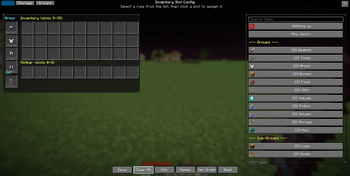
The central screen (the S button or a keybind). Tabs across the top: Inv, Storage, Groups.
Inv tab: a live picture of your inventory. Pick a rule from the right‑hand palette, then left‑click a slot to assign it; right‑click resets a slot to any.
Rules: any (accepts anything), empty (kept empty), Groups (Weapons, Tools, Armor, Blocks, Food, Valuables, Potions, Splash, Arrows, Utility, Misc), Sub‑groups (Logs, Boats, …), or a specific item. A search box filters 1600+ items.
Armor + offhand: rules for helmet / chestplate / leggings / boots and the shield/offhand slot.
Auto‑refill marker: middle‑click a hotbar slot to flag it with a green R (see Automations).
Bottom row: Save, Clear, Kits, Names, Ranks (Tier Order), Back, and Warehouse when available.
Help: a Guide button (full manual) and a ? quick‑tip overlay (click outside to close).
Per‑chest profiles
Each chest can remember its own sort layout. Open a chest → New profile? → Yes.
Identity is resolved by, in order: anvil custom name → exact block coordinates (both halves of a double chest) → adjacent‑sign text. A sign next to a chest also names its profile.
Carrying mode: a profile becomes "active" only while its chest is open; the Pr button re‑binds a carried profile to the open chest. Nothing marks a chest as non‑storage (hidden from the map).
Profiles are private and local — never shared.
Groups & Tier Order (Ranks)
Groups tab / editor: edit the built‑in item groups or create custom groups so rules match exactly what you mean.
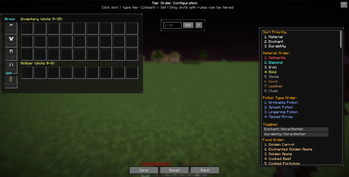
Tier Order (Ranks): within a type, set the priority order so sorting is deterministic (e.g. netherite above diamond). Double‑click a slot to jump straight into it.
Kits
Save a whole slot‑config layout as a named Kit and load it later. A Cycle slot preset keybind flips between saved Kits on the fly.
Warehouses (linked chests)
The Warehouse map (Wh button / keybind) is a top‑down view of your chests.
Link 2+ nearby chests (within range, connected) into one warehouse; OST at any member — or Sort on the map — organises the whole group together. Unlink breaks it up.
On servers, links are private by default; a foreign link is revealed to another player only after they open one of its chests (then the whole warehouse shows on their map).
Permissions & anti‑theft (servers)
Per‑player OST permission: select your own link → OST button → a picker of known players, each toggled on/off. Default off — a revealed link is visible but not sortable until granted.
Anti‑theft (server‑enforced): you can't link a chest that's in someone else's warehouse, can't remote‑withdraw from a foreign link, and can't sort a link without permission.
Automations (Free mode)
Auto‑refill (green R): a marked hotbar slot refills itself from your inventory when it empties, using the slot's rule or the last item that was there.
Chest refill (Rf): top up every marked hotbar slot from the open chest in one press.
Deposit‑all (Dep): send back every inventory stack whose item is already in the chest.
Scroll: plain‑scroll a slot to quick‑move it; Shift+scroll sorts one item per notch.
Trash / Void (under Storage): a rule grid; matching items are dropped on pickup. A Trash mode toggle switches Drop‑all vs Keep‑1‑stack.
Remote crafting
A materials panel by the inventory and crafting table lists the combined contents of nearby chests (icon + name + count) with search and a quantity box; click to pull items to your inventory. Range: 60 blocks at a table in single‑player, 15 elsewhere.
Server‑friendliness & safety
Quick switch (master mode): one button flips everything between Server‑Friendly and Free.
Free gating: automations only run in private/whitelisted environments (single‑player, LAN, Realms, Aternos, whitelisted servers); off on normal public servers.
Whitelist (opt‑in): add a trusted server (behind a confirmation) to enable Free features there.
Fight mode: real PvP forces Server‑Friendly for ~20s (with a small HUD timer); kept on at all times on public servers, so the mod never gives a combat edge.
Death auto‑sort: optionally re‑sorts after you recover your gear.
Keybinds (Controls → Inventory Organizer)
All unbound by default: Sort, Open Kits, Open Settings, Open Warehouse map, Chest refill, Cycle slot preset. A Keybind mode setting (Inventory‑only / Free / Off) controls where they're allowed to fire.
Help & languages
A full, word‑wrapped in‑game Guide (auto‑opens on first settings entry) and a per‑screen ? quick help.
9 languages: English, Magyar, Deutsch, Español, Français, 中文, 日本語, Русский, Português, with button labels sized so translations don't overflow.
Part 2 — How it's built (architecture)
Sides & entry points
Environment "*" — loads on both sides. The main entrypoint registers the networking payload types (common) and the server‑side receivers; the client entrypoint registers keybinds, screen hooks (Fabric ScreenEvents), the HUD element, and the client tick.
Core split: the client owns all UI/sorting/config; the server owns only the shared warehouse link store + sort engine + remote‑craft aggregation.
Configuration (client, local)
OrganizerConfig — a JSON config holding slot rules, storage presets, custom groups, warehouse groups (local links), known chests, Kits, keybind/sort settings, whitelist, trash rules, etc.
StoragePreset — one chest's layout (slot rules, size, identity: name/positions/sign). SlotRule, WarehouseGroup — supporting data.
Sorting
InventorySorter / SortLogic — inventory sort + rule matching + stack consolidation.
StorageSorter — chest sort using the active StoragePreset.
ChestIdentifier (client) — resolves which local profile is active for the open chest (name → coordinates → sign), and whether the chest belongs to a foreign link (sort‑only).
Warehouse subsystem
WarehouseClient — client‑side state: the handshake flag, the visible‑links cache (own + revealed foreign), the remote‑craft stock, the OST‑roster cache, and all the send helpers.
WarehouseNet — registers payloads and the server receivers; the server thread does all the work.
WarehouseLinks — server‑side store of links (owner, dimension, positions, the owner's per‑chest rules, OST allow‑list) + a joined‑player roster; persisted to inventory-organizer-warehouse-links.json.
WarehouseEngine — the sort engine: pulls all items from a group into a pool, then re‑places each stack into the chest whose rule matches best (double‑chest aware, distance‑guarded).
RemoteStock — server‑side remote‑craft: aggregates nearby chest contents and withdraws items (skips foreign‑link chests).
WarehouseMapScreen, OstPermScreen — the map UI and the OST permission picker.
Networking (handshake‑gated)
On join the server sends WarehouseHelloPayload; the client sets an available flag. Until then the client sends nothing, so on a vanilla server the mod is completely silent.
Client→server: warehouse map query, upload/delete link, sort link, sort group, request OST roster, set OST permission, craft stock query, craft withdraw.
Server→client: hello, link map data, OST roster, craft stock.
Every server action re‑validates distance and ownership/permission and never trusts the client; anti‑spam cooldowns guard sorting and withdrawing.
Client integration & robustness
Mixins: CreativeInventoryScreenMixin (buttons in the creative inventory), InventoryScreenMixin, ContainerScreenAccessor (leftPos/topPos/hovered slot), ContainerScrollMixin (scroll on container screens).
FightModeTracker (tamper‑resistant PvP detection + HUD), ServerEnvironment (Free‑mode gating), DeathSortTracker.
UI is resize‑safe: layout is rebuilt in init() (re‑run on resize); a universal guard forces a re‑init when the screen's cached size differs from the window, and a leftPos watcher re‑lays‑out the in‑game overlays when the recipe book shifts the GUI.
Build & releases
Single Java source base; per‑version projects (26.1 / 26.1.1 / 26.1.2) share the same code with version‑specific Fabric metadata. Distributed as one jar per Minecraft version.
请登录后举报
暂无评论,抢个沙发吧~