
ServerAlarmClock
作者:rebot | 分类:模组
Minecraft 版本: 1.21 1.21.1 1.21.2 1.21.3 1.21.4
平台: bungeecord
标签: optimization technology utility

ServerAlarmClock
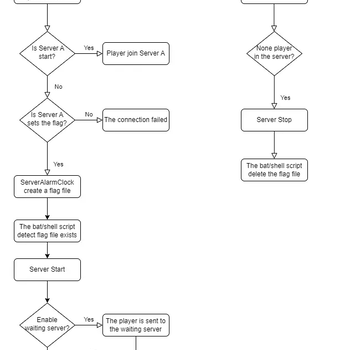
ServerAlarmClock is the perfect wake-up call for your Minecraft server! Ever tried to join a server that's still fast asleep? With ServerAlarmClock, your server will automatically start up when someone attempts to join, ensuring no one has to wait too long for the fun to begin.
Features
- ? Automatic Server Start: Your server will automatically boot up when a player attempts to join a stopped or sleeping server.
- ? Custom Messages: Send players fun and customizable messages while they wait for the server to start.
- ? Easy Configuration: Simple setup with a lightweight, no-hassle config.
Command
# reload your plugin config(serveralarmclock.reload)
/sac reload
How to Use
-
Install the Plugin:
- Download the
ServerAlarmClock.jarfile and place it in your BungeeCord plugins folder.
- Download the
-
Configure the Flags:
- Open the
config.ymlfile located in theServerAlarmClockfolder. - Under the
flagssection, specify the paths to the flag files for each of your servers. These flags will be used to trigger the server startup.
- Open the
-
Setup the Server Startup Script:
- You need to create or modify your server startup script to include the logic for checking the flag file. The example of a Linux shell script is provided at the end of this passage.
-
Start the Server:
- Once everything is configured, reload the plugin using /sac reload. The plugin will now monitor server connections and start the target server when a player attempts to join a server that is currently stopped.
-
Enjoy!
Keep your players happy and your server ready with ServerAlarmClock—no more unexpected downtime!
请登录后举报
暂无评论,抢个沙发吧~