
SoundPlayer
作者:rebot | 分类:模组
Minecraft 版本: 1.21 1.21.1 1.21.2 1.21.3 1.21.4 1.21.5 1.21.6 1.21.7 1.21.8 1.21.9 1.21.10 1.21.11
平台: bukkit paper spigot
标签: adventure game-mechanics utility

SoundPlayer
Version: 1.1
Author: XCaNiNeX
See it in action on caninecraft.reviverealm.net
Overview
SoundPlayer is a plugin that lets you create custom sound regions on your server. Play immersive sounds when players enter specific areas like hubs, spawn points, or mini-games. Regions can now be configured with different playback modes, loop timing, volume, and pitch for more control over how sounds behave.
Commands
Primary command:
/player
Aliases:/looper,/spl
Set Region Corners
-
/player pos1
Set the first corner of the region at your location.- Example:
/player pos1
- Example:
-
/player pos2
Set the second corner of the region at your location.- Example:
/player pos2
- Example:
Sound Formats
- Minecraft sound example:
entity.player.levelup - Minecraft Sound List: Minecraft Sound List
- Sounds and Music Discs now added to tab completion!
- Custom sound example:
iamusic:music_disc.mozart
(Example of a custom sound provided by ItemsAdder or a resource pack)
Create and Manage Regions
-
/player set <name> <sound> [message]
Create a region with a name, sound, and an optional enter message.- Example:
/player set spawn_area entity.player.levelup &6Welcome to spawn!
- Example:
-
/player setmode <region> <mode> <loop-delay>
Change how a region plays its sound. -
Long sounds or music discs need delay to match duration
- Modes:
ON_ENTER,LOOP,INTERVAL - Example:
/player setmode spawn_area LOOP <ticks>
- Modes:
-
/player play <name>
Activate the region.- Example:
/player play spawn_area
- Example:
-
/player stop <name>
Deactivate the region.- Example:
/player stop spawn_area
- Example:
-
/player remove <name>
Delete the region permanently.- Example:
/player remove spawn_area
- Example:
Player Controls
-
/player toggle
Enable or disable region sounds for yourself.- Useful for players who prefer silence in hubs or busy areas.
Plugin Management
-
/player reload
Reloads the plugin’s configuration and region data.- Example:
/player reload
- Example:
How It Works
- Define a region: Use
/player pos1and/player pos2to set corners. - Create a region: Use
/player set <name> <sound> [message]to save it. - Choose playback behavior: Use
/player setmodeto control how the sound plays. - Activate: Use
/player play <name>to enable the region. - Manage: Use
/player stopto deactivate or/player removeto delete.
Configuration
-
regions.yml
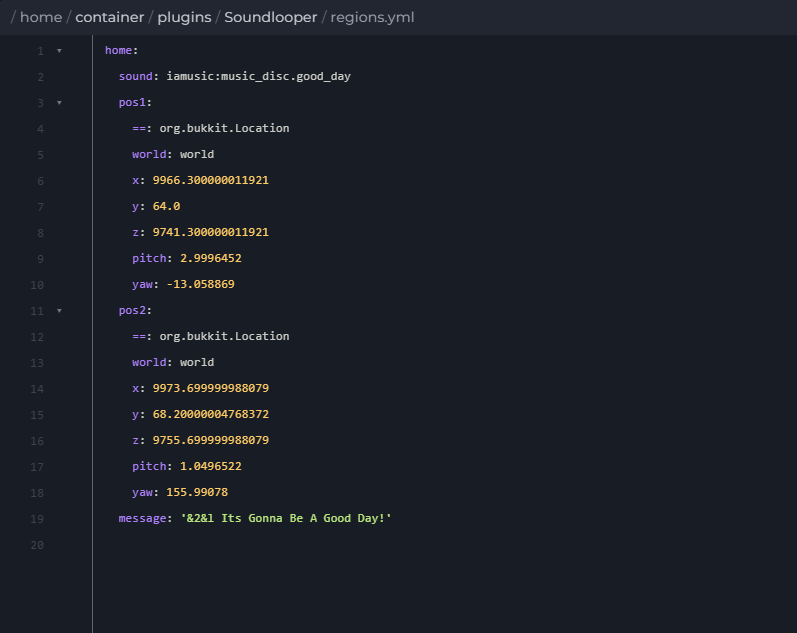
Stores region bounds, sounds, messages, playback mode, volume, pitch, and loop timing. -
active_regions.yml
Tracks which regions are active across restarts.
Compatibility
- Minecraft Version: 1.21+
- Dependencies: None
Enjoy creating immersive soundscapes on your server with SoundPlayer.
请登录后举报
请 登录 后赞助作者。
暂无评论,抢个沙发吧~