
Smaller Totem & Shield
作者:rebot | 分类:数据包
Minecraft 版本: 15w49b 15w50a 15w51a 1.9 1.9.1 1.9.2 1.9.3 1.9.4 1.10 1.10.1 1.10.2 1.11 1.11.1 1.11.2 1.12 1.12.1 1.12.2 1.13 1.13.1 1.13.2 1.14 1.14.1 1.14.2 1.14.3 1.14.4 1.15 1.15.1 1.15.2 1.16 1.16.1 1.16.2 1.16.3 1.16.4 1.16.5 1.17 1.17.1 1.18 1.18.1 1.18.2 1.19 1.19.1 1.19.2 1.19.3 1.19.4 1.20 1.20.1 23w31a 23w32a 23w33a 23w35a 1.20.2-pre1 1.20.2 23w42a 23w43a 23w43b 23w44a 23w45a 23w46a 1.20.3 1.20.4 24w03a 24w03b 24w04a 24w05a 24w05b 24w06a 24w07a 24w09a 24w10a 24w11a 24w12a 24w13a 24w14potato 24w14a 1.20.5-pre1 1.20.5-pre2 1.20.5-pre3 1.20.5 1.20.6 24w18a 24w19a 24w19b 24w20a 1.21 1.21.1 24w33a 24w34a 24w35a 24w36a 24w37a 24w38a 24w39a 24w40a 1.21.2-pre1 1.21.2-pre2 1.21.2 1.21.3 24w44a 24w45a 24w46a 1.21.4 1.21.5 1.21.6 1.21.7 1.21.8 1.21.9 1.21.10 1.21.11 26.1 26.1.1 26.1.2 26.2-pre-4 26.2-pre-5 26.2-pre-6 26.2-rc-1 26.2-rc-2 26.2 26.3-snapshot-1 26.3-snapshot-2
平台: minecraft
标签: combat equipment utility
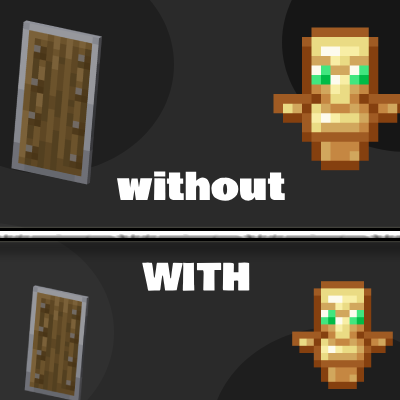
?️ Smaller Totem & Shield
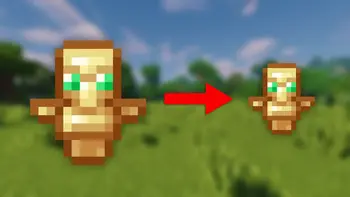
Tired of your Totem of Undying and Shield blocking your view? Smaller Totem & Shield makes both the Totem and Shield smaller while keeping Minecraft's vanilla style, giving you a cleaner screen and better visibility during PvP.
Whether you're playing Crystal PvP, Sword PvP, SMPs, Bedwars, or Survival, this resource pack helps you focus on your opponent instead of large off-hand items.
✨ Advantages
- ?️ Smaller Shield
- ? Smaller Totem of Undying
- ? More screen visibility
- ? Better focus during combat
-
⚔️ Improved PvP experience
✅ Compatibility
Supports a wide range of Minecraft versions.
Works perfectly with:
- ✔️ Vanilla Minecraft
- ✔️ OptiFine
- ✔️ Sodium
- ✔️ Lunar Client
- ✔️ Badlion Client
? Advantages
Having more visible screen space makes it easier to:
- ? Spot opponents faster
- ? Keep your crosshair on target
- ⚔️ React quicker in PvP
- ? Reduce screen clutter
- ? Enjoy a cleaner combat experience
Small changes can make a big difference when every second counts!
? Installation
Method 1 (Recommended)
-
Download the resource pack.
-
Open Minecraft.
-
Go to Options → Resource Packs.
-
Click Open Pack Folder.
-
Move the downloaded
.zipfile into the folder.- Do not extract the ZIP file.
-
Return to Minecraft.
-
Select Smaller Totem & Shield and click Done.
Method 2
Copy the .zip file into:
Windows
%AppData%\.minecraft\resourcepacksThen enable it from Options → Resource Packs.
⭐ Recommended PvP Packs
Want an even better PvP experience? Pair this pack with these!
? Full Bright
Never lose a fight because it's too dark! Full Bright removes darkness, making cave fights and nighttime PvP much easier.
? PvP Crosshair
Improve your aim with a clean PvP crosshair designed for better accuracy and visibility.
❤️ Support
If you enjoy Smaller Totem & Shield, please consider:
⭐ Following the project
❤️ Leaving a like
? Sharing it with your friends
? Downloading other D & A mods, Texture Packs, Plugins, Modpacks and Datapack
Your support helps keep the project updated with new Minecraft versions!
Happy PvPing! ⚔️
Designed by the D & A Team!

请登录后举报
暂无评论,抢个沙发吧~