
Cape Switcher
作者:rebot | 分类:模组
Minecraft 版本: 26.1.2
平台: fabric
标签: utility
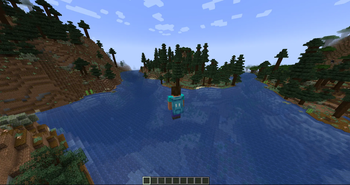
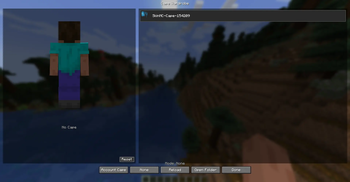
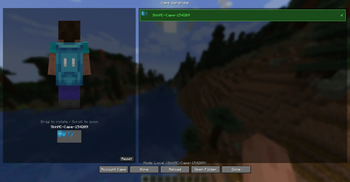
Cape Switcher
Cape Switcher is a client-side Fabric mod for Minecraft 1.21.4 that lets you choose, preview, and switch local custom capes directly in-game.
Cape Switcher — клиентский Fabric-мод для Minecraft 1.21.4, который позволяет выбирать, просматривать и менять локальные кастомные плащи прямо в игре.
Features / Возможности
-
Choose custom cape textures from local PNG files
Выбор кастомных текстур плащей из локальных PNG-файлов -
Three cape modes: Account, Local, None
Три режима плаща: плащ аккаунта, локальный плащ, без плаща -
In-game Cape Wardrobe GUI
Игровое меню Cape Wardrobe -
3D player preview
3D-превью модели игрока -
Drag to rotate the model
Вращение модели мышью -
Scroll to zoom
Приближение и отдаление колёсиком мыши -
Hover preview over cape cards
Предпросмотр плаща при наведении на карточку -
Hotkey to open the wardrobe
Хоткей для открытия гардероба -
Auto-creates config and capes folders
Автоматическое создание папок конфига и плащей -
Error-safe loading
Мод не крашит игру при отсутствующих или битых файлах -
English and Russian localization
Английская и русская локализация
Installation / Установка
-
Install Fabric Loader for Minecraft 1.21.4.
Установите Fabric Loader для Minecraft 1.21.4. -
Install Fabric API.
Установите Fabric API. -
Put the mod
.jarfile into your.minecraft/mods/folder.
Поместите.jarфайл мода в папку.minecraft/mods/. -
Launch the game.
Запустите игру.
How to Add Capes / Как добавить плащи
- Open the capes folder:
.minecraft/config/cape-switcher/capes/- Put your PNG cape files there.
Example:
.minecraft/config/cape-switcher/capes/my_cape.png-
Open the Cape Wardrobe in-game.
-
Press Reload.
-
Select your cape.
- Откройте папку с плащами:
.minecraft/config/cape-switcher/capes/- Поместите туда PNG-файлы плащей.
Пример:
.minecraft/config/cape-switcher/capes/my_cape.png-
Откройте Cape Wardrobe в игре.
-
Нажмите Reload.
-
Выберите нужный плащ.
Cape Texture Format / Формат текстуры плаща
Cape textures should use the standard Minecraft cape format:
64x32
128x64
Текстуры плащей должны использовать стандартный формат Minecraft:
64x32
128x64
Cape Modes / Режимы плаща
Account Cape / Плащ аккаунта
Shows your official Minecraft account cape if you have one.
Показывает официальный плащ Minecraft-аккаунта, если он есть.
Local Cape / Локальный плащ
Shows a custom PNG cape from your local capes folder.
Показывает кастомный PNG-плащ из локальной папки с плащами.
None / Без плаща
Disables the cape display.
Отключает отображение плаща.
Controls / Управление
Default hotkey:
CControls inside the wardrobe:
-
Left Mouse Drag — rotate player preview
Зажать ЛКМ и двигать мышью — вращать модель игрока -
Mouse Wheel — zoom preview
Колёсико мыши — приближать или отдалять модель -
Reset View — reset preview rotation
Reset View — сбросить поворот модели -
Reload — reload cape files
Reload — перезагрузить список плащей -
Open Folder — open the capes folder
Open Folder — открыть папку с плащами
Important Notes / Важные замечания
This mod is client-side only.
Other players will not see your selected local cape unless they use a compatible sync system.
Этот мод работает только на клиенте.
Другие игроки не увидят ваш локальный плащ, если у них нет совместимой системы синхронизации.
Cape Switcher does not include or redistribute official Minecraft/Mojang cape textures.
Cape Switcher не содержит и не распространяет официальные текстуры плащей Minecraft/Mojang.
Official account capes are displayed only through the normal Minecraft account system using the Account Cape mode.
Официальные плащи отображаются только через стандартную систему Minecraft-аккаунта в режиме Account Cape.
Building from Source / Сборка из исходников
To build the mod from source, run:
./gradlew buildThe built .jar file will be located in:
build/libs/Для сборки мода из исходников выполните:
./gradlew buildГотовый .jar файл будет находиться в:
build/libs/License / Лицензия
This project is licensed under the MIT License.
Этот проект распространяется под лицензией MIT.
请登录后举报
暂无评论,抢个沙发吧~