
Disenchant to Book
作者:rebot | 分类:模组
Minecraft 版本: 26.2
平台: fabric
标签: equipment management utility
Disenchant to Book
Move enchantments from your gear onto books — right from your inventory.
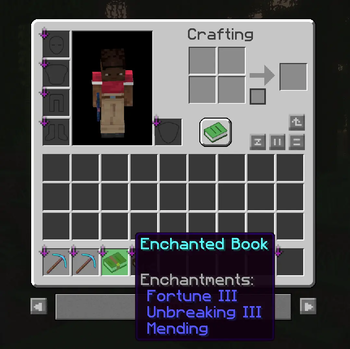
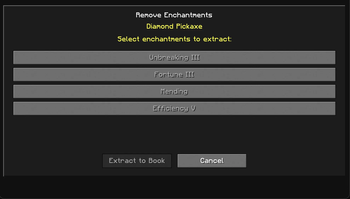
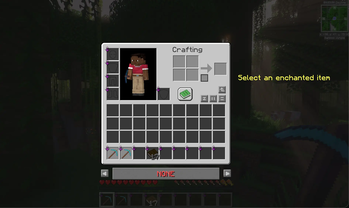
Press ' (apostrophe) to open a simple screen that looks like your inventory. Click an enchanted item, pick which enchantments you want, and pull them off into an enchanted book.
Works on tools, weapons, armor, and enchanted books that have more than one enchantment.
What you can do
- Take enchants off gear — Select enchantments on a sword, pickaxe, armor piece, etc. They move onto a blank book in your inventory. You need at least one blank book for this.
- Split an enchanted book — If a book has two or more enchantments, you can move some of them onto a new enchanted book. At least one enchant must stay on the original book. You need an empty inventory slot for the new book. Books with only one enchantment cannot be split.
- See what counts — Enchanted items light up; plain items are dimmed so you know what to click.
- Choose exactly what to move — Click individual enchantments in the list before you extract.
- Change the key — Default is
'. Rebind in Controls → Disenchant to Book, or in Mod Menu if you use it.
How to use it
- Press
'to open the screen. - Click an enchanted item.
- Click the enchantments you want to move.
- Gear: keep a blank book in your inventory.
- Enchanted book (2+ enchants): leave an empty slot for the new book, and do not select every enchant — one must stay behind.
- Click Extract to Book.
You can still use normal inventory keys while the screen is open (drop items, move to hotbar, and so on).
What you need
Permissions: You need permission to use cheats — op level 2 on a server, or cheats turned on in single-player.
Items:
- From gear: at least one blank book.
- From an enchanted book: an empty slot for the new book, and the source book must keep at least one enchantment.
Mods (required):
- Minecraft 26.1.2
- Fabric Loader 0.19.2 or newer
Optional: Mod Menu — for changing the keybind in the mod list.
Single-player vs multiplayer
Single-player: Install the mod on your client. With cheats on, it just works — nothing shows up in chat.
Multiplayer (best): Put the same mod on the server and on every player’s client who will use it. Extracts happen quietly with no chat spam.
Multiplayer (client only): If the server does not have the mod, your client will run game commands instead. You will see those in chat, and you still need op level 2.
Installation
- Install Fabric and Fabric API for Minecraft 26.1.2.
- Drop
disenchant_to_book-<version>.jarinto your client’smodsfolder. - Optional for multiplayer: Add the same jar (and Fabric API) to the server’s
modsfolder and restart the server.
Players who use the screen still need the mod on their own game, even if the server has it.
请登录后举报
请 登录 后赞助作者。
暂无评论,抢个沙发吧~