
MapBrowser
作者:rebot | 分类:模组
Minecraft 版本: 1.20 1.20.1 1.20.2 1.20.3 1.20.4 1.20.5 1.20.6 1.21 1.21.1 1.21.2 1.21.3 1.21.4 1.21.5 1.21.6 1.21.7 1.21.8
平台: bukkit paper purpur spigot
标签: game-mechanics technology utility
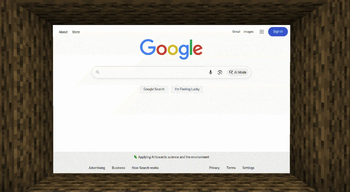
MapBrowser



A powerful Spigot/Paper plugin that brings a modern web browser into Minecraft using maps and the Java Chromium Embedded Framework (JCEF). Interact with any website, watch videos, and even play Minecraft in Minecraft!
✨ Features
- Dynamic Browser Creation: Create interactive browser screens of any size, anywhere in your world.
- Real-time Web Rendering: Powered by the Chromium engine, it renders modern websites with full CSS and JavaScript support.
- Fully Interactive: Click, type, and send key presses (like Enter, Shift) to interact with web pages just like a real browser.
- In-Game Developer Tools: Toggle Chromium DevTools in real-time to debug web layouts and performance on the fly.
- Highly Configurable: Enable remote debugging, set a custom user agent, change user data paths, and add custom CEF arguments via
config.yml.
❗ Dependencies
This plugin requires the MapEngine API to function. Please install it on your server before installing MapBrowser.
⚙️ Installation
- Download and install MapEngine on your server.
- Download the latest
MapBrowser-*-all.jarfrom the Releases Page or the "Versions" tab. - Place the downloaded
.jarfile into your server'spluginsdirectory. - Restart your server.
⚠️ Important First-Time Setup:
On its first launch, MapBrowser will automatically download the necessary Chromium Embedded Framework (JCEF) binaries. This process can take several minutes and requires a stable internet connection. Please monitor your console for progress.
📜 Commands & Permissions | Command | Description | Usage | Permission | |-----------------|--------------------------------------------------------------------------|-------------------------------------------------|--------------------------------| | `/mb create` | Creates a new browser screen at the specified location. | `/mb create [width] [height]` | `mapbrowser.command.create` | | `/mb list` | Lists all currently active browser screens. | `/mb list` | `mapbrowser.command.list` | | `/mb remove` | Removes a specified browser screen. | `/mb remove ` | `mapbrowser.command.remove` | | `/mb modify` | Modifies the properties of an existing screen. | `/mb modify [values...]` | `mapbrowser.command.modify` | | `├ url` | Changes the URL loaded by the screen. | `/mb modify url ` | | | `├ devtools` | Toggles the developer tools on or off. | `/mb modify devtools ` | | | `├ pos` | Moves the browser screen. | `/mb modify pos ` | | | `├ size` | Changes the size of the browser screen. | `/mb modify size ` | | | `└ refresh` | Refreshes the browser page. | `/mb modify refresh` | | | `└ scale` | Setting the scale of browser page. | `/mb modify scale ` | | | `/mb input` | Sends text input to the specified screen. | `/mb input ` | `mapbrowser.command.input` | | `/mb keys` | Sends a key event to the specified screen. | `/mb keys ` | `mapbrowser.command.keys` | | `/mb executeJs` | Executes custom JS code or a JS snippet in the specified browser screen. | `/mb executeJs ` | `mapbrowser.command.executejs` | | `/mb near` | Lists the ID of the nearest browser screen. | `/mb near` | `mapbrowser.command.near` | 🔧 Configuration (config.yml) The configuration file is generated at `plugins/MapBrowser/config.yml` on the first run. ```yaml # --------------------------------------------------- # # MapBrowser Configuration # # --------------------------------------------------- # jcef: # Your custom JCEF binaries path (leave blank to disable) # Default: (plugins)/MapBrowser/jcef-bundle custom-install-path: "" # Custom jcef-maven download mirror (for custom-builds) mirror: "https://github.com/Steve3184/mb_jcefbuild/releases/download/v1/" # Should jcef-maven check the JCEF binaries at startup? skip-download: false browser: # Should we enable the sound (default is false) enable-sound: false # CEF's user data directory # Default: (plugins)/MapBrowser/userdata user-data-dir: "userdata" # CEF's remote debugging remote-debugging: enabled: false # Should we enable it? (default is false) port: 9222 # Remote Debugging Port (default is 9222) # CEF's User-Agent user-agent: "" # Where should CEF output the log # 'file' -> write to (plugins)/MapBrowser/cef.log # 'console' -> write to console chrome-log-output: "file" # Extra CEF startup args custom-chrome-args: - "--disable-gpu-compositing" - "--disable-gpu-vsync" ```
🔗 Links & Credits
- Source Code: GitHub Repository
- License:
GNU AGPL v3 - Acknowledgements:
- pianoman911 for the powerful MapEngine library.
- CinemaMod for their pre-built JCEF binaries which greatly simplify development.
请登录后举报
请 登录 后赞助作者。
暂无评论,抢个沙发吧~