
Better Compass Azimut
作者:rebot | 分类:模组
Minecraft 版本: 1.20.1
平台: forge
标签: adventure game-mechanics utility


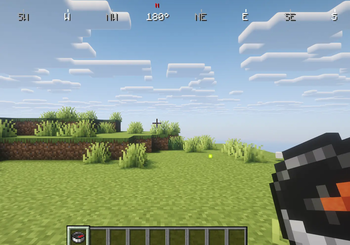
? Better Compass
Better Compass is a lightweight and fully configurable Minecraft mod that adds a modern compass HUD with directional indicators, coordinates display, biome info, and dimension tracking. It features a complete theming system with multiple pre-designed themes and full server-client configuration management.
⚠️ By default, a compass must be present in the player's inventory for the HUD to work (configurable via server or client settings).
✨ Features
? Directional Indicators - Shows 8 cardinal directions (N, NE, E, SE, S, SW, W, NW)
? Facing Angle - Displays exact facing direction in degrees with smooth animation
? Coordinates Display - Real-time X, Y, Z coordinates with customizable position and scale
? Dimension Info - Shows current dimension (Overworld/Nether/End)
?️ Biome Display - Displays current biome name
? Theme System - 4 pre-built themes (default, compact, colorful, immersive) with full customization
⚙️ Custom Themes - Create unlimited custom themes with 50+ configurable parameters
? Hot-Reload - Reload themes without restarting with /bettercompass theme reload
? Full Customization - Configure colors, positions, sizes, and animations via TOML files
? Server Override - Servers can force themes and settings on all connected clients
? Compass Requirement - Toggle compass requirement at server or client level
? Lightweight - Optimized for minimal performance impact
? Multi-Platform - Available for both Forge and Fabric
⚙️ Configuration
The mod uses TOML configuration files for complete customization:
Client Configuration (config/bettercompass/compass.toml):
requireCompass = false
currentTheme = "default"requireCompass: If true, HUD only appears with a compass in inventorycurrentTheme: Selected theme (default, compact, colorful, immersive, or custom)
Server Configuration (server_config.toml):
serverForceTheme = false
serverTheme = "default"
requireCompass = "client"serverForceTheme: If true, forces all clients to use the specified themeserverTheme: Theme to enforce on all players (ignored if serverForceTheme = false)requireCompass: "client" (player chooses), "true" (required), "false" (optional)
? Theme System
Themes are stored in config/bettercompass/themes/ as TOML files. Each theme contains:
- Colors: Primary, secondary, background, text, border (ARGB format)
- Dimensions: Compass size, text scale, padding, border width
- Positions: X, Y coordinates for each HUD element
- Coordinates Display: Position, scale, and visibility
- Dimension Display: Position, scale, and visibility
- Biome Display: Position, scale, and visibility
- Animation: Smooth rotation speed and other effects
- Metadata: Theme name, author, and description
Supported Color Formats:
- ARGB:
0xAARRGGBB(e.g.,0xFF00FF00for opaque green) - Hex:
#RRGGBB(e.g.,#00FF00) - RGB:
rgb(255, 0, 0) - RGBA:
rgba(255, 0, 0, 128)
Example Theme (config/bettercompass/themes/custom.toml):
# Better Compass Theme: default
# Classic Better Compass theme

[metadata]
name = "default"
description = "Classic Better Compass theme"
author = "Better Compass"
version = "1.0"

[position]
hudPosition = "top-center"
hudOffsetX = 0
hudOffsetY = 0

[compass]
width = 400
height = 20
spacing = 90
scale = 1.0

[colors]
background = 0x80000000
border = 0xFFFFFFFF
text = 0xFFFFFFFF
direction = 0xFFAAAAAA
north = 0xFFFF0000
east = 0xFFFFFFFF
south = 0xFFFFFFFF
west = 0xFFFFFFFF
playerDirection = 0xFFFFFFFF
coordinates = 0xFFFFFFFF
dimension = 0xFFFFFFFF
biome = 0xFFFFFFFF

[playerDirection]
position = "center"
offsetX = 0
offsetY = 0

[coordinates]
show = true
position = "bottom-center"
offsetX = 0
offsetY = -15
format = "X: %d Y: %d Z: %d"

[dimension]
show = false
position = "below-coordinates"
offsetX = 0
offsetY = 12

[biome]
show = false
position = "below-dimension"
offsetX = 0
offsetY = 12

[appearance]
showBorder = false
borderWidth = 1
borderRadius = 3
showBackground = false
backgroundPadding = 4
textScale = 1.0
textShadow = false

[animation]
smoothRotation = false
rotationSpeed = 0.3
Simply create a new TOML file in config/bettercompass/themes/ with your own theme configuration. The theme will be automatically loaded and available through commands.
All commands support Tab-completion for theme names.
/bettercompass theme list- Display all available themes with the current one marked/bettercompass theme set <name>- Switch to a specific theme (saved to config)/bettercompass theme current- Show the currently active theme and its properties/bettercompass theme reload- Hot-reload all themes from disk (useful for developers)
? Server Compatibility
Better Compass features complete server-client integration:
- Client-only mode: Works seamlessly in single-player
- Server mode: Administrators can enforce themes and settings across all players
- Real-time sync: Configuration changes sync immediately when players join
- Override system: Server theme forcing takes priority over client preferences
- Flexibility: Individual settings can be left to client choice or forced server-wide
? Default Themes
- default - Balanced, clean design suitable for most playstyles
- compact - Optimized for smaller screens and minimal HUD footprint
- colorful - Vibrant colors for better visibility and visual appeal
- immersive - Subtle and elegant design for atmosphere preservation
? Creating Custom Themes
Simply create a new TOML file in config/bettercompass/themes/ with any name. Themes are automatically loaded and available through commands. The theme system provides 50+ customizable parameters to match any player preference or server aesthetic.
? Mod Goal
Better Compass enhances navigation with a modern, highly customizable interface while maintaining vanilla-friendly balance. Whether you prefer a subtle compass or a feature-rich HUD, the extensive theme system accommodates every playstyle in both single-player and multiplayer environments.
请登录后举报
暂无评论,抢个沙发吧~