
Area Hints
作者:rebot | 分类:模组
Minecraft 版本: 1.20.4
平台: fabric quilt
标签: adventure management social
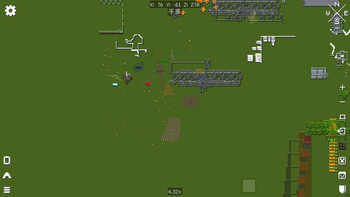
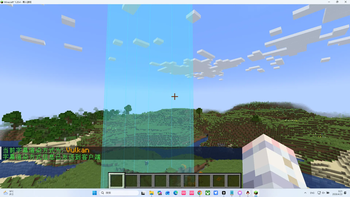
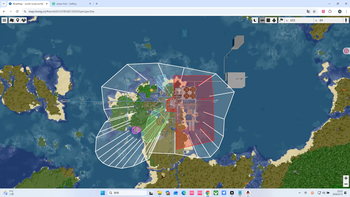


🏷️ Area Hints Mod
Add immersive area name popups to your Minecraft world!
When entering custom regions, elegant area titles appear at the top of your screen. Supports multi-level nesting, dimension default names, and easy creation tools—making exploration feel truly meaningful.
📖 Overview
Areas Hint allows players to define regions (called “domains”) using polygons and display custom names upon entry. All calculations are handled client-side with multithreaded optimization, placing almost zero load on the server. Say goodbye to complex commands and use intuitive tools to mark your world with ease.
✨ Features
- Player Customization: Freely name regions, define boundaries and height.
- High Performance: Zero server load, with client-side optimization and multithreading.
- Automatic Area Titles: Enter places like “Elven Forest” or “Dark Castle” and see smooth title animations appear on screen.
- Multi-level Regions: Supports nested regions (e.g., “Kingdom” → “Throne Room”) with elegant transitions or combined displays.
- Dimension Default Names: Displays the dimension name (e.g., “Wilderness Continent”) when outside all regions.
- Easy Creation Tool: Use
/areahint easyaddfor an interactive setup—just walk and click to create areas. - Fully Customizable: Modify names, colors, heights, split or merge regions anytime.
- Beautiful & Smooth UI: RPG-style title display (inspired by Genshin Impact), with adjustable styles and smooth animations.
- No Claim Restrictions: Mark any place freely—explore without limits.
🎯 Why Choose Areas Hint?
- Player-Friendly: No admin permissions required for creating area markers.
- Optimized Performance: Client-side processing keeps multiplayer smooth.
- Plug and Play: Install and start marking areas with simple commands.
- Highly Compatible: Works seamlessly with minimaps, shaders, and optimization mods.
🛠️ Features Overview
- Polygon-based region definition with multi-level domains (top-level / subdomains).
- Ray-casting detection to determine player position.
- Multiple rendering methods (CPU, OpenGL, Vulkan).
- Rich subtitle style customization.
- Full command system for configuration and management.
- Interactive domain creation tool EasyAdd, designed for ease of use.
📋 Command System
Basic Commands
| Command | Description | Common Permission |
|---|---|---|
/areahint help |
Show all commands and usage | Everyone |
/areahint reload |
Reload configuration and area files | Admin |
/areahint on |
Enable client-side area hints | Everyone |
/areahint off |
Disable client-side area hints | Everyone |
Area Viewing & Management
| Command | Description | Common Permission |
|---|---|---|
/areahint check |
List all joint areas | Everyone |
/areahint check <joint area> |
View details of a specific joint area | Everyone |
/areahint delete |
Start interactive area deletion | Everyone (usually only for areas you can operate) |
/areahint tcp [area] |
Teleport to a safe location near the area's center | Teleport permission |
/areahint udp [area] |
Teleport to a random safe location inside the area | Teleport permission |
/areahint settp [command prefix] |
Set the command prefix used for teleporting, e.g., tp or minecraft:tp |
Teleport settings permission |
Area Creation & Editing
| Command | Description | Common Permission |
|---|---|---|
/areahint add <JSON> |
Add an area via JSON (kept for compatibility; easyadd recommended) |
Admin |
/areahint easyadd |
Start interactive area addition | Everyone |
/areahint addarea |
Full alias for easyadd, supports the same interactive subcommands |
Everyone |
/areahint rename |
Start interactive area renaming | Everyone |
/areahint addsignature |
Add an extended signature to an area | Admin or signature operators |
/areahint deletesignature |
Delete an area's extended signature | Admin or signature operators |
Area Geometry Editing
| Command | Description | Common Permission |
|---|---|---|
/areahint expandarea |
Select an area from a list to expand | Everyone |
/areahint expandarea <area> |
Directly specify an area to expand (recommended) | Everyone |
/areahint shrinkarea |
Select an area from a list to shrink | Everyone |
/areahint shrinkarea <area> |
Directly specify an area to shrink (recommended) | Everyone |
/areahint dividearea |
Start interactive area division | Everyone |
Single Vertex Editing
| Command | Description | Common Permission |
|---|---|---|
/areahint addhint |
Start interactive vertex addition | Everyone |
/areahint deletehint |
Start interactive vertex deletion | Everyone |
Style & Display Settings
| Command | Description | Common Permission |
|---|---|---|
/areahint recolor |
Start interactive area recoloring | Everyone |
/areahint sethigh |
Start interactive area height setting | Everyone |
/areahint hintrender |
View current rendering mode | Everyone |
/areahint hintrender <cpu\|opengl\|vulkan> |
Set rendering mode | Everyone |
/areahint titlestyle |
Start interactive area title style selection | Everyone |
/areahint titlesize |
Start interactive area title size selection | Everyone |
/areahint addsubtitle |
Add or replace the area subtitle | Admin or signature operators |
/areahint replacesubtitle |
Alias for addsubtitle with replace semantics |
Admin or signature operators |
/areahint deletesubtitle |
Delete the area subtitle | Admin or signature operators |
/areahint replacesubtitlecolor |
Change the area subtitle color | Admin or signature operators |
/areahint replacesubtitlesize |
Change subtitle size for this client | Everyone |
/areahint frequency |
Show current detection frequency | Everyone |
/areahint frequency <1-60> |
Set detection frequency (supports decimals) | Everyone |
Description System
| Command | Description | Common Permission |
|---|---|---|
/areahint adddescription |
Add a normal area description | Admin or signature operators |
/areahint replacedescription |
Replace a normal area description | Admin or signature operators |
/areahint deletedescription |
Delete a normal area description (only deletes the description file) | Admin or signature operators |
/areahint adddimensionalitydescription |
Add a dimension area description | Admin or dimension area signers |
/areahint replacedimensionalitydescription |
Replace a dimension area description | Admin or dimension area signers |
/areahint deletedimensionalitydescription |
Delete a dimension area description (only deletes the description file) | Admin or dimension area signers |
Dimension Area Management
| Command | Description | Common Permission |
|---|---|---|
/areahint dimensionalityname |
Start interactive dimension area name management | Depends on server configuration |
/areahint dimensionalitycolor |
Start interactive dimension area color management | Depends on server configuration |
/areahint firstdimname <name> |
Set the dimension area name when entering a new unnamed dimension for the first time | Everyone |
/areahint firstdimname_skip |
Skip the first-time dimension area name setting | Everyone |
Other Features
| Command | Description | Common Permission |
|---|---|---|
/areahint replacebutton |
Start interactive key binding replacement | Everyone |
/areahint boundviz |
Toggle boundary visualization | Everyone |
/areahint language |
Start interactive language selection | Everyone |
/areahint debug |
Toggle debug mode | Admin |
/areahint debug on |
Enable debug mode | Admin |
/areahint debug off |
Disable debug mode | Admin |
/areahint debug status |
View debug status | Admin |
/areahint serverlanguage <language code> |
Set server-side log language | Console / High permission |
🏰 Use Cases
- RPG Servers: Name towns, dungeons, and wilderness areas to enhance immersion.
- Adventure Maps: Add story-driven area titles or hidden location names.
- Building Servers: Label large builds with names or authors.
- Singleplayer Worlds: Mark your base, farms, mines—create your own journey log.
✅ Compatibility
Areas Hint is fully compatible with the following mods (tested):
(Keep your original compatibility list as-is, since mod names remain unchanged.)
🌟 Final Words
Areas Hint is more than just a mod—it’s the “place naming system” of your Minecraft world. It makes every journey feel meaningful and immersive. Whether you're building an epic RPG server or documenting your personal creations, it adds a whole new layer of experience.
Try it now and give your world its own identity!
请登录后举报
请 登录 后赞助作者。
暂无评论,抢个沙发吧~