
World Mirror
作者:rebot | 分类:模组
Minecraft 版本: 1.21.11
平台: fabric
标签: utility
World Mirror
World Mirror is a client-side Fabric mod that saves the parts of a Minecraft world your
client can see, then turns them into a local singleplayer save. It works on multiplayer
servers, Realms, and singleplayer worlds; the server does not need to install anything.
Use it to archive a build, keep a personal record of an area, or take a permitted server
world offline. Only download worlds where you have permission to do so.
Important before you start
- Press P after joining the world. World Mirror does not continuously record unless
the action bar says the download session is active. - Pressing O exports data that has already been captured. It does not start a download
session or magically fetch distant chunks. - Mirrors go to
<.minecraft>/downloaded_worlds/by default. Minecraft does not show
that folder in the Singleplayer menu. Choose Saves Folder in World Mirror's settings
if you want the mirror to appear there automatically. - A client-side mod can only save information sent to your client. Open containers whose
contents matter, and expect server-only data to be missing.
Quick start
- Install the World Mirror JAR that exactly matches your Minecraft version.
- Join the world and press P. Check that the action bar says World Mirror is active.
- Explore the area you want to save. Open chests, barrels, furnaces, and other containers
whose inventories you want to keep. - Press O when you want an immediate export, then wait for the completion message.
- Press P again to stop the download session.
- Open the mirror from Singleplayer if you selected Saves Folder. Otherwise it remains
under<.minecraft>/downloaded_worlds/<mirror-name>/until you move it or change the
per-world save location.
Automatic export on stop is available in settings but is disabled by default, so using
O before stopping is the safest simple workflow.
Controls
| Key | Action |
|---|---|
| P | Start or stop the download session |
| O | Export captured changes now |
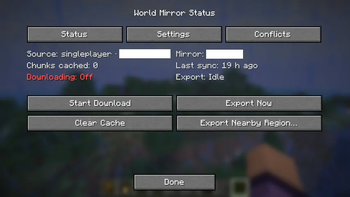
| I | Open World Mirror's status and settings screen |
| M | Open the built-in chunk map |
| L | Clear the in-memory capture cache |
All controls can be rebound under Options → Controls → World Mirror. Clearing the cache
with L does not delete mirror files already written to disk.
What World Mirror saves
- Terrain and block states from loaded chunks in the Overworld, Nether, End, and observed
custom dimensions. - Block entities such as signs, banners, player heads, beacons, and lecterns.
- Contents of containers you open while recording, including double chests.
- Best-effort snapshots of client-visible mobs, vehicles, paintings, item frames, armour
stands, dropped items, and rider/passenger groups. Moves and despawns are reconciled in
areas the client can safely observe without deleting last-known entities from unloaded
chunks. - Changes over time, with periodic background exports and an optional experimental
adaptive mode for busier sessions.
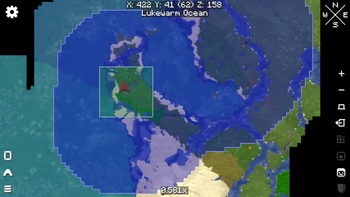
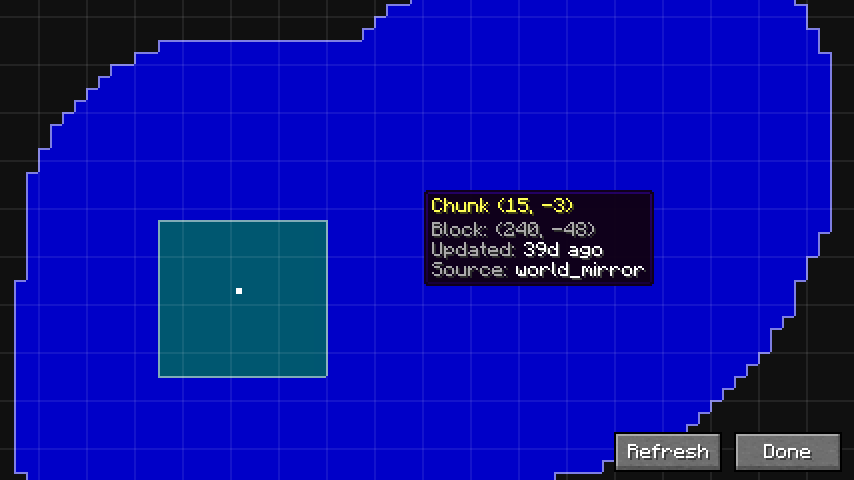
The built-in map shows recorded chunks and unresolved conflicts. Drag to pan, use the
mouse wheel to zoom, and hover a chunk for its coordinates, age, and source.
What it cannot save perfectly
World Mirror is not a server backup. Unopened inventories, server datapacks, structure
metadata, hidden entity state, and chunks the server never sends may be absent. Entities
in unloaded chunks keep their last client-known state until the chunk is observed again.
Uncaptured terrain is intentionally void in the generated save.
Save locations and conflicts
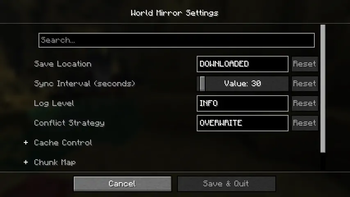
Press I, open Settings, then choose Global Settings. Optional Mod Menu provides
another shortcut to the same screen.
- Downloaded Folder (default): saves to
<.minecraft>/downloaded_worlds/; useful for
keeping mirrors separate, but not listed in Singleplayer. - Saves Folder: saves to
<.minecraft>/saves/; immediately visible in Singleplayer.
When an incoming chunk meets an existing local chunk, choose one of these strategies:
- Overwrite (default): use the eligible incoming server update.
- Ignore: keep the local chunk and write only chunks that are not already present.
- Manual: keep the local chunk and store the incoming version for review. Resolve it
from the chunk map or use Overwrite All / Discard All on the Conflicts tab.
Export Nearby Region on the status screen creates a separate save in the Singleplayer
folder from the chunks currently loaded around you. It is useful when you only need one
area instead of a continuing mirror.
Installation
| Minecraft | Required Java |
|---|---|
| 1.21.11 | Java 21 or newer |
| 26.1.2 | Java 25 or newer |
| 26.2 | Java 25 or newer |
Install:
- Fabric Loader 0.19.3 or newer.
- The matching Fabric API.
- The World Mirror JAR for your exact Minecraft version.
Cloth Config and SQLite JDBC are bundled. Mod Menu
is optional, and LibGui is not required.
Optional Xaero's World Map overlay
World Mirror works without Xaero. To display World Mirror's chunk status on Xaero's
fullscreen map, install both:
- Xaero's World Map 1.40.x–1.44.x for your
Minecraft version; and - the matching Fabric file from
Xaero World Map Bridge 0.1.0.
The bridge release provides separate builds for Minecraft 1.21.11, 26.1.2, and 26.2.
Reporting a performance problem
Open Global Settings, enable Performance Diagnostic Logging, reproduce the problem for
at least 30 seconds, then attach latest.log and config/worldmirror.json to the report.
Disable the option afterward. The additional [perf] lines are designed for diagnosis and
are not needed during normal play.
请登录后举报
请 登录 后赞助作者。
暂无评论,抢个沙发吧~