
IPWhitelist
作者:rebot | 分类:模组
Minecraft 版本: 1.21.11
平台: fabric
标签: management utility
IPWL IP-Based Whitelist for Minecraft (Fabric)
Minecraft: 1.21.1-26.2 | Loader: Fabric | Java: 25 | License: GPL
A server-side mod that adds a second security layer on top of Mojang authentication. Every player is bound to one or more approved IP addresses, even if someone has a valid account, they cannot join unless they are connecting from a pre-approved IP. Connections are blocked before authentication even completes, so rejected players consume minimal server resources.
Installation
- Drop the
.jarinto your server'smods/folder. - Start the server. The mod creates
config/ipwl.jsonautomatically. - Add yourself as an IPWL admin (see below) and start managing players.
No OP required. IPWL uses its own admin list — OP status is completely separate.
Admin Setup
IPWL has its own permission system. Only players listed as IPWL admins can run any /ipwl, /lockdown, /seen, or /connections command. The server console always has full access.
/ipwl admin add <player>     — Grant IPWL access (saved to config immediately)
/ipwl admin remove <player>  — Revoke access instantly, refreshes their command tree
/ipwl admin list             — Show all current IPWL admins
When an admin is removed they lose tab-complete and command execution immediately without needing to rejoin.
Whitelist Commands
/ipwl add <player>           — Allow player from any IP
/ipwl add <player> <ip>      — Allow player from a specific IP
/ipwl addip <player> <ip>    — Add a second allowed IP to an existing player
/ipwl removeip <player> <ip> — Remove one specific IP from a player
/ipwl remove <player>        — Remove player entirely and kick them if online
/ipwl list                   — Show all whitelisted players and their IPs
/ipwl reload                 — Reload config and whitelist from disk
IP formats supported:
- Exact:
192.168.1.5 - Wildcard suffix:
192.168.1.*(matches any IP starting with that prefix) - CIDR notation:
192.168.1.0/24(works for both IPv4 and IPv6) - Any IP:
*(player can join from anywhere)
Temporary Access
/ipwl tempadd <player> <ip> <duration>Grants access for a limited time without modifying the permanent whitelist. Duration examples: 30m, 2h, 1d, 3600s. When the time expires, all online admins are notified automatically.
IP Bans
/ipwl banip <ip>       — Permanently ban an IP (blocks all accounts from it)
/ipwl unbanip <ip>     — Lift a permanent ban
/ipwl banip list       — Show all permanently banned IPs
Permanent bans are saved to config/ipwl.json and survive server restarts.
Security Tools
/lockdown on     — Block all new connections immediately (admins still allowed)
/lockdown off    — Resume normal operation
/seen <player>   — Show last known IP and timestamp for a player
/connections     — List all currently active connections
/security status — Show live security stats (blocked, allowed, temp bans, etc.)
Unknown Player Alerts
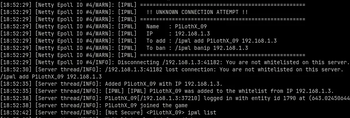
When someone tries to join and is not on the whitelist, every online admin receives a chat message with two clickable buttons:
- [Accept] — runs
/ipwl add <player> <ip>instantly - [Ban IP] — runs
/ipwl banip <ip>instantly
At the same time, the server console prints a clearly visible block:
[IPWL] ====================================================
[IPWL]   !! UNKNOWN CONNECTION ATTEMPT !!
[IPWL] ====================================================
[IPWL]   Name   : Steve
[IPWL]   IP     : 192.168.1.100
[IPWL]   To add : /ipwl add Steve 192.168.1.100
[IPWL]   To ban : /ipwl banip 192.168.1.100
[IPWL] ====================================================
All admin actions (accept, ban, remove) are broadcast to every online admin so no one acts on stale information.
Bruteforce & Rate Limiting
The mod automatically detects and blocks abusive connection patterns:
| Pattern | Action |
|---|---|
| Same IP tries 3+ different usernames within 60 seconds | 1-hour ban (bot / credential stuffing) |
| Same IP hammers the server too fast (rate limit threshold) | 5-minute ban (configurable) |
| Permanent ban in config | Blocked forever |
Both ban types are enforced before authentication completes.
Logging
/ipwl logs verbose   — Log all attempts, retries, and debug info
/ipwl logs silent    — Log only kicks and critical security events (default)
The console always shows unknown-player alerts and bruteforce detections regardless of log level.
Configuration
Located at config/ipwl.json. Created automatically on first run.
| Field | Default | Description |
|---|---|---|
maxConnectionsPerIp |
2 |
Max simultaneous sessions from one IP |
rateLimitWindowMs |
1000 |
Minimum ms between connections from same IP |
maxFailuresBeforeTempBan |
5 |
Rate limit failures before 5-min temp ban |
tempBanDurationMs |
300000 |
Single-name temp ban duration (ms) |
enableRateLimit |
true |
Toggle rate limiting |
enableDuplicateCheck |
true |
Block duplicate logins for the same username |
enableJoinAlerts |
true |
Send admin alerts for unknown players |
alertCooldownMs |
30000 |
Minimum ms between alerts for the same IP |
verboseLogging |
false |
Mirrors /ipwl logs verbose |
allowWildcardIps |
true |
Allow * as a wildcard IP entry |
allowSubnetPatterns |
true |
Allow 192.168.1.* style patterns |
admins |
[] |
List of IPWL admin usernames |
bannedIps |
[] |
Permanently banned IPs |
Data Files
| File | Contents |
|---|---|
config/ipwl.json |
All settings, admin list, permanent IP bans |
config/ipwl_whitelist.json |
Player → IP mappings |
config/ipwl-stats.json |
Persistent connection statistics (survives restarts) |
config/ipwl-seen.json |
Last-seen data for /seen command |
config/ipwl-lang.json |
Optional message overrides (no rebuild needed) |
To customise any in-game message, create config/ipwl-lang.json on the server and add only the keys you want to change. This file takes priority over the built-in strings.
How It Works (Brief)
Every login attempt is intercepted at ServerboundHelloPacket — the very first packet a client sends — before Mojang authentication starts. The checks run in this order:
- Lockdown mode → block non-admins
- Permanent IP ban → block
- Temp ban (rate limit or bruteforce escalation) → block
- Bruteforce detection (3+ names from same IP in 60s) → 1-hour ban
- Rate limit (too fast) → block, escalate to temp ban after threshold
- Duplicate login check → block
- Whitelist IP check → block + fire admin alert if not listed
- Max connections per IP → block
- Allow secondary async re-verification runs post-join as a safety net
请登录后举报
暂无评论,抢个沙发吧~