
System Music Notification Toast
作者:rebot | 分类:模组
Minecraft 版本: 26.2
平台: fabric neoforge
标签: social utility
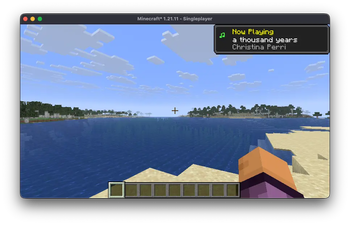


🎵 System Music Notification Toast
Display your currently playing music as a Minecraft toast notification.
What it does
System Music Notification Toast (SMN Toast) is a client-side mod for Fabric and NeoForge that detects music playing on your system and displays it as a toast notification in Minecraft. When a new track starts playing, you'll see a "Now Playing" toast showing the song title and artist name.
Features
- Automatic notifications — A toast appears whenever a new track starts playing
- Manual trigger — Configurable keybind to show the current track on demand (unbound by default)
- Clean design — Uses the vanilla Minecraft toast style
- Cross-platform — Works on Windows, Linux and macOS
Platform Support
| Platform | Method | Requirements |
|---|---|---|
| Windows | SMTC (System Media Transport Controls) | None (built-in) |
| Linux | MPRIS via D-Bus | None (native) or playerctl (non-Flatpak) |
| Linux (Flatpak) | MPRIS via D-Bus | Permission grant (see below) |
| macOS | AppleScript | Permission grant (see below) |
How to use
- Install the mod in your Fabric or NeoForge mods folder
- Start playing music in any compatible player
- A toast will appear when a new track starts
To manually show the current track, bind a key in Options → Controls → Key Binds → System Music Notification Toast.
Compatible Players
- Windows: Spotify, Windows Media Player, browser media (Edge/Chrome), foobar2000, and any app using SMTC
- Linux: Spotify, VLC, Firefox, Chromium, and any MPRIS-compatible player
- macOS: Spotify, Music.app (Spotify has higher priority)
Flatpak Users (Linux)
If you're using a Flatpak launcher (like PrismLauncher), you need to grant permission for the mod to communicate with media players.
Run this command:
flatpak override --user org.prismlauncher.PrismLauncher '--talk-name=org.mpris.MediaPlayer2.*'Or using Flatseal:
- Open Flatseal and select your launcher (e.g., PrismLauncher)
- Go to Session Bus → Talk
- Add
org.mpris.MediaPlayer2.*
Restart the launcher after applying the permission.
Note: This permission only allows communication with media players — it does not grant access to run commands on your host system.
macOS Permission
macOS will prompt you to allow Minecraft (or your launcher) to control Spotify and/or Music.app. Allow it to enable track detection.
If you denied it previously, go to System Settings → Privacy & Security → Automation and enable access for your launcher or Minecraft.
(Thanks to NatsuCamellia for the macOS support <3)
请登录后举报
请 登录 后赞助作者。
暂无评论,抢个沙发吧~