
DiscordUtils
作者:rebot | 分类:模组
Minecraft 版本: 1.8 1.8.1 1.8.2 1.8.3 1.8.4 1.8.5 1.8.6 1.8.7 1.8.8 1.8.9 1.9 1.9.1 1.9.2 1.9.3 1.9.4 1.10 1.10.1 1.10.2 1.11 1.11.1 1.11.2 1.12 1.12.1 1.12.2 1.13 1.13.1 1.13.2 1.14 1.14.1 1.14.2 1.14.3 1.14.4 1.15 1.15.1 1.15.2 1.16 1.16.1 1.16.2 1.16.3 1.16.4 1.16.5 1.17 1.17.1 1.18 1.18.1 1.18.2 1.19 1.19.1 1.19.2 1.19.3 1.19.4 1.20 1.20.1 1.20.2 1.20.3 1.20.4 1.20.5 1.20.6 1.21 1.21.1 1.21.2 1.21.3 1.21.4 1.21.5 1.21.6 1.21.7 1.21.8 1.21.9 1.21.10 1.21.11
平台: folia paper purpur spigot
标签: management social utility
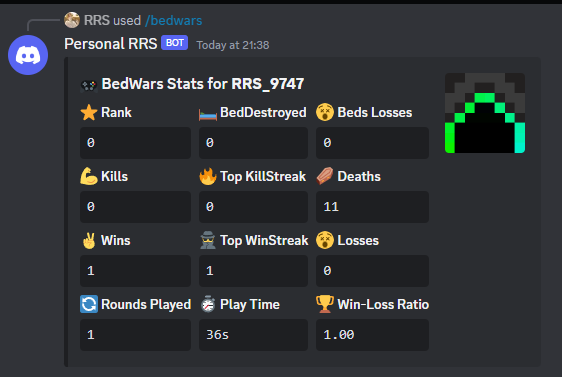
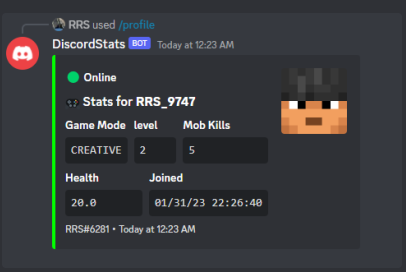
Easily Show Server Stats on Discord
DiscordUtils is a plugin that helps you display up to 25 customizable stats from your Minecraft server directly on your Discord server. With easy setup and management using Discord slash commands, your server's stats will be more engaging and accessible to your community.
Features:
- Customizable Titles and Placeholders: Use PlaceholderAPI to personalize your stats.
- Track Multiple Stats: Display up to 25 different stats without any hassle.
- Easy Configuration: Adjust settings easily in the config.yml file.
- Smooth Performance: Enjoy lag-free operation with secure data storage.
- Player Linking: Integrate with DiscordSRV for seamless player account linking.
- Clean Display: Remove color codes from placeholders for a neat appearance.
- Simple Management: Use Discord slash commands to manage stats effortlessly.
Commands:
- /profile add: Add new stats.
- /profile edit: Edit existing stats.
- /profile remove: Remove existing stats.
Supported Plugins:
- BedWars:
Setup Instructions:
- Install PlaceholderAPI on your server.
- Download and install DiscordUtils.
- Configure the plugin's settings in the config.yml file.
- Manage your Discord server stats using the commands: /profile add, /profile edit, and /profile remove.
- For a quick setup, run
/profile preset 1to use a preset profile.
Setting Up Your Discord Bot:
- Visit the Discord Developer Portal.
- Create a new application and give it a name.
- In the "Bot" section, add a bot and copy its token to the config.yml file.
- Enable the "Message Content Intent" option for the bot.
- In the "OAuth" section, copy the Client ID and use the following link to invite the bot to your server:
- Replace
YOUR_CLIENT_ID_HEREwith the copied Client ID.
请登录后举报
暂无评论,抢个沙发吧~