
ModeratorMode
作者:rebot | 分类:模组
Minecraft 版本: 1.20.5 1.20.6 1.21 1.21.1 1.21.2 1.21.3 1.21.4 1.21.5 1.21.6 1.21.7 1.21.8 1.21.9 1.21.10
平台: paper
标签: management utility

? Overview
ModeratorMode is an essential tool that allows staff members to switch into a dedicated moderation mode with a single command. It safely saves their entire survival state—including location, inventory, health, and effects—and equips them with a configurable set of admin tools. This allows them to perform their duties efficiently and return to their previous state exactly as they left it.
This plugin is built to be robust, lightweight, and fully manageable from in-game, making it a perfect fit for any server.
✨ Features
- Seamless State Saving: Toggling moderator mode (
/mm) instantly saves a player's location, inventory, gamemode, health, food level, experience, and potion effects. - Crash-Proof Persistence: Player data is saved to a local JSON file, ensuring that even if the server crashes, a moderator's inventory and state are never lost.
- Fully Configurable Hotbar: Admins can define a custom set of items that moderators receive upon entering the mode. Add special tools, compasses, or custom items from other plugins directly from in-game!
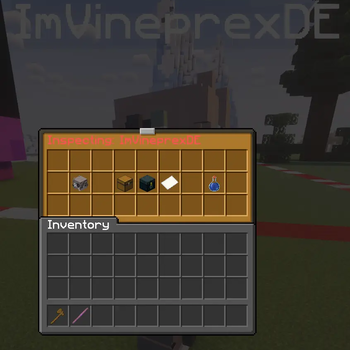
- Player Inspection System: Right-click any player while in moderator mode to view their inventory, ender chest, statistics, and active potion effects in real-time—all in secure, read-only GUIs.
- Comprehensive Logging: All moderation actions are automatically logged to JSON files with timestamps, including mode entries/exits, player inspections, and hotbar modifications.
- Built-in Moderator Tools:
- Simple Vanish: Automatically hides moderators from regular players using the reliable built-in Bukkit method.
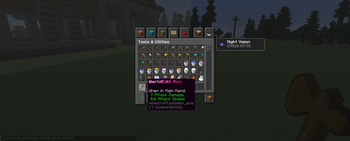
- Permanent Night Vision: Grants infinite night vision to ensure moderators can see everything clearly, day or night.
- Item Drop Protection: Prevents moderators from accidentally dropping their configured tools.
- Easy In-Game Management: All hotbar items can be managed via simple admin commands. No need to manually edit YAML files after the initial setup.
- Lightweight & No Dependencies: Built to be efficient and stable with no external plugin dependencies required for core functionality.
? Commands & Permissions
Player Commands
Requires the permission moderatormode.use.
| Command | Alias | Description |
| :--- | :--- | :--- |
| /modmode | /mm | Toggles moderator mode on or off. |
| /modmode help | | Displays the help message. |
Admin Commands
Requires the permission moderatormode.admin.
| Command | Description |
| :--- | :--- |
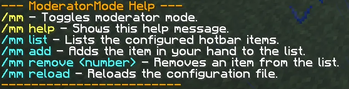
| /modmode list | Shows the current list of configured hotbar items. |
| /modmode add | Adds the item you are currently holding to the hotbar list. |
| /modmode remove <number> | Removes an item from the list by its number (from /mm list). |
| /modmode reload | Reloads the plugin's configuration file from disk. |
Inspection (ModeratorMode Feature)
Requires the permission moderatormode.inspect
| Action | Description |
|---|---|
| Right-click player | Opens inspection GUI while in moderator mode. |
Permission Nodes
| Permission | Description |
|---|---|
moderatormode.use |
Allows toggling the moderator mode. |
moderatormode.admin |
Allows managing hotbar items and reloading config. |
moderatormode.inspect |
Allows inspecting players in moderation mode. |
moderatormode.inspect.ip |
Allows copying player IP addresses in inspection. |
moderatormode.seevanished |
Allows seeing vanished moderators (bypasses vanish). |
⚙️ Installation
- Download the latest
ModeratorMode-*.jarfrom the [Versions Page]. - Place the JAR file into your server's
/pluginsfolder. - Restart your server. The default configuration file (
config.yml) and logs directory will be generated automatically. - (Optional) Grant the necessary permissions to your staff groups using a permissions plugin like LuckPerms.
- Review the
config.ymlto customize hotbar items and logging settings.
That's it! Your staff can now use /mm to moderate more effectively.
请登录后举报
请 登录 后赞助作者。
暂无评论,抢个沙发吧~