
Blocketing
作者:rebot | 分类:模组
Minecraft 版本: 1.21.9 1.21.10
平台: fabric
标签: management social utility



Blocketing
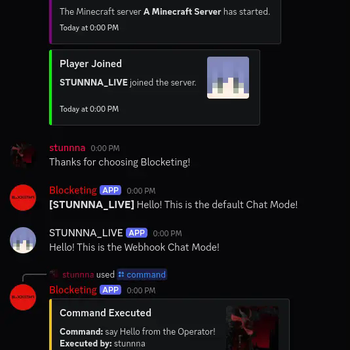
Blocketing is a Fabric mod for seamless communication between a Discord channel and a Minecraft server, enabling bidirectional message synchronization and command execution.
[]() [](https://fabricmc.net/) [](https://modrinth.com/mod/blocketing) [](https://github.com/crunnna/blocketing-fabric-mod/releases)✨ Features
- ✅ Syncs Minecraft and Discord messages in both directions ?
- ✅ Join/Leave notifications with player avatars ?️
- ✅ Server start/stop announcements ?
- ✅ Toggle sending advancement and death messages to Discord ?
- ✅ Run Minecraft commands from Discord (permission-based) ?️
- ✅ Player chat webhook mode (with avatar & name) ?
- ✅ In-game configuration via commands ?
- ✅ Update notifications for new mod versions ?
- ✅ Paginated player list and server status via Discord slash commands ?
- ✅ Multi-server support to run multiple Minecraft server instances using the same Discord bot token (per-server channel filtering) ♾️
? Installation
? 1. Install the Mod
- Download the latest .jar from the Releases Page.
- Place the
.jarfile in your server’smods/folder. - Start the Minecraft server with Fabric.
- Configure the bot using the in-game commands (see below).
? 2. Set up the Discord Bot
- Create a new Discord bot application in the Discord Developer Portal.
- Add the bot to your Discord server.
- Copy the
bot tokenfor later configuration.
?️ Permissions
- Minecraft:
/blocketingcommands require permission level 4 (OP). - Discord: For
/consolevia Discord, the user must have the configured OP role (if set).
⚙️ Configuration Commands
All configuration is done in-game using /blocketing commands (OP only):
Setup Discord Integration
/blocketing setup token <token>
Set the Discord bot token./blocketing setup guild <guild_id>
Set the Discord server (guild) ID./blocketing setup channel <channel_id>
Set the Discord channel ID for message sync./blocketing setup op_role <role_id>
Set the Discord role ID required to run/consolefrom Discord./blocketing setup webhook_url <url>
Set the Discord webhook URL for player chat webhook mode./blocketing setup
List available setup commands.
Feature Toggles
/blocketing toggle advancements
Enable/disable sending advancement messages to Discord./blocketing toggle deaths
Enable/disable sending death messages to Discord./blocketing toggle player_chat_mode
Enable/disable player chat webhook mode (uses webhook for chat, with player avatar and name)./blocketing toggle update-info
Enable/disable update notifications for new mod versions./blocketing toggle discord_chat_log
Enable/disable logging of Discord chat messages to the server console./blocketing toggle
List available toggles.
Other Commands
/blocketing reload
Reload the configuration and restart the Discord bot.
? Discord Slash Commands
/status
Show server status (TPS, MSPT, CPU, RAM, uptime, version)./players
Show online players (paginated, with navigation buttons)./console <command>
Run a Minecraft command from Discord (requires OP role if set).
? Player-Chat Webhook Mode
When enabled, Minecraft chat messages are sent to Discord using a webhook, displaying the player's name and avatar.
To enable, set a webhook URL and use /blocketing toggle player_chat_mode.
? Notifications
- Join/Leave: Player join/leave events are announced in Discord with player avatars.
- Advancements/Deaths: Advancement and death messages can be toggled.
- Server Start/Stop: Server start/stop events are announced in Discord.
- Update Info: OPs and Discord can be notified when a new mod version is available.
❓ Need Help?
Feel free to ask questions or open an issue.
请登录后举报
请 登录 后赞助作者。
暂无评论,抢个沙发吧~