
Fly Speed Modifier
作者:rebot | 分类:模组
Minecraft 版本: 26.1.2
平台: fabric
标签: cursed utility
Languages
Fly Speed Modifier
A client-side Fabric mod that lets you hold a key and scroll the mouse wheel to temporarily adjust the current movement speed multiplier.
Features
- Adjusts Vanilla Creative Flight speed
- Adjusts Freecam movement speed when Freecam is installed and active
- Optionally applies the same multiplier to other client-controlled movement
- Hold the adjustment key and scroll the mouse wheel to change the multiplier
- Supports configurable minimum, maximum, default multiplier, and scroll step values
- Supports optionally resetting the multiplier when adjustment starts
- Full Range mode raises the available maximum from
20xto100x - Uses non-linear mouse-wheel multiplier adjustment
- Uses Left Alt as the default adjustment key
Usage
- Enter a supported movement state, such as Creative Flight, Freecam, or a supported movement mode with Apply to Other Movement enabled.
- Hold Left Alt.
- Scroll the mouse wheel to change the multiplier.
- The current value is shown as
Speed multiplier: 2.00xin English or the corresponding translated text for the selected game language.
Configuration
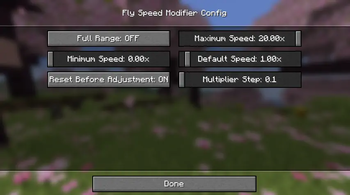
Full Range
- Disabled by default
- Disabled: maximum available multiplier is
20x - Enabled: maximum available multiplier is
100x - The Maximum Speed and Default Speed sliders update immediately when this option changes
Minimum Speed
Sets the lowest allowed temporary speed multiplier.
A value of 0x disables newly applied movement for supported paths, although existing inertia, knockback, or special impulses may still continue according to vanilla behavior unless that movement path is explicitly scaled.
Maximum Speed
Sets the highest allowed temporary speed multiplier within the range selected by Full Range.
Default Speed
Sets the multiplier used for the first adjustment and when Reset Before Adjustment is enabled.
Its available range is always limited to the current Minimum Speed and Maximum Speed values.
Reset Before Adjustment
- Enabled: pressing the adjustment key resets the multiplier to Default Speed
- Disabled: pressing the adjustment key keeps the previous multiplier
Multiplier Step
Controls how quickly the multiplier changes for each mouse-wheel unit.
Apply to Other Movement
The Apply to Other Movement option is disabled by default.
When enabled, the current multiplier is also applied to supported client-controlled movement, including:
- Walking, sprinting, sneaking, and normal horizontal movement
- Horizontal control while airborne and not flying
- Swimming and movement in lava
- Active upward and downward movement in water
- Climbing ladders, vines, and other climbable blocks
- Player-controlled living mounts that use the standard riding movement path, including horses, pigs, striders, camels, and happy ghasts
- Boat and raft propulsion
- Elytra movement on all three axes, including diving, climbing, and natural descent
The option does not intentionally modify:
- Normal player jump velocity
- Horse jump strength
- Knockback, explosions, or collision impulses
- Boat turning speed
- Minecart movement
- Powder-snow upward movement
Multiplayer Warning
This is a client-side movement modification. Remote servers may correct, reject, or flag modified movement. Using high multipliers can cause desynchronization, anti-cheat violations, disconnections, or bans. Use it on multiplayer servers only when the server rules explicitly allow it. The mod author is not responsible for penalties caused by its use.
High Elytra multipliers can move the player across very large distances in a single tick. Use conservative values, especially while using fireworks or approaching unloaded chunks, terrain, or the world border.
Supported Versions
- Minecraft 26.1.2
- Fabric Loader 0.19.2+
- Fabric API 0.150.0+
- Java 25
- Mod Menu (Optional)
License
MIT
请登录后举报
请 登录 后赞助作者。
暂无评论,抢个沙发吧~